Please check Section 5.2.1.1
SSID
Service Set identifier, the default SSID is CWR-935M
define to any.
Channel Width Please select the channel width, it has 2 options: 20MHZ, and 40MHZ.
Control Sideband
Enable this function will control your router use lower or upper
channel.
Channel Number Please select the channel; it has Auto, 1, 2~11 or 13 options.
Broadband SSID
User may choose to enable Broadcast SSID or not.
Data Rate Please select the data transmission rate.
Associate Clients Check the AP connectors and the Wireless connecting status.
Enable MAC Clone (Single
Ethernet Client)
Clone the MAC address for ISP to identify.
Enable Universal Repeater
Client simultaneously)
Allow to equip with the wireless way conjunction upper level, provide
the bottom layer user link in wireless and wired way in the meantime.
(The IP that bottom layer obtains is from upper level.) Please check
Section 5.2.1.2
SSID of Extended Interface
While linking the upper level device in wireless way, you can set SSID
to give the bottom layer user search.
Apply Change & Reset
Click on Apply Changes to save the setting data. Or you may click on
Reset to clear all the input data.
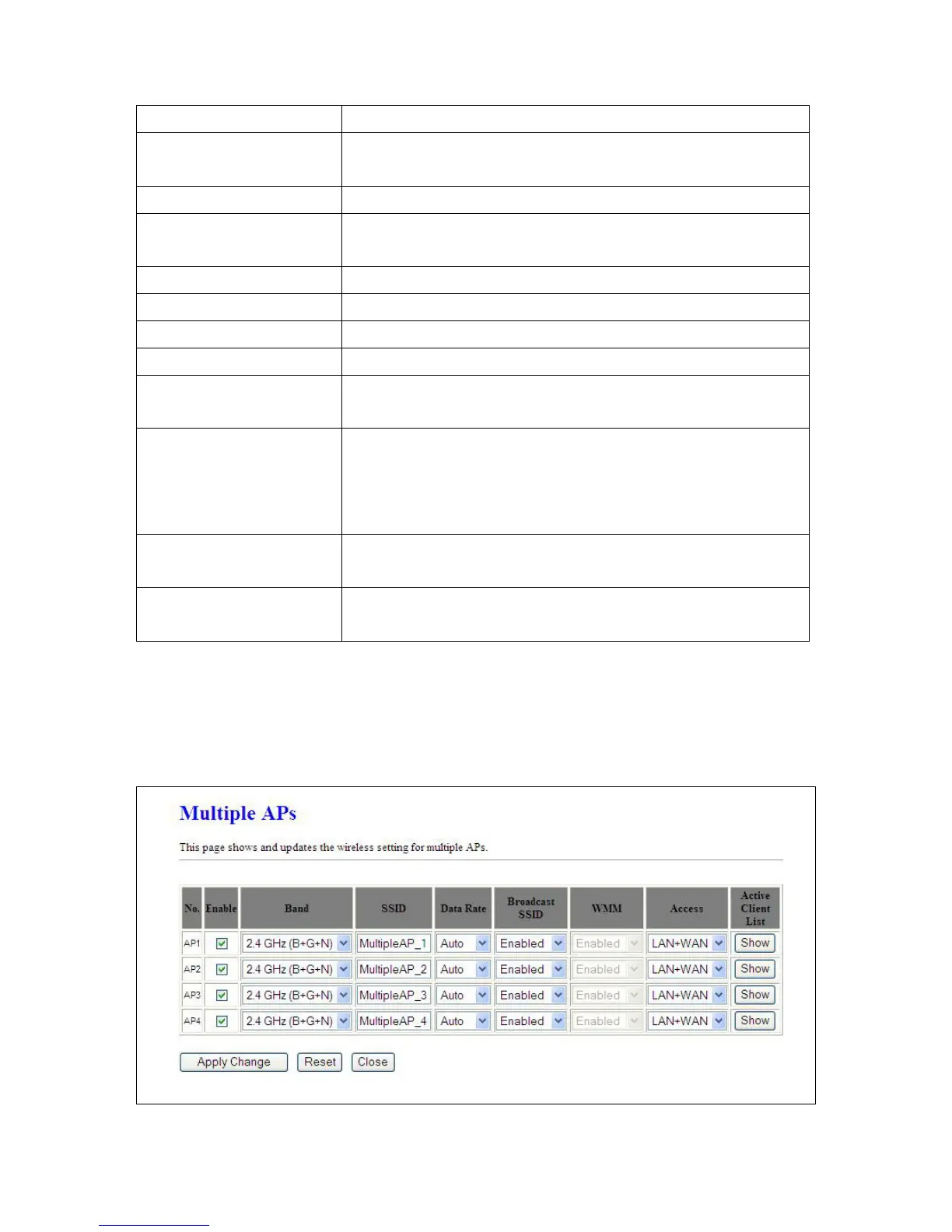
5.2.1.1 Multiple APs
Multiple APs can provide users another 4 different SSID for connection. Users can add or limit the
properties for each connection.



 To Next Page