coatmaster Flex
7.2. Navigation Panel
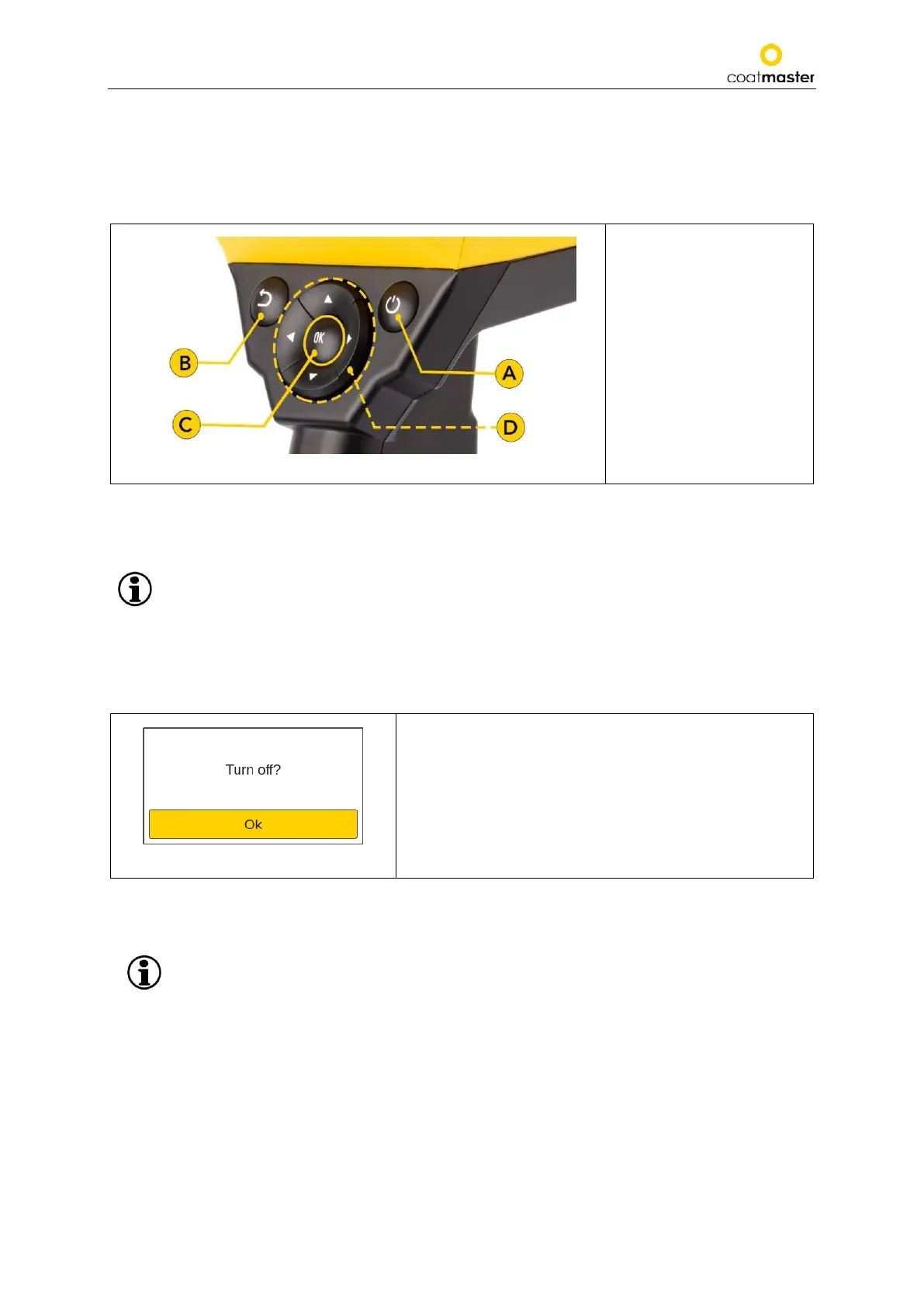
Figure 8: Input panel - keys and elements show an overview of the most important elements for navigating
the menus.
Figure 8: Input - panel keys and elements
Ⓐ On/Off button
Ⓑ Back button (to go back
to the previous display or,
in the menu, one level up)
Ⓒ OK button
Ⓓ Arrow keys
7.3. Turning the Power On/Off
After you have connected to the Flex server, and the charged battery is inserted, turn on the unit
by pressing the On/Off button Ⓐ in the input panel (see Figure 8: Input panel - keys and
elements).
It takes about 20 seconds for the coatmaster® Flex to boot up. To see the time until the coatmaster® Flex
is fully operational, view the boot window on the coatmaster® Flex screen; the boot indicator scale is
shown in the display.
Figure 9: Turning off
To switch off the device, press the On/Off button Ⓐ, then
confirm the action by pressing the OK button Ⓒ.
CAUTION Do not remove the battery to turn off the device!
The device can be forced to shut down when the On/Off button is pressed for more than five
seconds. With this shortcut procedure, a ‘OK button Ⓒ’ confirmation is not necessary.



 To Next Page