Chapter 3: Calls, faxes and SMS
94 SMS service
SMS service
Introduction
The SMS service provided by the SBU lets you send and receive short text
messages from and to the satcom system. Theses messages are public and
stored in the system, they can be viewed by all system users. The SMS
service is also used to alert you that a voice mail has been received.
This message service does not manage personal SMS messages to and from
personal IP devices.
To send an SMS message
You can send and receive SMS messages using the SBU of the AVIATOR
700 system. To do this you must connect a computer to the system using a
LAN or WLAN connection and access the web interface.
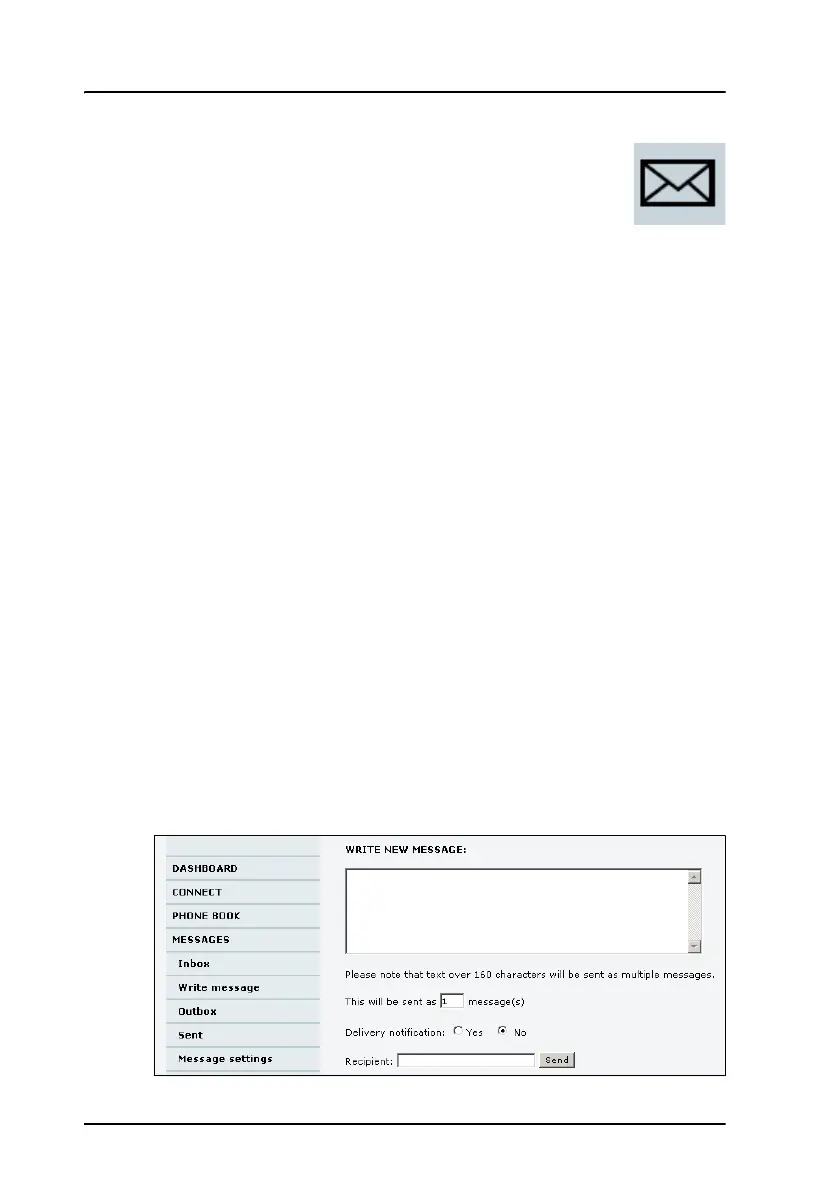
To send an SMS message from the system, do as follows:
1. Access the web interface from a connected computer, open a browser
and type the address: http://192.168.0.1 (default). The DASHBOARD
page is displayed.
2. Click MESSAGES from the left navigation pane.
This page contains new incoming messages. On this page you can
archive the messages and move them to the Inbox or you can delete a
message.
3. In the left navigation pane, click Write message.


 To Next Page