Chapter 5: System operation
136 Full Feature handset operation (SDU)
To edit a Quick Dial entry
Do as follows:
1. Scroll to the quick dial number you want to change and press
GB.
2. Scroll through the phone book to the phone number you want to use
with the selected quick dial number.
3. Press
C to select the phone number.
System Setup, Pin Setup
PIN codes for the full-feature handset
For some of the functionality, access to the full-feature handset is
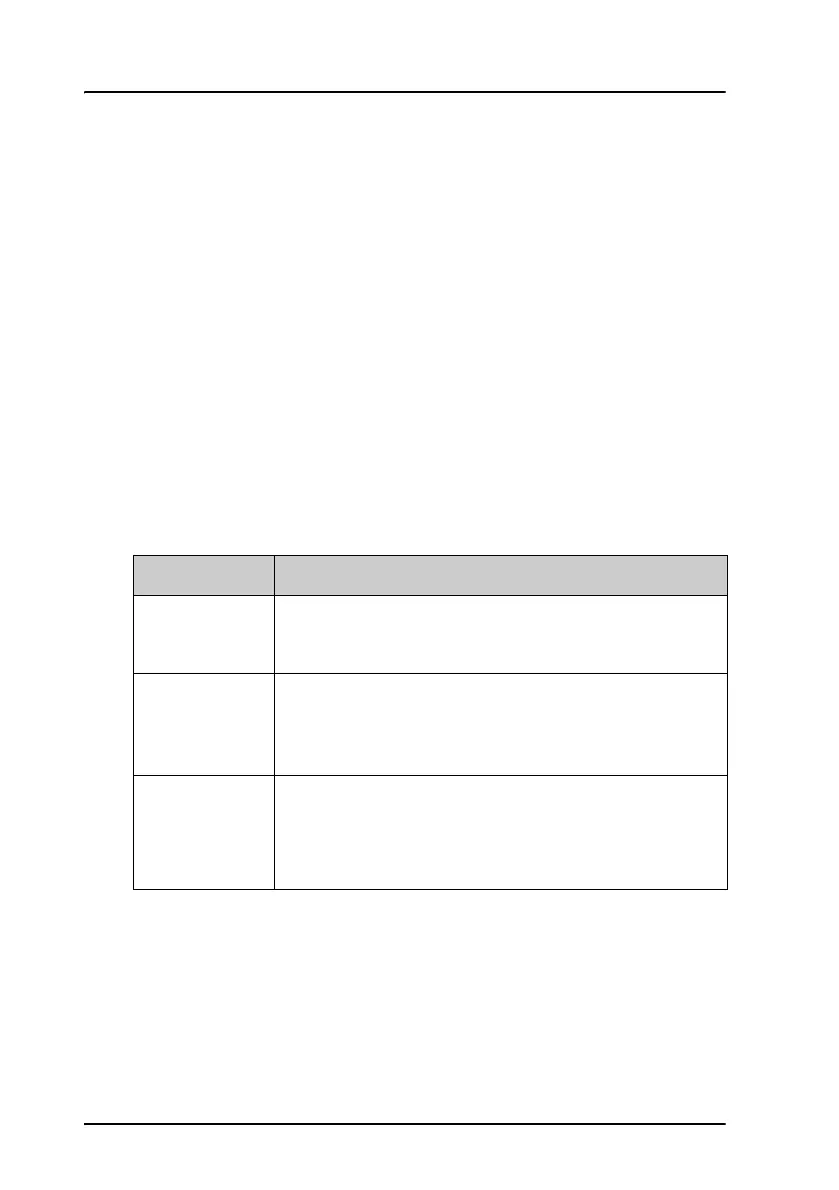
restricted by a PIN code. Three different kinds of user PIN codes are used in
the satcom system:
For all PIN code types the length must be between 4 and 8 digits. For
further information how to change and disable PIN codes see System
Setup, Pin Setup on page 136.
Use the Pin Setup submenu to disable or change PIN codes.
PIN code Functionality
Normal User
The normal everyday user can make and receive calls,
access the phone book, choose an ocean region and a
default LES and GES, and read the error log and status.
Super User
The Super User has the same rights as the Normal User.
In addition, the Super User can access certain super
user functions. A Super User will typically be a person
responsible for setting up and maintaining the system.
Service Provider
The Service Provider has access to all functionality
accessible through the Full Feature handset.
Only Cobham SATCOM and/or the supplier of the
equipment normally know this PIN code.



 To Next Page