Chapter 5: System operation
154 MCDU operation
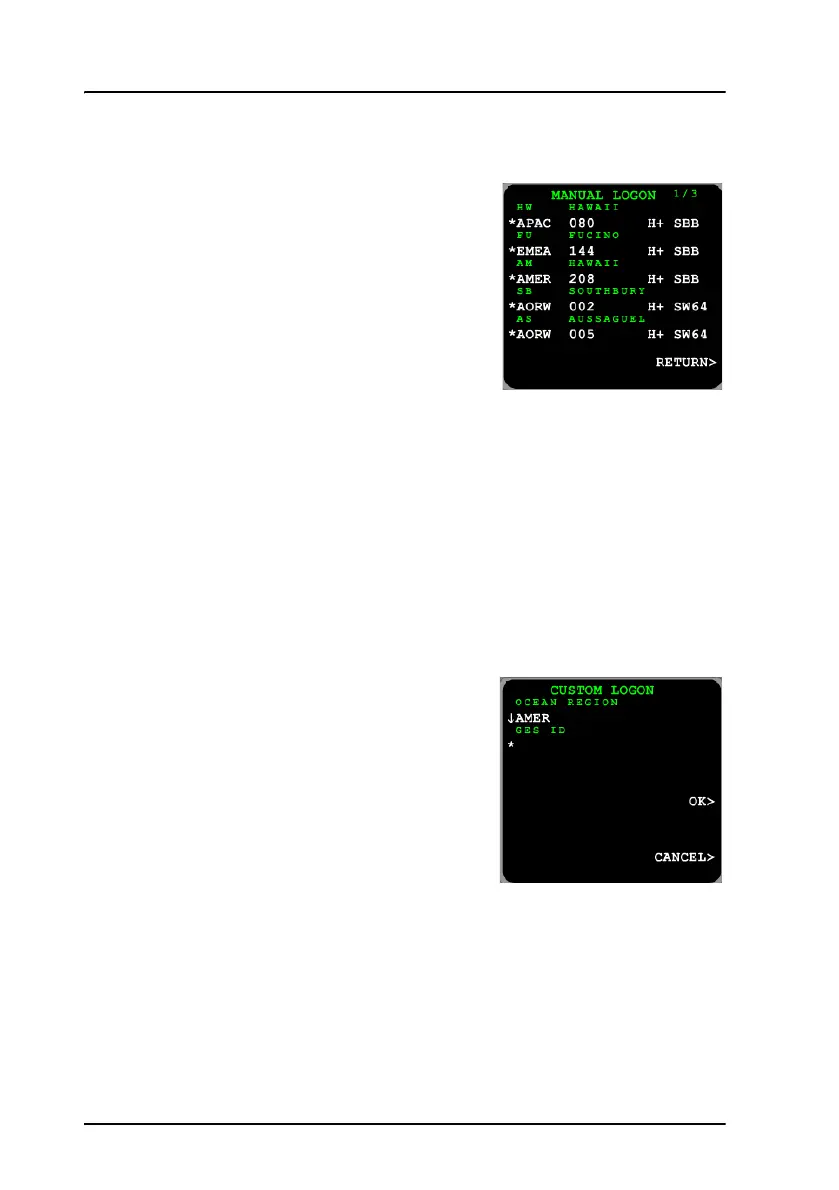
MANUAL LOGON
This view presents a list of all known GESs.
For each GES the following information is
shown:
• Name of the GES.
• Satellite on which the GES operates.
• Identifier of the GES.
• Services supported by the GES.
To logon to a specific GES, press the arrow
key next to the row of the GES. The list may span several pages. To browse
to the next page, press the button NEXT.
The right hand side of the view shows the services of the GES.
Example: If you select the GES AMER 208 you will get the services H+
(Classic Aero) and SBB (SwiftBroadband). If you select the GES
AORW 002 you will get the services H+ (Classic Aero) and
SW64 (Swift64).
CUSTOM LOGON
To initiate logon on a specific satellite and
GES do as follows:
1. Enter the CUSTOM LOGON view.
2. Select a satellite.
3. Type in the identifier of the intended
GES on the scratch pad. You find the GES
ID in List of available GESs on page 215.
4. Press the arrow key next to the GES identifier and select OK.



 To Next Page