7-6 Preventive Maintenance
Press the or key to incrementally rotate the platen roller
so that you can clean its entire surface.
14. Clean any dust or other contaminants from the donor guide bar
using the platen roller or print head cleaning wipe provided
with the imager’s cleaning kit.
15. Wait for the thermal print head and platen roller to dry
thoroughly.
If you need to reload the color ribbon, go to step 16. Otherwise
go to step 18.
16. From the
Open Top Cover
menu, select the
Move Ribbon Carriage
menu option. Press the key to move the ribbon carriage up
so you can reload the color ribbon.
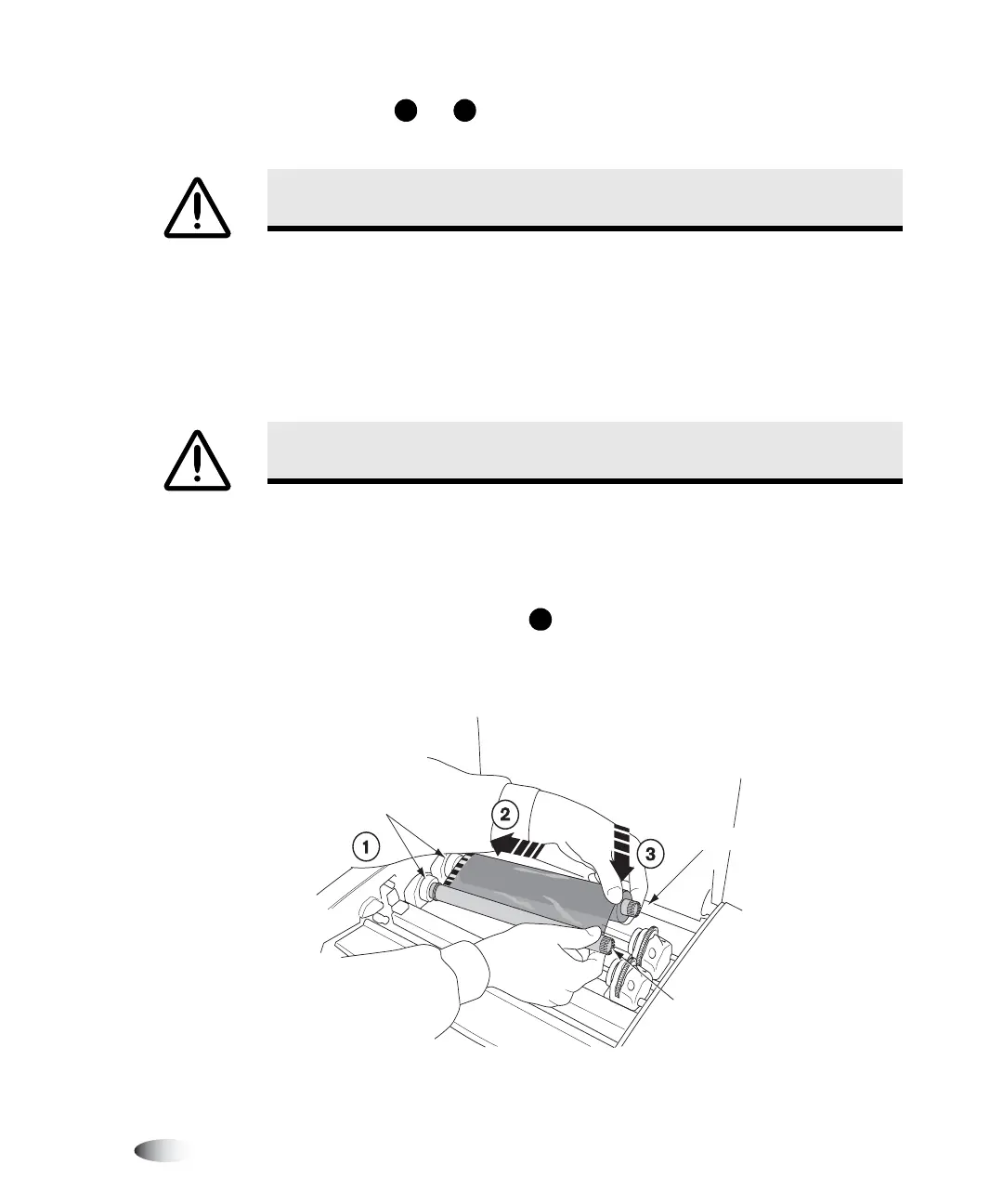
17. Reload the color ribbon, as shown in the following figure.
18. Close the top cover.
CAUTION
Use only the platen roller cleaning wipe when cleaning the platen roller.
Damage to the platen roller may occur if the
print head cleaning wipe
is used.
CAUTION
The thermal print head must be completely dry before attempting to use
the imager. Allowing the head to heat up again while still wet will cause damage.
S
T
S
Spring-loaded
spindles
Black (Supply)
Gray (Take-up)



 To Next Page