ION
®
-E Series Hardware Installation Guide M0201AA
Page 6 © June 2017 CommScope, Inc.
ION-E Series System Overview
ION-E SERIES SYSTEM OVERVIEW
TheION-EisaunifiedwirelessinfrastructureplatformdefinedaroundITbasedarchitecture.Itbrings
togetherlicensedwirelessandpower,plusGigabitEthernetforWiFiintoonewirelesssystemthatcanscale
tobuildingsizeandistechnologyandspectrumagnosticandadaptive.
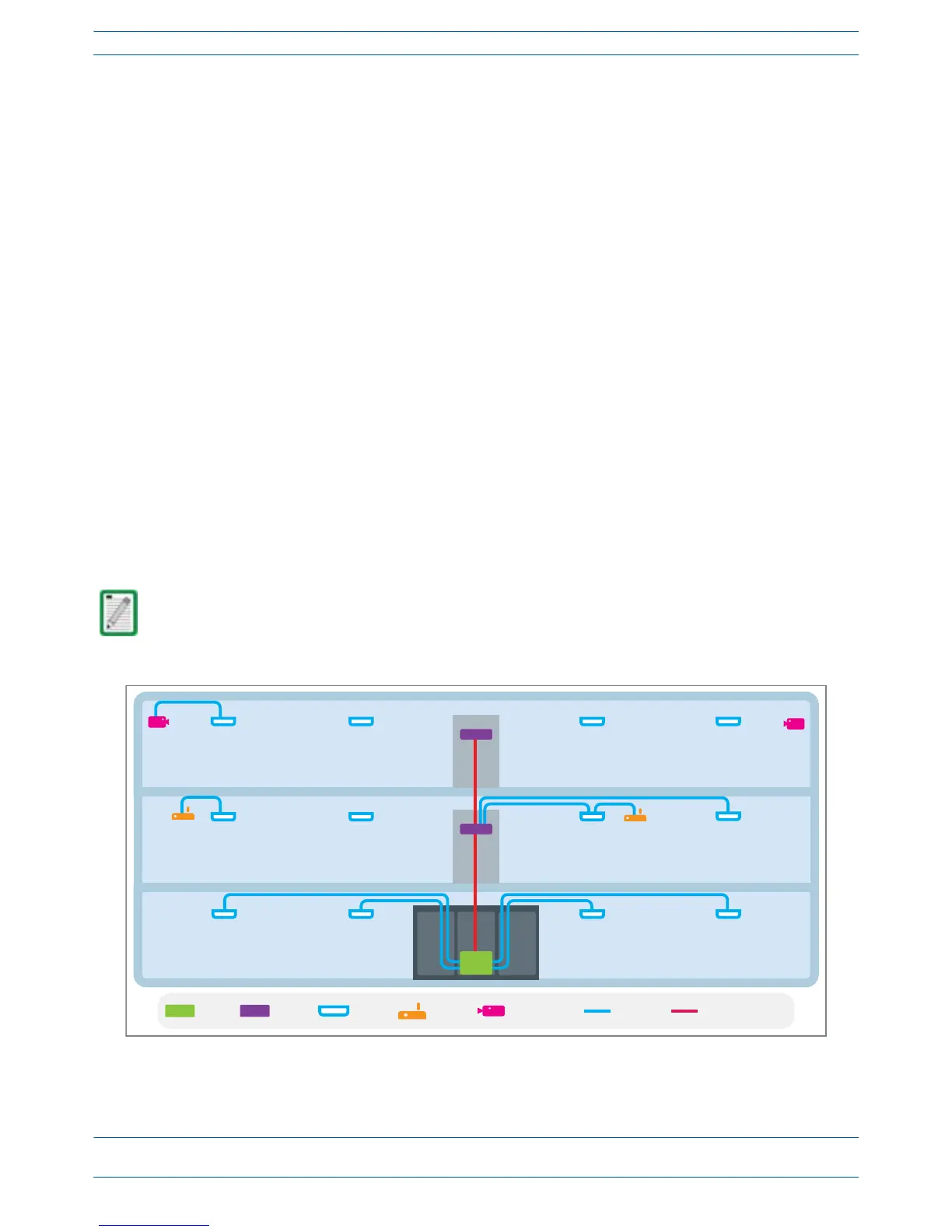
AbasicION-Esystemcomprisesthefollowingmaincomponents,asshowninFigure2-1.
• CentralAreaNode(CAN)—providesserver-levelcontrolandprimarysignaldistribution.2Uand4U
subrackoptionsareavailable.
• TransportExpansionNode(TEN)—connectstoaCANusingMulti-ModeorSingle-Modefiberasa
secondarydistributionpoint.2Uand4Usubrackoptionsareavailable.
• AccessPoint—connectsCAN/TENtoantennasorotherwirelessdevices,andcanbeanyofthefollowing.
– UniversalAccessPoint(UAP)—connectstheCAN/TENtoaninternalantenna;receivesdataand
powerthroughCategory6Atwistedpaircabling.SupportsGigabitEthernetforWiFi,IPcameras,or
otherdevicesinadditiontowirelessoveracommoncable.
– UAP-X—connectstheCAN/TENtoanexternalantenna;otherwisefunctionsthesameasthe
standardUAP.
– CarrierAccessPoint,LowPower(CAPL)—interfaceswiththeCAN/TENviaaCAT6Acable,orvia
anopticallink.Onthedownlink,theCAP
LconvertssomeorallofthedataarrivingattheCAPLto
analogsignalsandsendsthemtotheanantenna.Ontheuplink,receivedsignalsaredigitizedand
serializedintodatastreamswhicharesentbacktotheCAN/TEN.EachCAP
Lcontainsuptofour
transceiverpathsforRFcoverage.
Figure 2-1. Basic ION-E System
A WCS-2 and a WCS-4 can be configured for use as a CAN or a TEN. When the information in this guide
applies to both configurations, the term “CAN/TEN” is used. When the information pertains to only one
of the configurations, that configuration will be identified singularly as “CAN” or “TEN.”


 To Next Page