49
4.6.1 Base Mounting
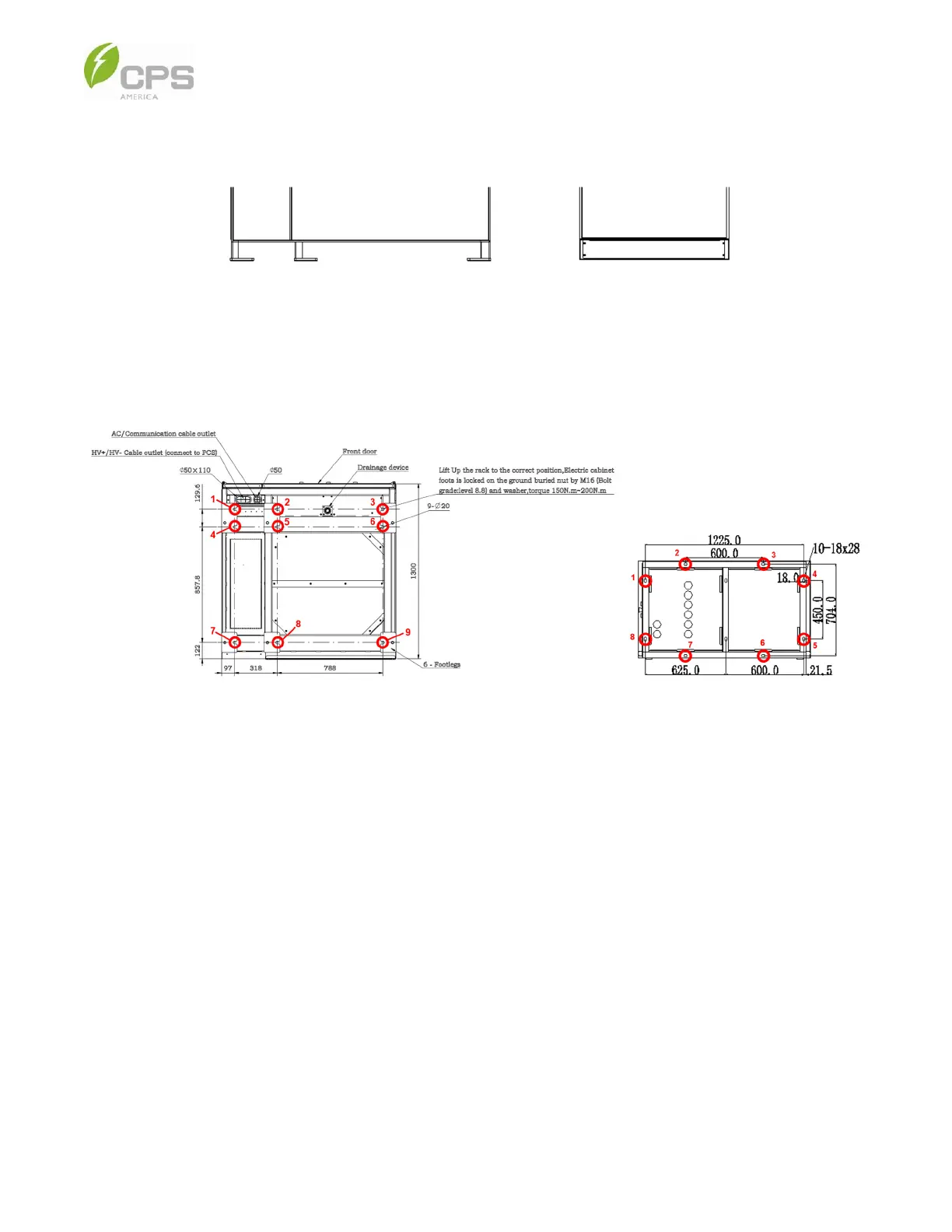
NOTE: The ESS cabinet base is welded to the cabinet, as shown below:
Figure 4-2 Cabinet Bases (Left: Battery Cabinet, Right: PCS Cabinet)
1. Install anchor expansion bolts (eight for PCS cabinet and nine for battery cabinet) according to the following diagram and
drill holes according to the specifications of the expansion bolts.
Figure 4-3 Diagram of Base Mounting Holes (Left: Battery Cabinet, Right: PCS Cabinet)
2. Install the expansion bolts into the drilled holes and place the ESS on the installation surface using a forklift or crane and
following the instructions in Section 3 Shipping and Delivery.
3. Align the base mounting holes with the expansion bolts, adjust the position and size, and tighten the bolts and nuts.



 To Next Page