Page 17
Option • Flash Output - This option causes the output to turn on and off at a rate set by the pulse timer for
this output (Address 221-228) when in alarm and is normally used to flash a lamp during an
activation.
Option Ž Single Pulse to Output - This option, when applied, produces a single pulse at the output during an
alarm (the pulse time is the value programmed at the output pulse timer address, 221-228).
Option • Lockout Once Reset - This option is used to limit the output to one operation per arming period.
Option • Siren Driver to Output - This option causes the output to be a modulated output designed to drive 8
ohm 10 watt horn speakers directly. Outputs 1 & 2 can have the siren driver feature. A different tone
is generated at output 1 to that at outputs 2.
NOTE: DO NOT CONNECT A HORN SPEAKER TO OUTPUT 1 or 2 WITHOUT FIRST TURNING
THIS OPTION ON OTHERWISE DAMAGE MAY OCCUR TO THE OUTPUT CONCERNED.
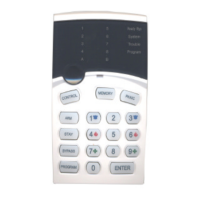
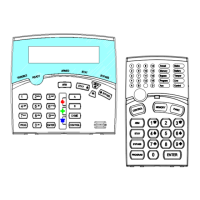
Option ‘ “Control” button can operate output - The “Control’ button on the keypad can be used to turn
outputs on or off. For this to happen this option must be turned on for the output/s concerned. To turn
an output on the operator simply presses the “Control’ button at which time the “System” & “Program”
LED’s will illuminate to indicate that the Control mode is active. If any controllable outputs are
currently on, the relevant green zone led (LEDS 1-8) will be on. The operator can now press a button
relating to the output/s they wish to control eg pressing the “1” button will turn output 1 on or off, The
“2” button for output 2 etc. When an output state is changed the zone LED will indicate the change of
state. When finished the operator then presses the “Enter” button to cancel the Control mode and
return to normal.
Option ’ Output Pulses for ‘24 hour’ alarms - If a 24 hour zone activates the alarm this option will cause the
output to flash at a rate equal to the value set for the pulse timer (Address 221-228).
Option “ Chime Zones Linked to Pulse Timer - Chime Zones programmed to this output will pulse at the
pulse timer rate (Address 221-228) for the duration of the Chime zone to output timer (Address 211-
218)
Address 32 - 38 as per Address 31 above for Outputs 2-8
24-Hour Output Options
Address 41 - 48
In this block of address 41 relates to output #1, 42 relates to output #2 etc
Address 41 ΠRemote Control Panic to Output - Default on
• Keypad Panic to Output - Default on
Ž Keypad Fire to Output - Default off
• Keypad Medical to Output - Default off
• Cabinet Tamper to Output - Default on
‘ Duress Alarm to Output - Default off
’ Mains Fail to Output - Default off
“ Battery Low to Output - Default off
Option ΠRemote Control Panic to Output - This option is used to send the operation of the Remote Control
panic button to an output i.e. when the Remote Control button is pressed any output with this option
enabled will turn on.
Option • Keypad Panic to Output - This option is used to send the Keypad Panic Button, or the 2 button
Panic function to an output. Keypad Panics are generated when a user presses the Panic Button or
buttons 1 & 3 Simultaneously at the keypad.
Option Ž Keypad Fire to Output - This option is used to send the manual Keypad Fire alarm function to an
output. The keypad Fire alarm is generated when a user presses buttons 4 & 6 Simultaneously at
the keypad.



 To Next Page