Page 4
+
_
0V
17V
Lin
Dat
Clk
Neg
Pos
0V
12V
1&5
0V
2&6
3&7
4&8
0V
Tmp
0V
12V
1 2 3 4
In
Line
Out
AC
AC
Heatsink
EXPANSION
F1 = 1.6Amp
Powe
Wave-8
V8.64
From
Street
To
Phone
P/Wave-8
Keypad
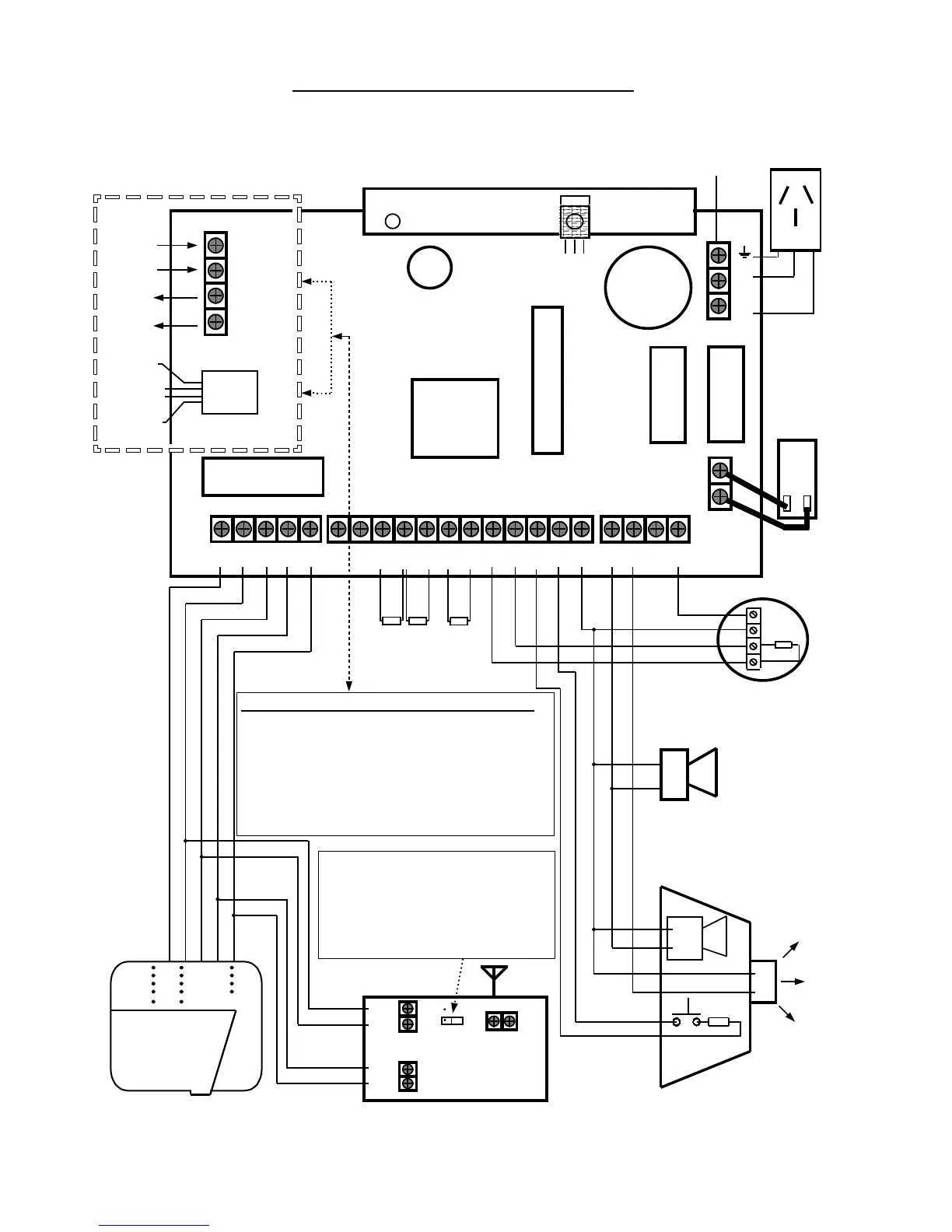
Optional Listen-in Keypad Connection
0v
12v
2k2
Latching Smoke Detector with
Normally Open Contacts
+
_
2k2
External Siren
Internal Alarm-Piezo
+
_
2k2
CONNECTION DIAGRAMCONNECTION DIAGRAM
2k2
2k2
16VAC
1.5Amp
Mains Earth
From Power
Pack
Tip-In
Ring-In
Ring-Out
Tip-Out
Line Out (“+”)
To Phones
( Tip-Out )
Line Out (“ - ”)
To Phones
( Ring-Out )
Line In
From
Street
Phone
Socket
Tip-In
Ring-In
F2 = 1.6Amp
F3 = 3Amp
Battery
RED
BLK
_
+
Mode 3 (Type 600) Plug And Wall Socket Wiring;
Before calling Crow tech. Support or your supplier Re:Phone
Line or Dialler reported issues, please ensure that the Mode-
3 socket on the wall is wired as per below.
********** Observe Line In / Out Polarities **********
Terminal 6 = Tip-In = “ + ” side of Line-In from Street
Terminal 2 = Ring-In = “ - ” side of Line-In from Street
Terminal 5 = Tip-Out = “ + ” side of Line-Out to Int. Phones
Terminal 1 = Ring-Out = “ - ” side of Line-Out to Int. Phones
Pos
Neg
Clock
Data
Wireless Receiver “Bit” set jumper.
On = 24 Bit / OFF = 40 Bit
( Leave OFF (on 1 pin only) for
any type of Crow Wireless
Product, since Crow products are
40 Bit setting compatible).
Gnd
Ant
RX-16 / 40
303 or 433 MHz
Wireless Receiver



 To Next Page