Driver assistance systems
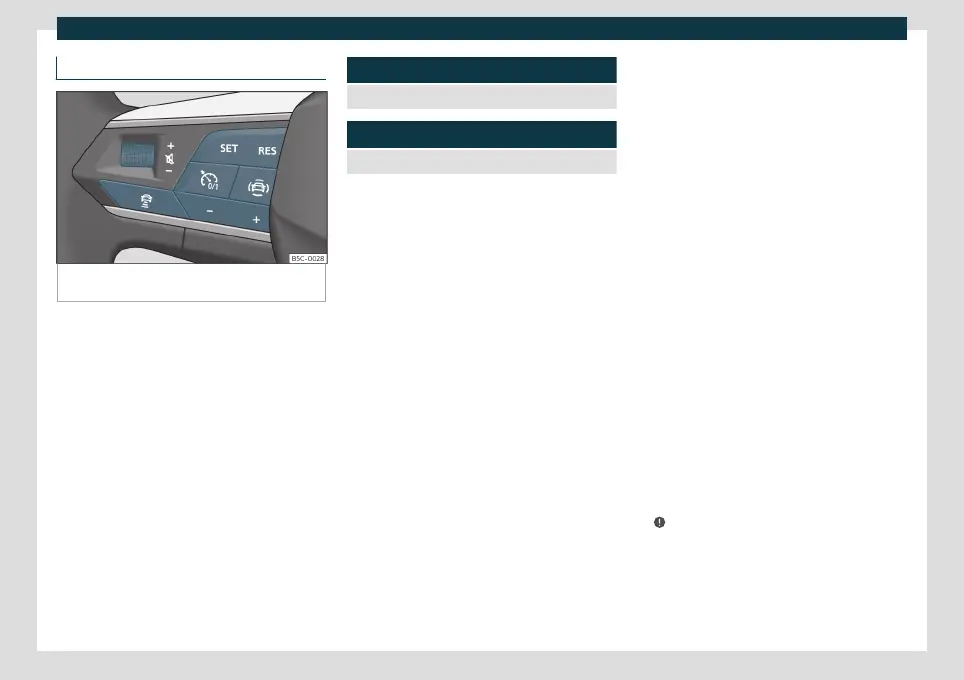
ACC operation
Fig. 161
On the multifunction steering wheel:
buttons to operate the ACC
Connecting
●
Press the
button on the multifunction
steering wheel.
The ACC does not regulate anything yet
(standby).
Start regulation
●
To start regulation, press the button
›››
Fig. 161.
The ACC sets the current speed, or the clos-
est speed within the valid range (30-210
km/h), as the cruise speed.
The gear lever must be in the D, S or M posi-
tion.
Depending on the driving situation, the fol-
lowing indicator lamps come on:
It lights up green
ACC connected, no vehicle detected in front.
It lights up green
ACC connected, vehicle detected in front.
When the ACC is in standby, the indicator
lamps light up grey.
Setting speed
To program the speed, press the
or
›››
Fig. 161 buttons to the desired speed. The
speed is adjusted at intervals of 10 km/h (5
mph).
When the ACC is active, the button
can
be pressed to increase the desired speed by
1 km/h (1 mph). You can then press
to de-
crease it by 1 km/h (1 mph).
Setting your distance level
The distance can be set to one of five levels,
from very short to very long:
●
Press the button
and then the button
or
›››
Fig. 161 .
●
Alternatively, press the button
as many
times as necessary to set the desired dis-
tance.
Keep in mind each country’s regulations on
minimum braking distances.
Suspend regulation (standby)
●
Briefly press the button
on the multi-
function steering wheel or press the brake
pedal.
The ACC indicator lamp is grey; the speed
and distance are saved.
If the ESC ASR
›››
page 250 is disconnected,
the ACC is automatically suspended.
Reinstating the cruise control
●
Press the
button. The ACC regulates to
the last speed and distance setting.
●
OR: Press the
button to use the current
speed.
Switching off
●
Press and hold the button
. The set
speed is cleared.
Exceeding the speed regulated by the ACC
While driving with the ACC switched on, the
driver can increase speed by pressing the ac-
celerator pedal. ACC regulation is suspen-
ded until you release the accelerator pedal
›››
.
Set the default distance setting
In the Infotainment system, you can pre-se-
lect the distance level when connecting the
ACC from:
»
229



 To Next Page