User's Manual
95
databases to the allowed space in total.
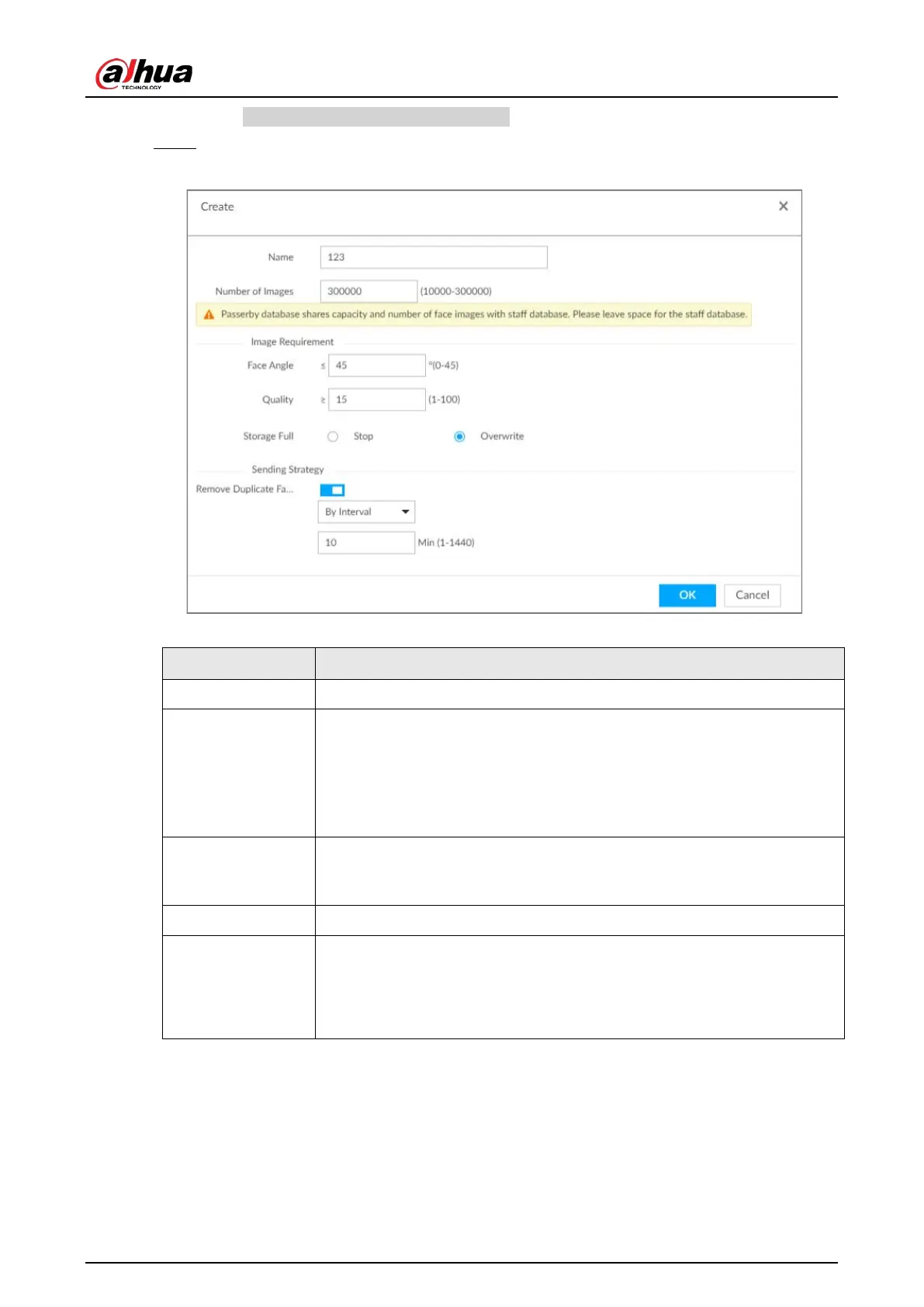
Step 3 Enter the passerby database information, and then click
OK.
Figure 6-49 Create a passerby database
Table 6-9 Parameters of creating passerby database
Name Enter the name of the database.
Number of Images
Configure how many face images the database can store.
●
Maximum = Total number of face images of the Device - the face
image number of the current staff databases - the face image number
of the current passerby databases.
●
Minimum: 10,000.
Face Angle
Set the allowed pitch angle and yaw angle of the face image. The value
ranges from 0 through 45 degrees. The smaller the angle, the more
accurate the face image.
Quality Only face images within the allowed quality range (1 to 100) can be added.
Storage Full
The storage strategy when storage space is used up.
●
Stop: No more images can be added.
●
Overwrite: The newest images overwrite the oldest images. Back up
the old images as necessary.


 To Next Page
 Loading...


