58 Spyder3 SG-34 GigE Vision Color Manual
03-032-20124-00 Teledyne DALSA
LVDS/ TTL format (positive)
LVDS/ TTL format (positive)
LVDS/ TTL format (positive)
LVDS/ TTL auxiliary output
LVDS/ TTL auxiliary output
LVDS/ TTL auxiliary output
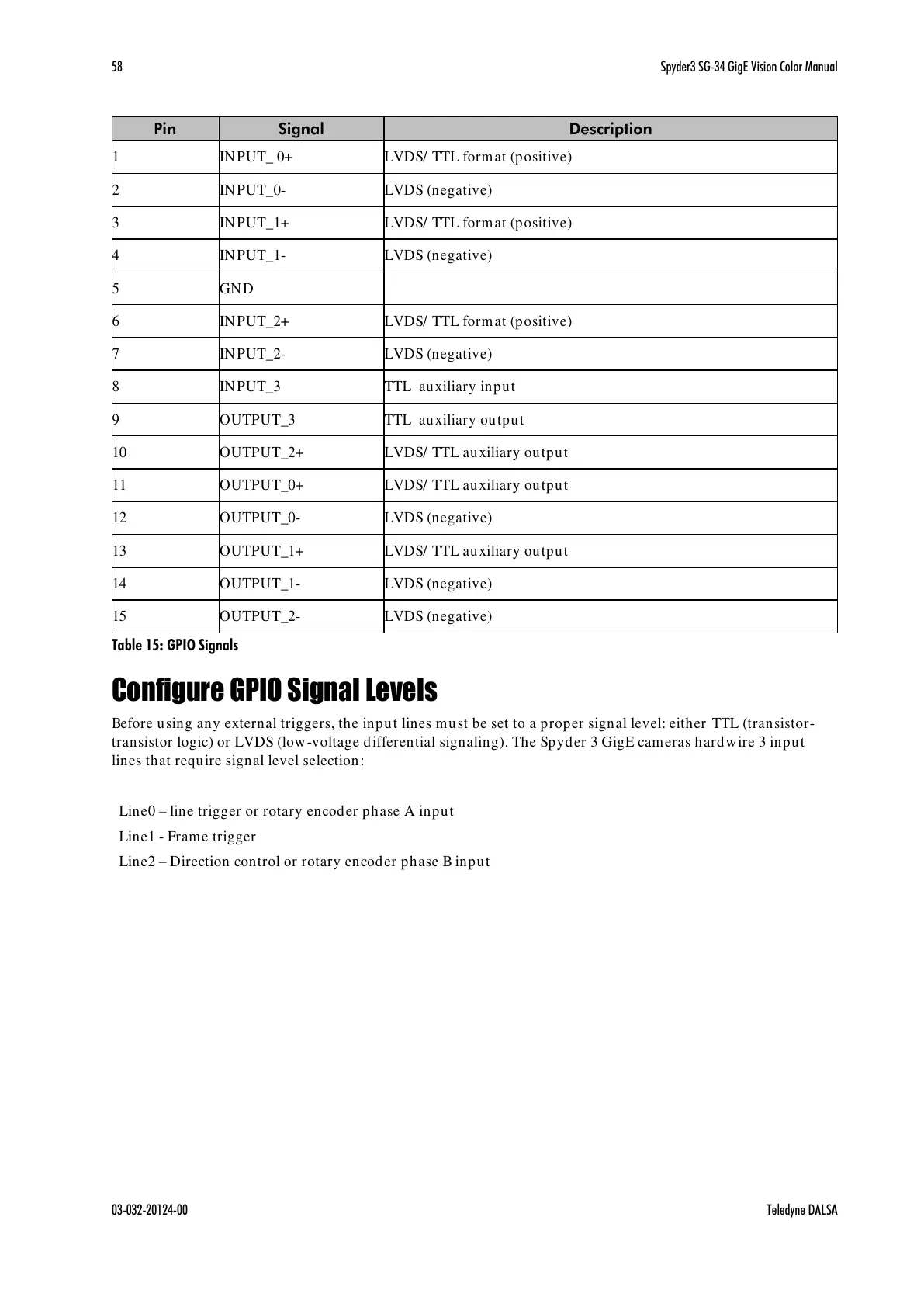
Table 15: GPIO Signals
Configure GPIO Signal Levels
Before using any external triggers, the input lines must be set to a proper signal level: either TTL (transistor-
transistor logic) or LVDS (low-voltage differential signaling). The Spyder 3 GigE cameras hardwire 3 input
lines that require signal level selection:
Line0 – line trigger or rotary encoder phase A input
Line1 - Frame trigger
Line2 – Direction control or rotary encoder phase B input
All manuals and user guides at all-guides.com



 To Next Page
 Loading...






