Manual Datafox Evo 4.3 Page 132 Date: 27.12.2017 V 04.03.09.XX
5.11. Finger scanner
5.11.1. Operation Finger Scanner
How to scan correctly - video guide: http://www.datafox.de/videothek.html
All terminals should be mounted in such a way that the finger sensor is at the same
height so that the handling can be carried out identically.
In no case may be components on the finger, which have an abrasive effect. These use
the protective layer of the line sensor and thus significantly reduce the service life.
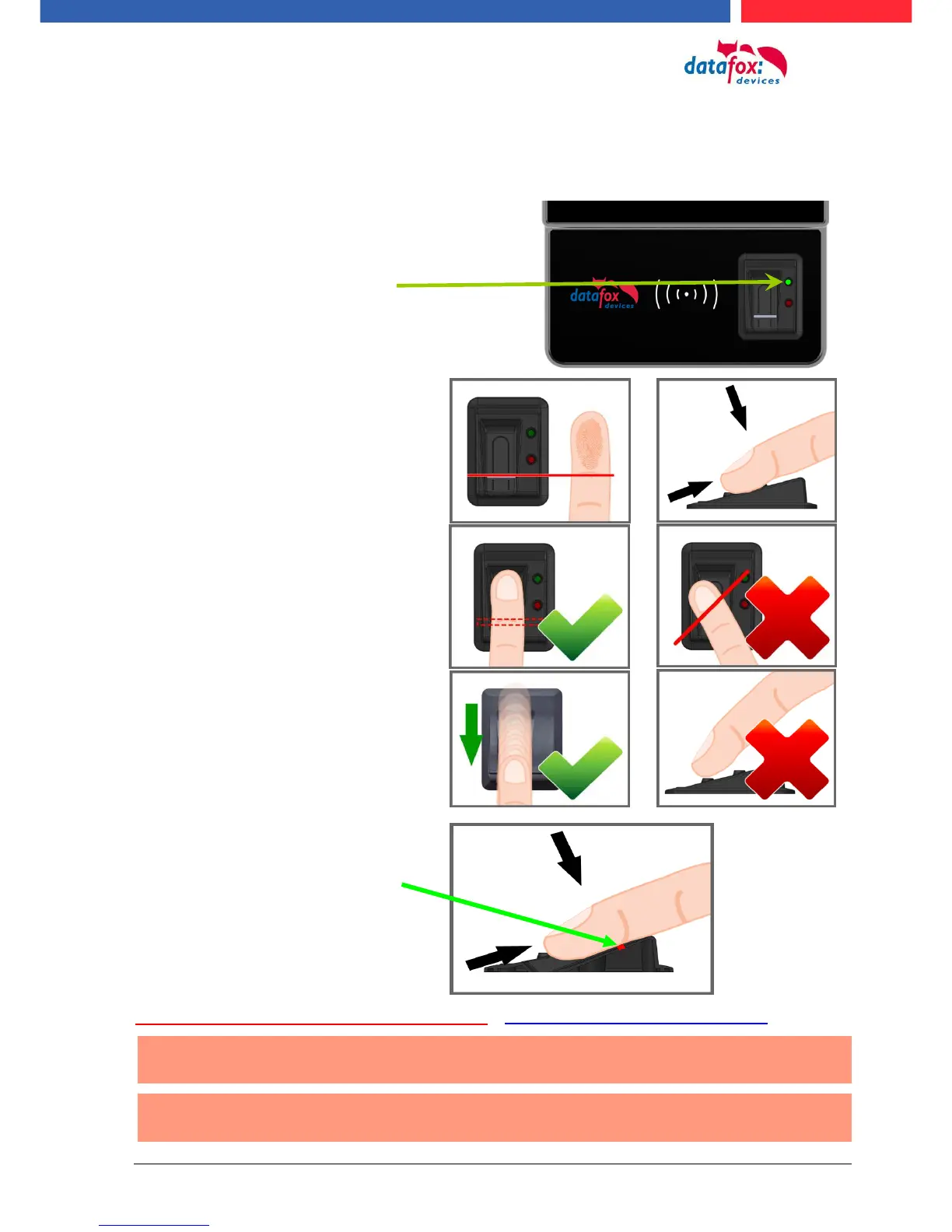
The fingerprint reader's readi-
ness to scan is indicated by the
flashing green LED.
1.) Place the finger with the
area of the first finger segment.
2.) Lay the finger flat. Caution, do
not place your fingers on the edge,
otherwise only a part can be detect-
ed.
3.) Pull the finger over the scanner
with a little pressure on the scanner.
In order to allow a good detection of
the finger, the fingers must be clean!
Attention!
This small strip, shown here
red, is the actual line scanner.
Pull the finger over the sensor
with light pressure. The contact
from the finger to the scanner
must not be interrupted.



 To Next Page