Manual Datafox Evo 4.3 Page 55 Date: 27.12.2017 V 04.03.09.XX
Attention:
A search for a new access point requires a lot of energy and drains the battery. Avoid a
continuous search for an access point when the device is operating at the limit by gen-
erously selecting the pause between scans for new access points (80-120s).
At most access points there is the possibility to set the "Beacon Interval". The higher this
is set, the less power the TimeboyIV needs. Recommendation: Beacon interval >300ms.
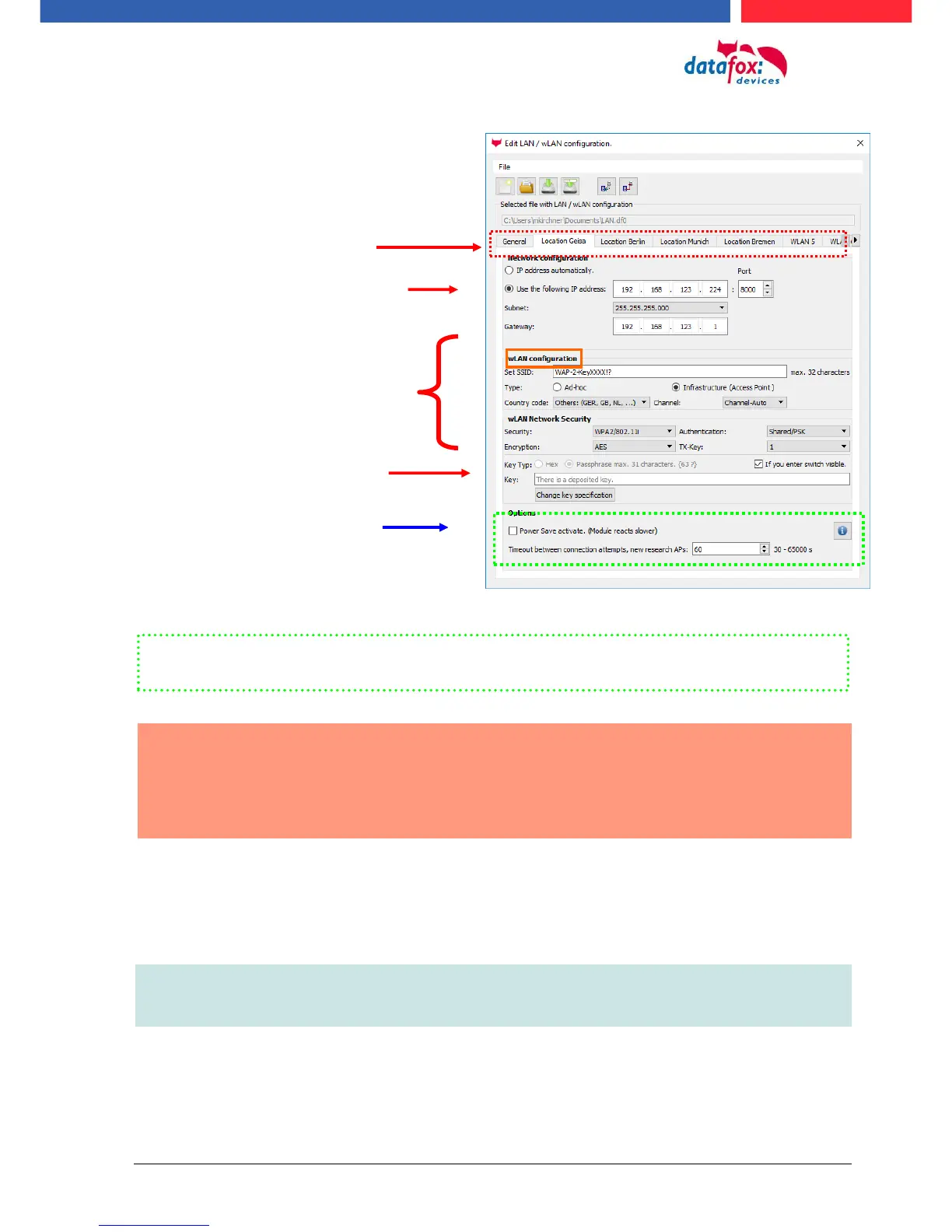
The entire file with all settings is transferred to the device. If the device has a display, the location
can be selected in the Bios menu -> Communication -> WLAN. Each location has its own configura-
tion for the WLAN connection. The user therefore has no insight into the dial-in parameters at the
various locations.
Hint:
With automatic selection of the configuration / location, the first attempt is always made to
establish a connection with the default schema.
Select the configuration or location for
which you want to set the WLAN pa-
rameters.
If you check this box, the battery
life will be significantly increased
if the device is operated with a
rechargeable battery. Important
for TimeboyIV!
All the settings required for an access
point can be made here.
If a key is stored, this will be
displayed.
A scan (search) for access points is only carried out after a disconnection after this set time.
Please note the following Attention Box!
Enter the IP address for the device
here.
This must be the same for every loca-
tion.



 To Next Page