NOTE: Dell EMC recommends that you do not modify the SATADOM Read/Write default setting.
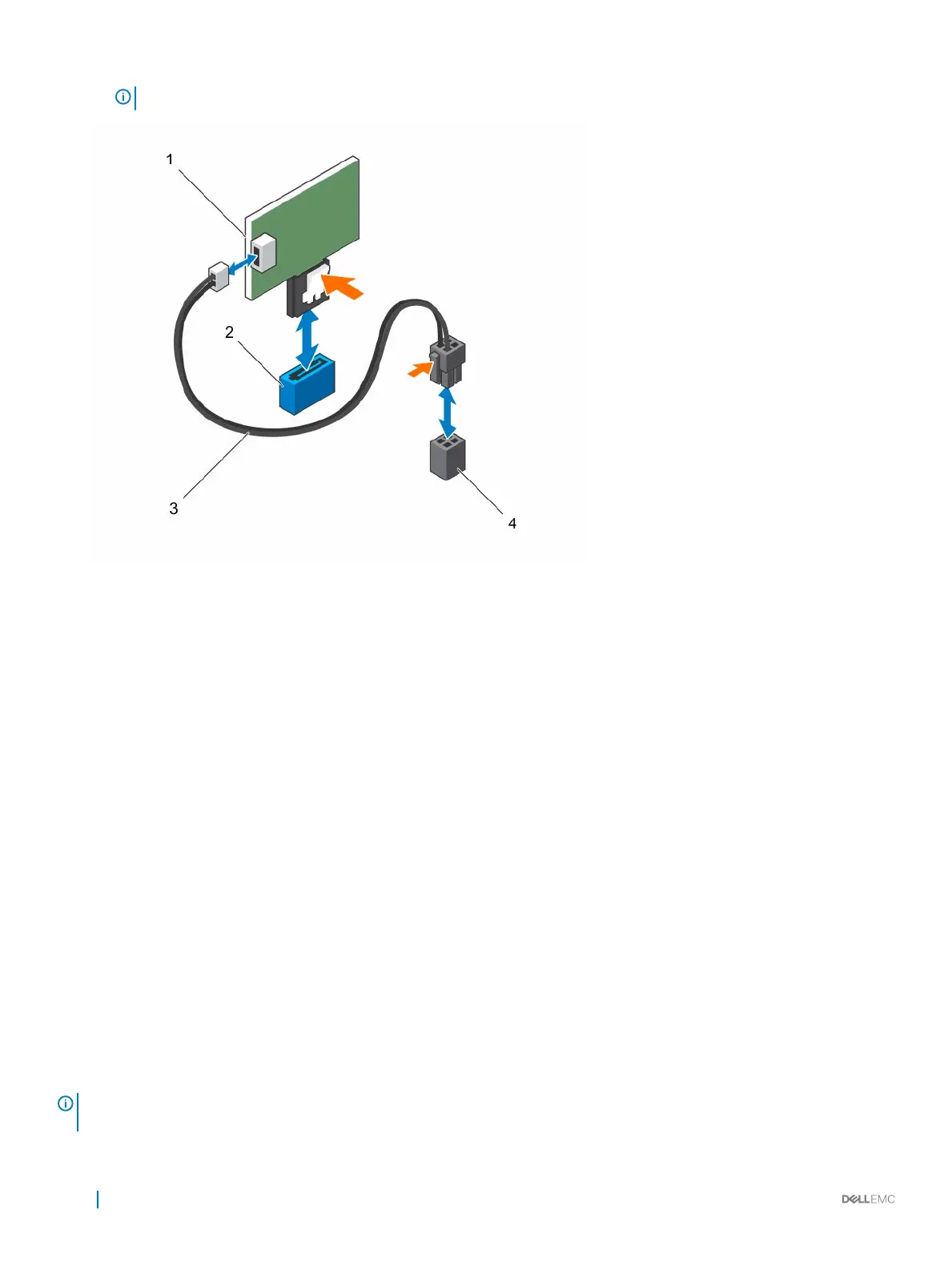
Figure 28. Removing the SATADOM
1
SATADOM 2 SATA connector SATA5
3 power cable 4 system board power connector
Installing the SATADOM
Prerequisites
Follow the safety guidelines listed in the Safety instructions section.
Steps
1 Holding the SATADOM by its edges, position it so that the card edge connector aligns with the onboard SATA connector 5 on the
system board.
2 Press the SATADOM with your thumbs until it is fully seated.
3 Reconnect all the cables.
Next steps
1 Reconnect the peripherals and connect the appliance to the electrical outlet.
2 Turn on the appliance, including any attached peripherals.
Cooling fans
Your appliance supports seven hot swappable cooling fans.
NOTE
: In the event of a problem with a particular fan, the fan number is referenced by the system management software,
allowing you to easily identify and replace the proper fan by noting the fan numbers on the cooling fan assembly.
70 Installing and removing components










 To Next Page