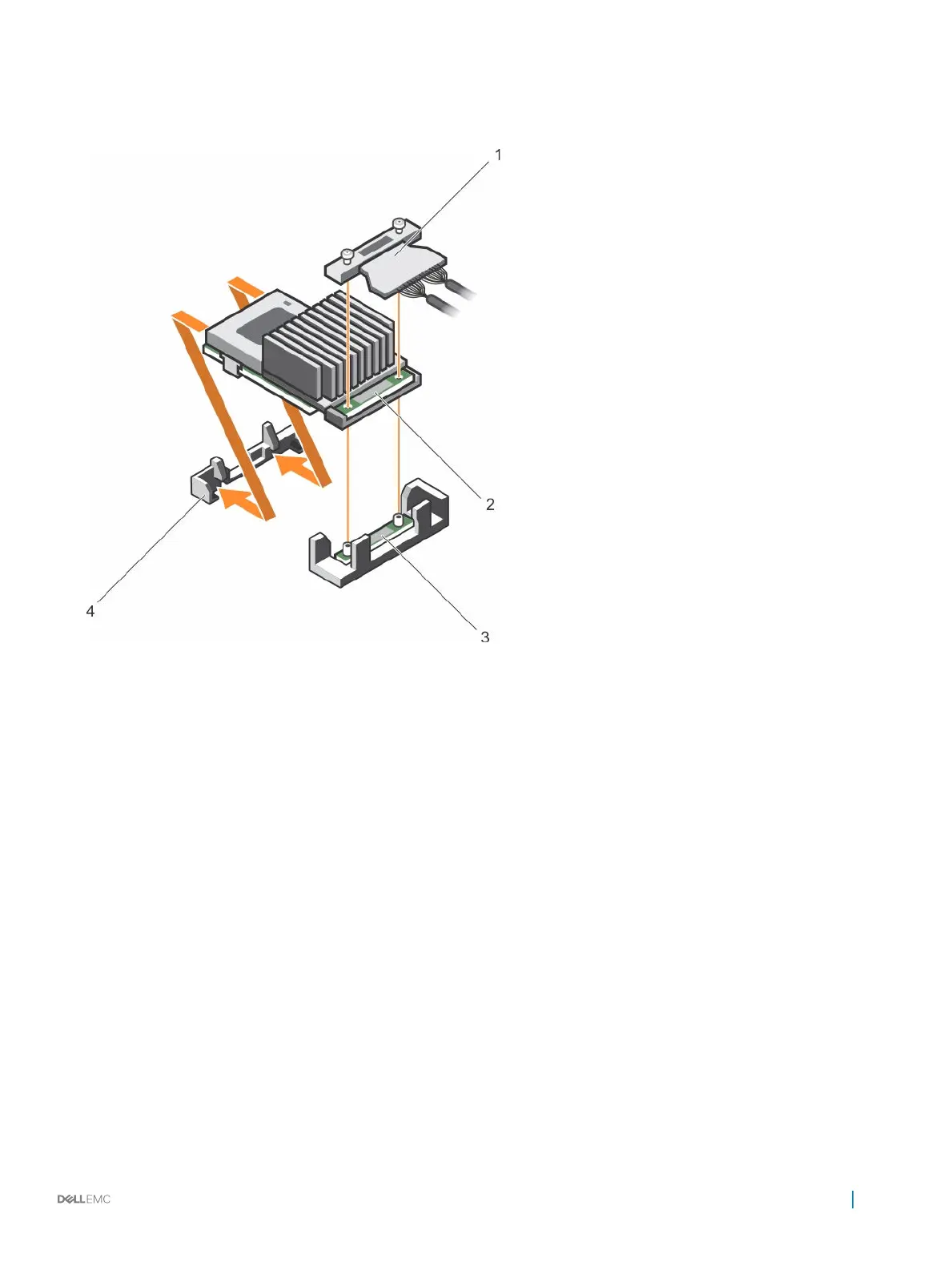
3 Align the screws on the integrated storage controller card cable with the screw holes on the connector.
4 Tighten the screws to secure the integrated storage controller card cable with the integrated storage controller card connector on
the system board.
Figure 52. Installing the integrated storage controller card
1
integrated storage controller cable 2 integrated storage controller card
3 integrated storage controller card connector on the
system board
4 integrated storage controller card holder
Next steps
1 Install the cooling shroud.
2 Follow the procedure listed in the After working inside your appliance section.
Network daughter card
The Network daughter card (NDC) is a small, removable mezzanine card. The NDC provides you with the flexibility of choosing different
network connectivity options, for example — 2 x 10GbE and 2 x 1GbE.
Removing the network daughter card
Prerequisites
1 Follow the safety guidelines listed in the Safety instructions section.
2 Follow the procedure listed in the Before working inside your appliance section.
3 Keep the Philips #2 screwdriver handy.
Installing and removing components
95










 To Next Page