Adding and Replacing Parts 227
6
Remove the processor thermal-cooling assembly (see "Removing the
Processor Thermal-Cooling Assembly" on page 224).
NOTICE: When removing the processor module, pull the module straight up. Be
careful not to bend the pins on the processor module.
7
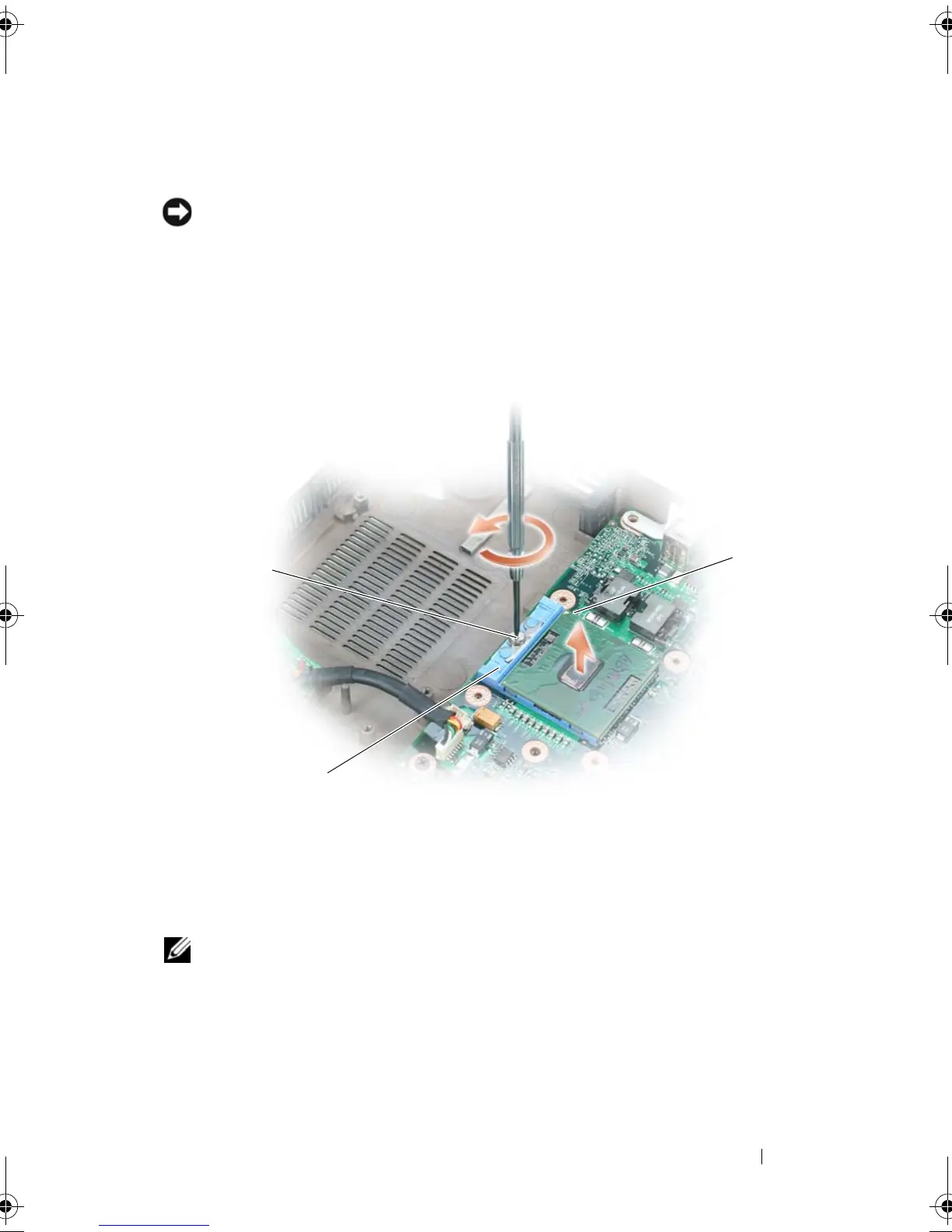
To loosen the ZIF socket, use a small, flat-blade screwdriver and rotate the
ZIF-socket cam screw counterclockwise until it comes to the cam stop.
NOTE: The ZIF-socket cam screw secures the processor to the system board. Take
note of the arrow on the ZIF-socket cam screw, which indicates the direction to
turn the cam screw.
8
Lift the processor module from the ZIF socket.
1 ZIF-socket cam screw 2 pin-1 corner of microprocessor
3 Z IF-socket
1
2
3
book.book Page 227 Tuesday, August 28, 2007 10:20 AM















 To Next Page