About Your Computer 45
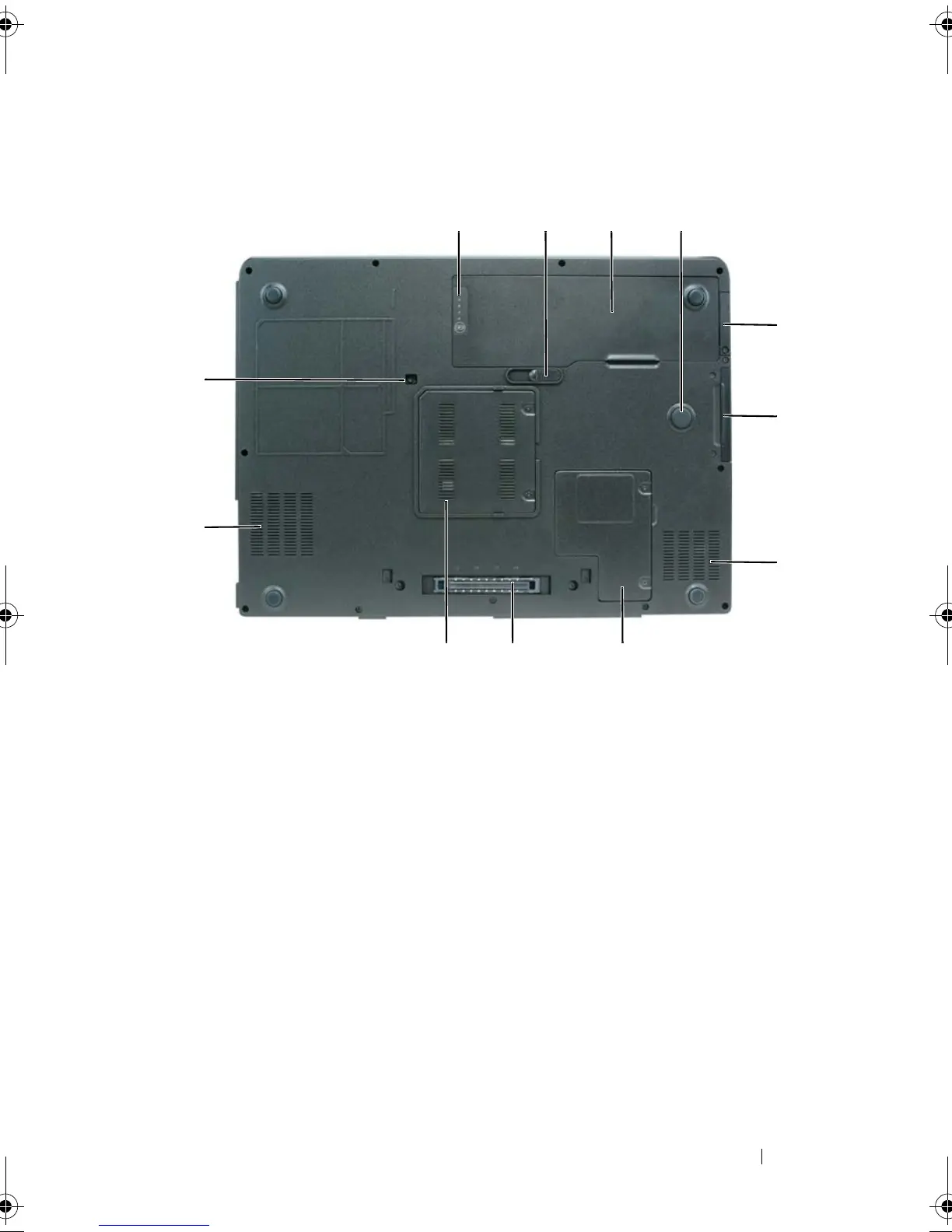
Bottom View
BATTERY CHARGE GAUGE/HEALTH GAUGE — Provides information on the battery
charge status. For more information, see "Checking the Battery Charge" on page 54.
BATTERY-BAY LATCH RELEASE — Releases the battery from the battery bay. For
more information, see "Removing the Battery" on page 60.
BATTERY — When a battery is installed, you can use the computer without
connecting the computer to an electrical outlet. For more information, see "Using a
1 battery charge/health gauge 2 battery-bay latch release
3 battery 4 strike zone
5 cover for optional internal card with
Bluetooth
®
wireless technology
6 hard drive
7 air vent 8 mini-card/modem cover
9 docking-device connector 10 memory module cover
11 air vent 12 optical-drive locking screw
5
6
7
89
11
12
10
book.book Page 45 Tuesday, August 28, 2007 10:20 AM















 To Next Page