Utility mode/Copy mode parameters
7
ineo 163/213 7-35
7.7 ADMIN. MANAGEMENT
From the "ADMIN. MANAGEMENT" menu, various parameters for
controlling the use of the machine can be specified. In order to specify
settings for the ADMIN. MANAGEMENT parameters, the administrator
access code must be entered.
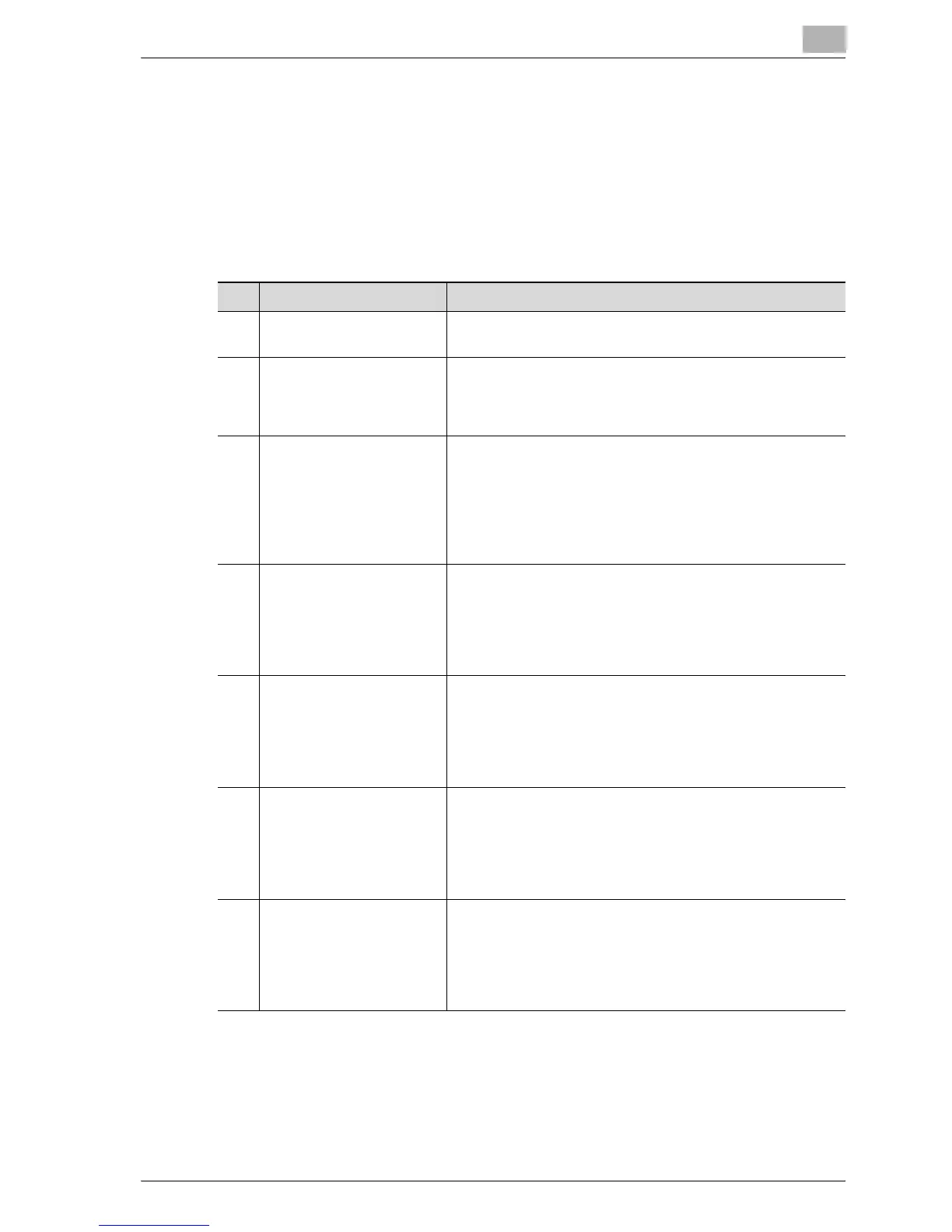
ADMIN. MANAGEMENT parameters
No. ADMIN. MANAGEMENT Description
1 ADMINISTRATOR NO. This parameter can be used to change the currently speci-
fied administrator access code to a different number.
2 AUTO SHUT OFF This parameter can be used to select whether ("ENABLE")
or not ("DISABLE") the "AUTO SHUT OFF" parameter in the
"MACHINE SETTING" menu can be set to "OFF".
The manufacturer’s default setting is "ENABLE".
3 ACCOUNT TRACK This parameter can be used to specify settings to manage
the accounts. A maximum of 50 accounts can be managed.
Enabling/disabling account management
Registering account numbers
Changing/deleting account numbers
Displaying/clearing total counters for each account
Clearing all total counters
4 NETWORK SETTING This menu option appears only when optional image con-
troller IC-206 or network interface card NC-503 is installed.
Settings necessary for connecting to a network can be
specified from this menu.
For details, refer to the user manual for the corresponding
option.
5 E-MAIL SETTING 1 This menu option appears only when optional image con-
troller IC-206 or network interface card NC-503 is installed.
Settings necessary for operations such as Scan to E-mail
can be specified from this menu.
For details, refer to the user manual for the corresponding
option.
6 E-MAIL SETTING 2 This menu appears only when optional image controller IC-
206 or network interface card NC-503 is installed.
Settings necessary for authentication with POP Before
SMTP can be specified from this menu.
For details, refer to the user manual for the corresponding
option.
7 USER SETTING This menu option appears only when optional image con-
troller IC-206 or network interface card NC-503 is installed.
Settings for the NTP server and the time zone can be spec-
ified from this menu.
For details, refer to the user manual for the corresponding
option.










 To Next Page