7
Utility mode/Copy mode parameters
7-54 ineo 163/213
7.8 COPY SETTING 1
The settings that are selected when the machine is turned on or when the
[Reset] key is pressed are called the "default settings". The default copy
settings can be changed from the "COPY SETTING 1" and "COPY SETTING
2" menus.
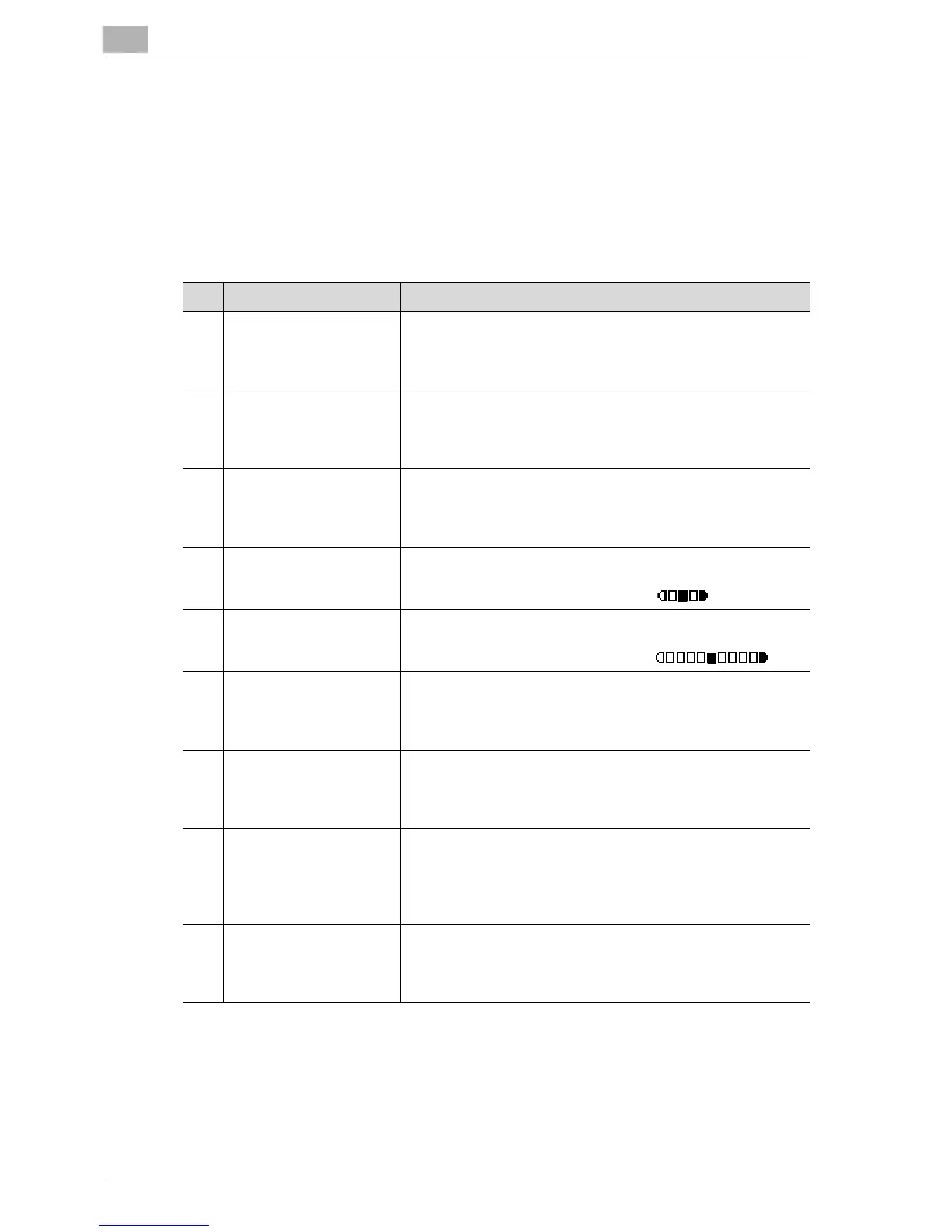
COPY SETTING 1 parameters
No. COPY SETTING 1 Description
1 PAPER PRIORITY This parameter can be used to select the paper drawer that is
selected as a default when the "AUTO" Zoom setting is select-
ed.
The manufacturer’s default setting is "TRAY1".
2 QUALITY PRIORITY This parameter can be used to select "TEXT", "PHOTO" or
"TEXT/PHOTO" for the image quality that is selected when the
machine is turned on or the [Reset] key is pressed.
The manufacturer’s default setting is "TEXT/PHOTO".
3 DENSITY PRIORITY This parameter can be used to select "AUTO" or "MANUAL"
for the density that is selected when the machine is turned on
or the [Reset] key is pressed.
The manufacturer’s default setting is "AUTO".
4 DENSITY LEVEL (A) This parameter can be used to select one of three density lev-
els for the "AUTO" Density setting.
The manufacturer’s default setting is .
5 DENSITY LEVEL (M) This parameter can be used to select one of nine density lev-
els for the "MANUAL" Density setting.
The manufacturer’s default setting is .
6 BINDING POSITION This parameter can be used to select whether the first page of
a book to be scanned is on the left (left-bound) or on the right
(right-bound).
The manufacturer’s default setting is "LEFT".
7 MARGIN SETTING This parameter can be used to specify between 0 and 20 mm
(in 1 mm increments) the width of the binding area (margin)
when copying documents to be bound.
The manufacturer’s default setting is 10 mm.
8 ERASE SETTING This parameter can be used to specify between 5 and 20 mm
(in 1 mm increments) the width that is erased when making
copies with "FRAME ERASE", "CENTER ERASE" or "CENT-
ER+FRAME ERASE" selected for the "ERASE" function.
The manufacturer’s default setting is 10 mm for.
9 SMALL ORIGINAL This parameter is used to select whether or not copying is
possible after loading a small document whose size cannot be
automatically detected.
The manufacturer’s default setting is "DISABLE".










 To Next Page