Creating a MODELA Player 4 File
90
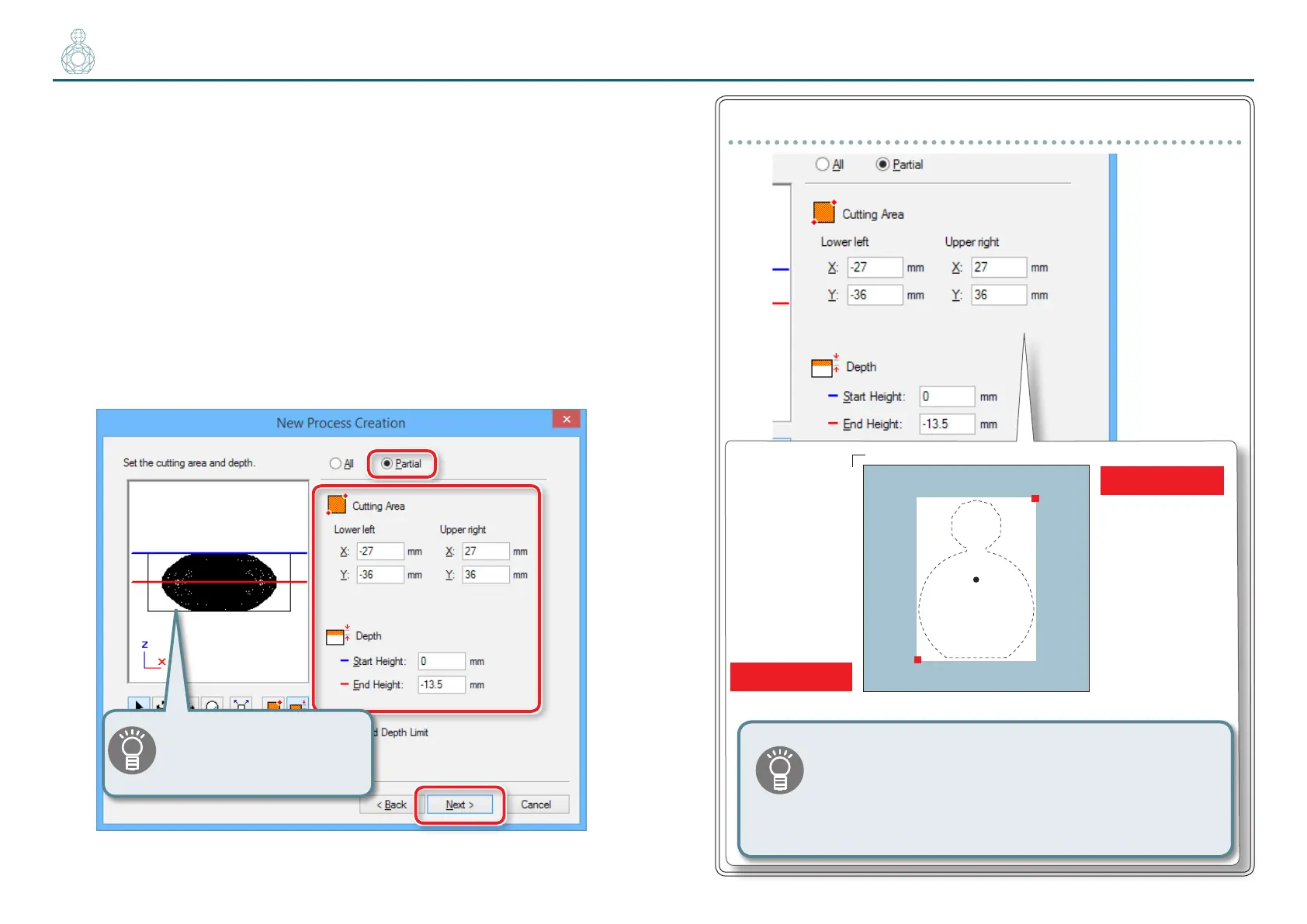
5. Set the area and depth for roughing.
5-1.
Set the area of roughing.
For double-sided cutting, select [Partial] : Manual input
5-2.
Enter the cutting area.
Enter the X and Y distance from the origin point of the model (bottom
left and top right) set in "STEP 3 : Set the Origin Point of the Model and
Orientation" (p. 71).
5-3.
Set the depth for roughing.
The roughing depth varies depending on the model geometry. Make
adjustments while looking at the red line in the preview screen.
5-4.
Click [Next].
“
Perfume.stl
“
Setting (Data:70 (H) x 52 (W) x 27 (D) mm)
Lower left( -27 , -36 )
Upper right( 27 , 36)
x
y
52
70
( 0 , 0 )
Front
For double-sided cutting, non-cutting areas (i.e., “support”) must be left in
margin spaces to support the model so that it will not detach during cutting.
To create this support, congure the settings so that “-1 mm” and “+1 mm”
are added to the lower-left (X/Y) and upper-right (X/Y) distances, respectively.
"“Supports” (p. 92)
The red line in the preview
screen can be dragged and a
position can also be specied.



 To Next Page