Jackson User Manual rev 2.2 www.diamondsystems.com Page 39
c. Connect USB A to USB A cable between J4 bottom port of Jackson board and Host PC installed with
Ubuntu 20.4 x86_64, Kernel version: 5.15.0-52 or above.
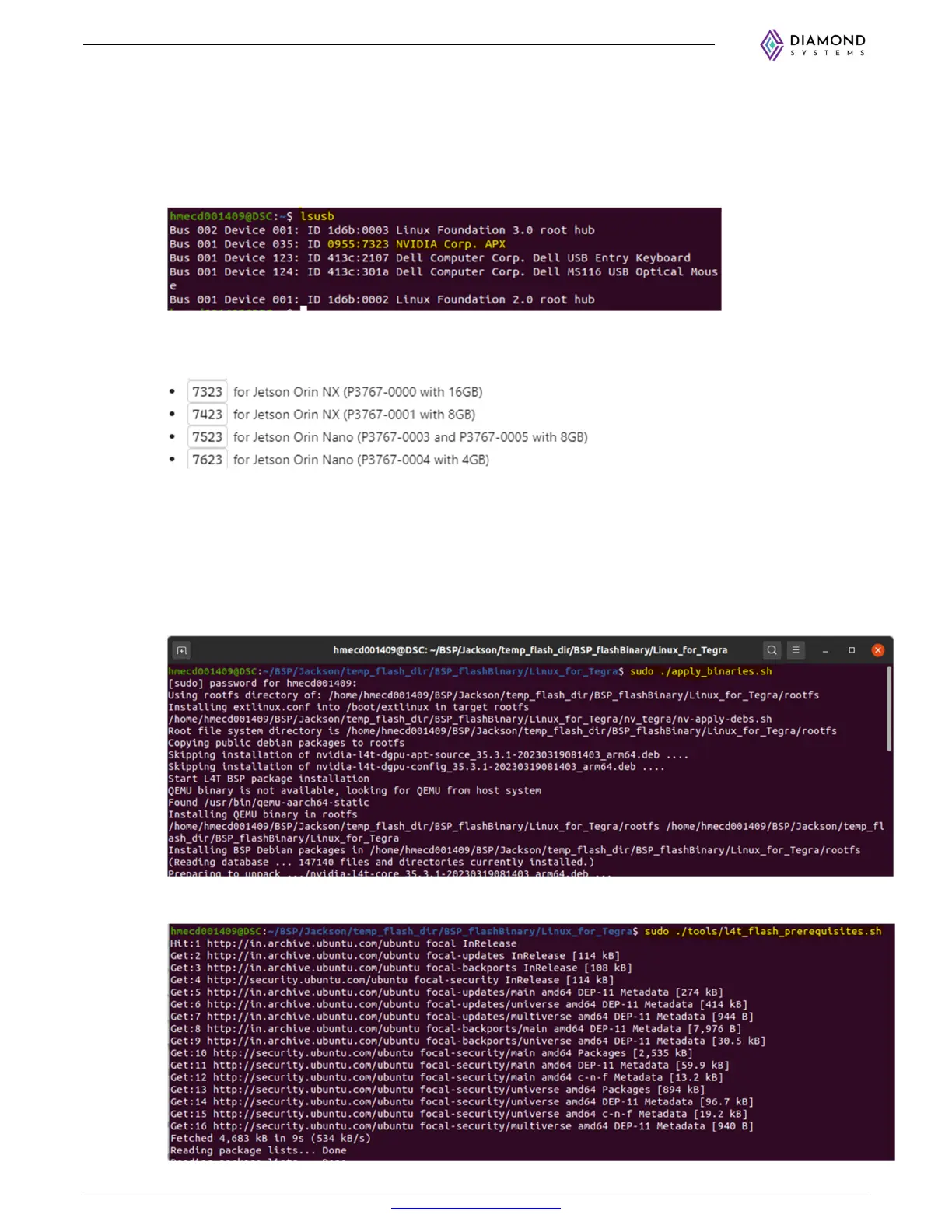
d. Open the Linux terminal in the Host PC and run ‘lsusb’ command to verify whether the board is in
recovery mode or not.
If board is booted in recovery mode, the Jetson Orin NX ™ will be detected as shown below.
Note: Similarly, the Jetson Orin Nano will be detected, but with different device ID. Refer below image
for Orin NX and Orin Nano module’s Device ID for different memory configuration.
e. Copy the released BSP folder in the Host PC and go to the ‘Linux_for_Tegra’ folder in the BSP
released folder on the terminal using ‘cd’ command. Refer below example for the same.
E.g.: $ cd /BSP/Jackson/temp_flash_dir/BSP_flashBinary/Linux_for_Tegra
f. Run the following three commands one by one to flash the Jackson from the host PC.
$ sudo ./apply_binaries.sh
$ sudo ./tools/l4t_flash_prerequisites.sh



 To Next Page