DWG2000E/F/G GSM/CDMA VoIP Gateway User Manual
_______________________________________________________________________________
Shenzhen Dinstar Technologies Co., Ltd.
51
Example
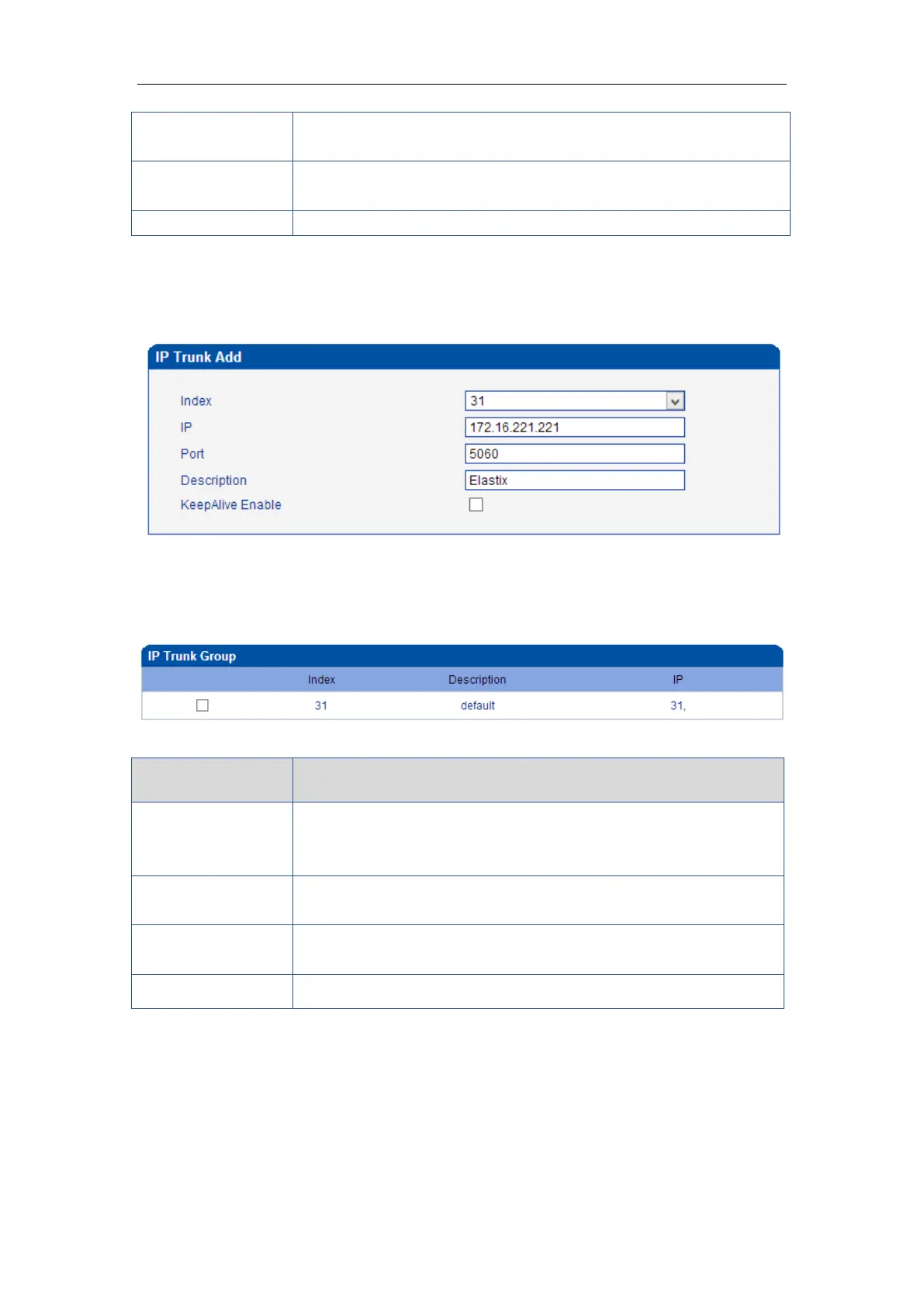
To add a remote IP of Softswitch, IP trunk index is 31, SIP port number “5060”
Figure 4-11-2 IP Trunk Modify
4.11.2 IP Trunk Group
Figure 4-11-3 IP Trunk Group
Table 4-11-2 Description of IP Trunk Group
Example
To add an IP group, set IP “10, 14, 17” to IP group 18
Figure 4-11-4 IP Trunk group modify
It is an interworking parameter between the remote Softswitch and the
SIP server. It specifies the IP address of the peer equipment.
It is an interworking parameter between the remote Softswitch and the
SIP server. It specifies the SIP port number of the peer equipment
Send OPTION to Softswitch/IPPBX to detect health status
This configuration is optional, and is used to add the IP that have the
same attributes to an IP group. The IP group will referenced by
IP->Tel routing and number manipulation.
It uniquely identifies a route. Its value is assigned globally, ranging
from 0 to 31.
It describes the route for the ease of identification. Its value is
character string
It specifies the IP will add to IP group














 To Next Page