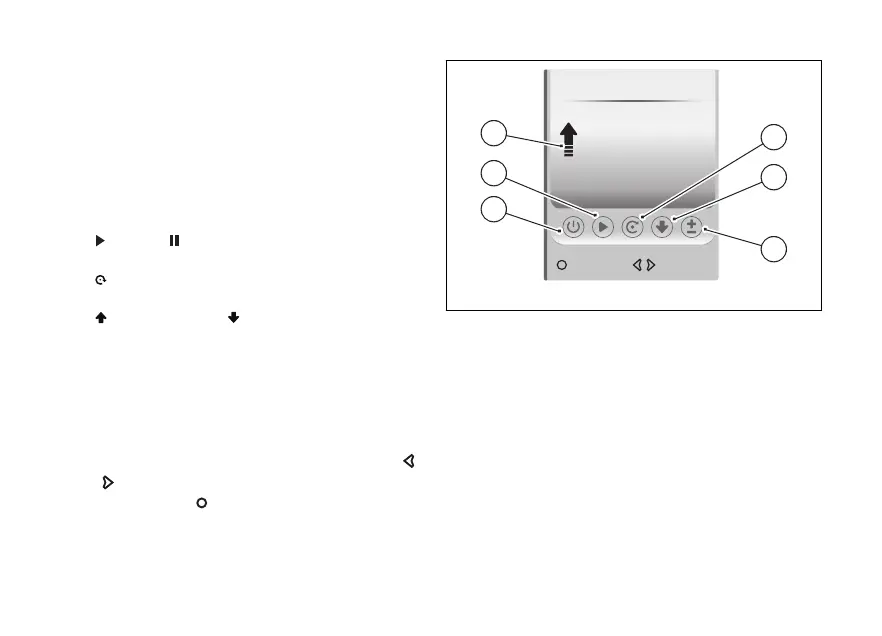
When the Trip master is selected, the following
controls are activated:
●
“On” or to activate or deactivate the Trip
master (B). When set to the distance
meter is displayed in grey; when it is set to “On,
it is displayed in black in light theme, white in the
dark theme. The display theme can be set via the
“Themes” function in the - Display”
menu.
●
play or pause to or stop the distance
calculation (C).
●
reset to reset the meter (D). When reset is
the distance counting is paused.
●
incremental or to change the
distance calculation mode (E).
●
± to increase or decrease the distance meter (F).
The meter is displayed in km or miles and with the
arrow (G) indicating the travelled distance counting
mode (incremental or
When a control is selected, it is displayed in red.
To select the desired control, use the
and .
Press the to activate the control.
If the meter in mode reaches 0.0 km or
miles, the Trip master counting is paused.
The unit of measurement can be changed using the
“Units” function in the - Display” menu.
On Move
85.0
km
Trip master
B
F
E
D
C
G
Fig 102
137










 To Next Page