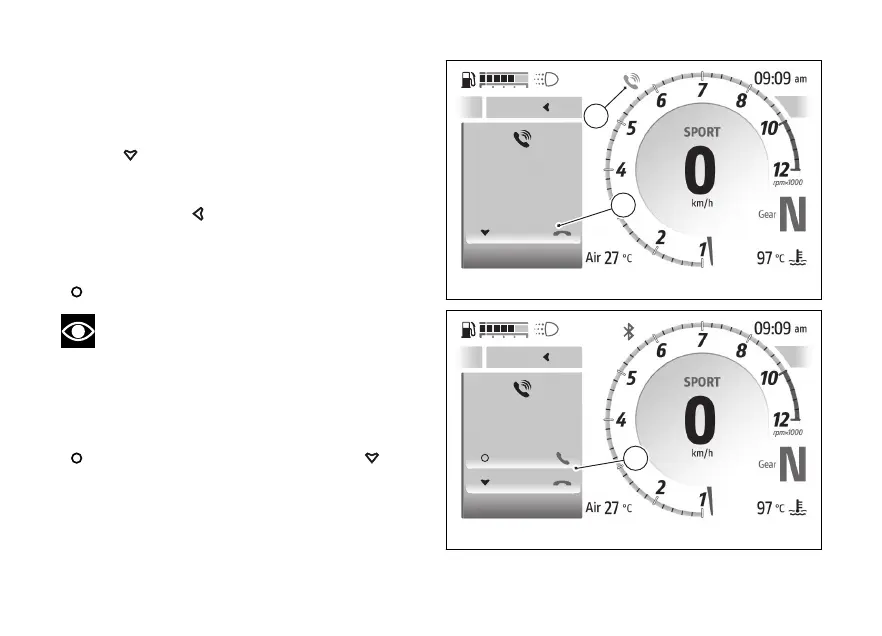
Call in progress
When a call is in progress a window is shown with the
name or number of the phone contact as well as the
item “End call” (C). To end the call, press and hold
for a long time.
During the call, it is possible to exit the call display to
access other menus on the main page by holding
down the
. The blue phone icon (D) is also
activated to indicate that the call is in progress.
To return to the call in progress window, select
“Phone” from the features” menu, and press
.
Note
The music player will be paused during a call.
Incoming call
When a call is received, a window appears with the
name or number of the caller and the items “Accept”
and “Decline” (E): to accept the call press the
, to decline the call press the .
Close
A
My Ride
Setings
Smar features
End call
Mario
Rossi
C
D
Fig 128
Close
A
My Ride
Setings
Smar features
Accept
Decline
Mario
Rossi
E
Fig 129
166










 To Next Page