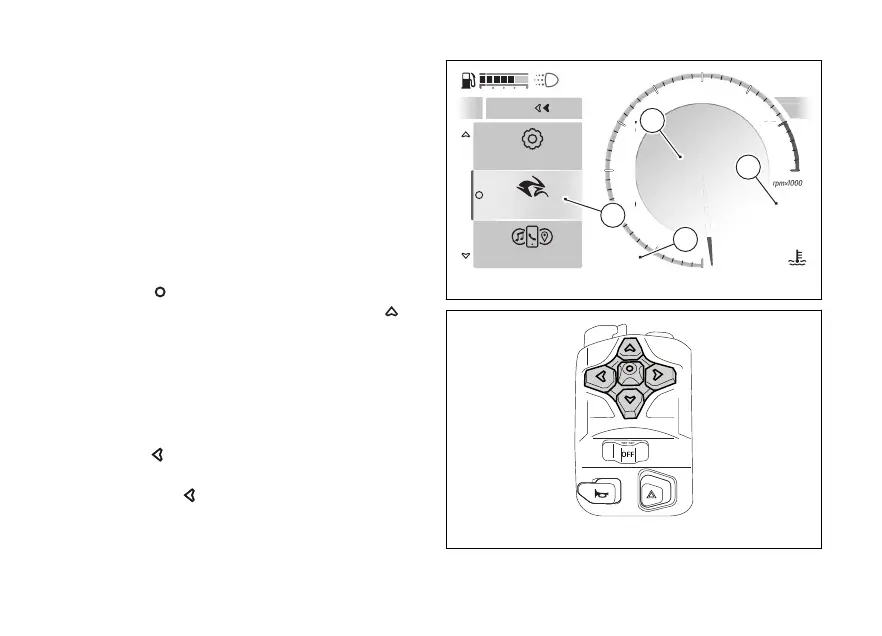
Function menu
This menu (A) contains a series of functions that can
be activated and are grouped in the following sub-
menus:
●
My Ride
●
features (grey if no Bluetooth device is
connected)
●
(grey if the speed is higher than 5 km/h
(3 mph))
To access the menu:
●
in the Road and Road Pro Infomode press the
.
●
in the Rally Infomode, keep the
pressed for a long time.
Opening the function menu changes the layout of
some elements, for example by moving the
speed, gear and air temperature to positions (B), (C)
and (D), respectively, in the Road Infomode.
During navigation through sub-menus, press
the
to return to the previous menu level.
The function menu can be closed by pressing and
holding for a long time.
The My Ride sub-menu contains the following
functions
My Ride
Setings
Smar features
Close
1
2
3
4
5
6
7
8
10
12
N
Gear
SPORT
0
km/h
27
°C
Air
97
°C
09:09
am
Fig 106
Fig 107
144










 To Next Page