•
•
Another possibility is to use the Com Port Server integrated in the system centre. This enables remote access
over IP with the CODESYS development system to the controller.
For configuration of the COM port server, see the operating manual of the system centre Virtus 5 (menu 4-1-5).
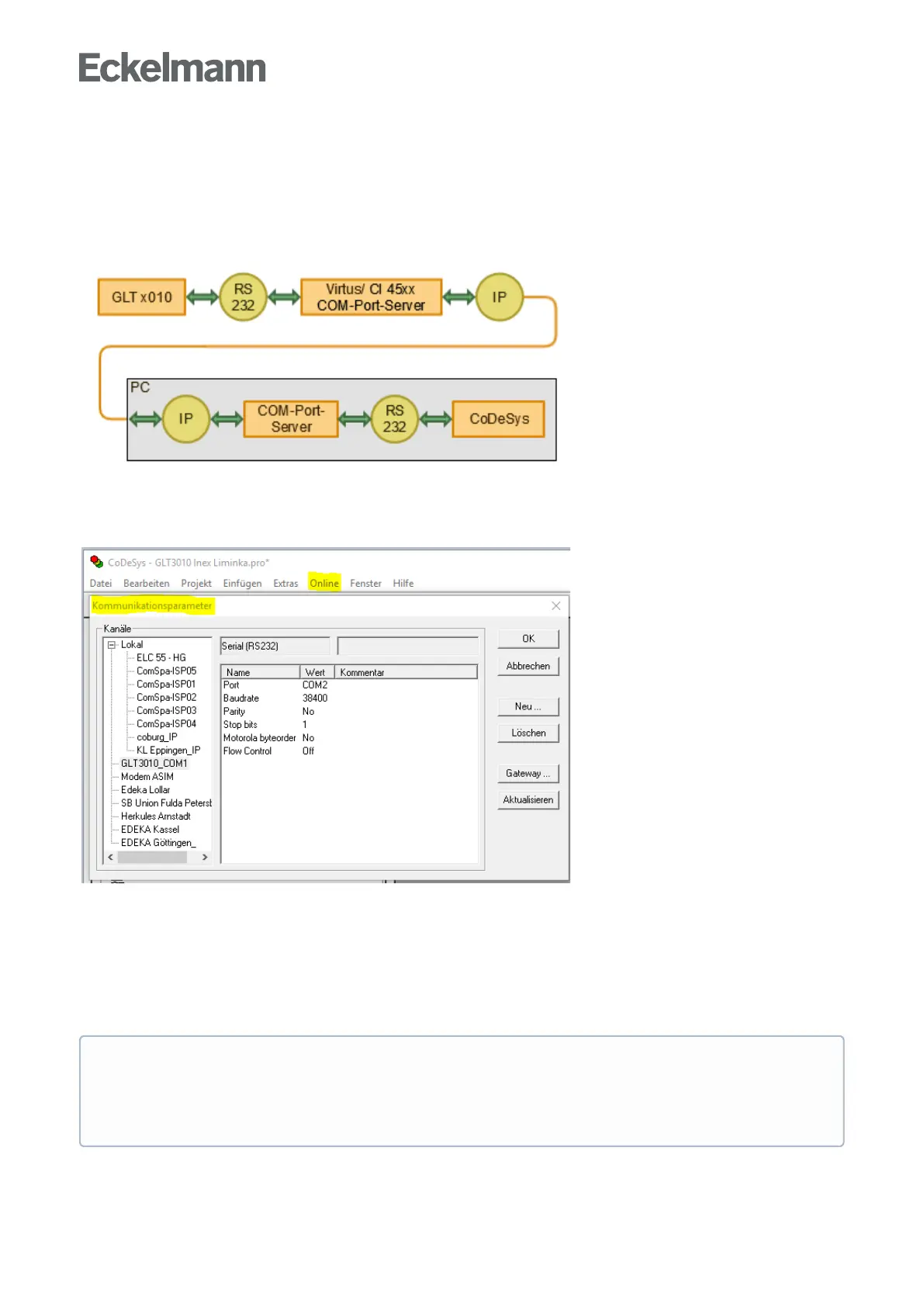
The COM port server driver must also be installed on the PC / notebook. The data flow between the GLT x010
and the PC/notebook as well as the implementation of the communicationprotocolTCP/IP↔RS232isshown
below:
The corresponding settings must be made in CODESYS in the Online menu, under Communication
Parameters:
On the left under "Channels", an existing configuration for RS232 can be selected or a new channel can be
created with the New button on the right (see screenshot for details).
Under Port, enter the COM port that the GLT 0x10 is connected to on the PC/notebook (here in the example
"COM2").
For communication via TCP/IP, the COM port of the COM port server must be set on the notebook, for
details see Windows Device Manager, there under "Serial interfaces (RS 232)".
Cable length
The RS232 connection cable between GLT x010 and system centre (Virtus 5, CI 45xx) in the switch
cabinet must not exceed a maximum length of 2 m and should be laid separately from low-voltage
cables in order to avoid interference coupling.



 To Next Page