9.5.2 Update der aktuellen Firmware
The file "GLT3010_xxx_Release.exe" (E) for the firmware update is available in the EDP at https://
edp.eckelmann.de/edp/lds/_RdC4ujAibE and may have to be unpacked from the ZIP archive before use.
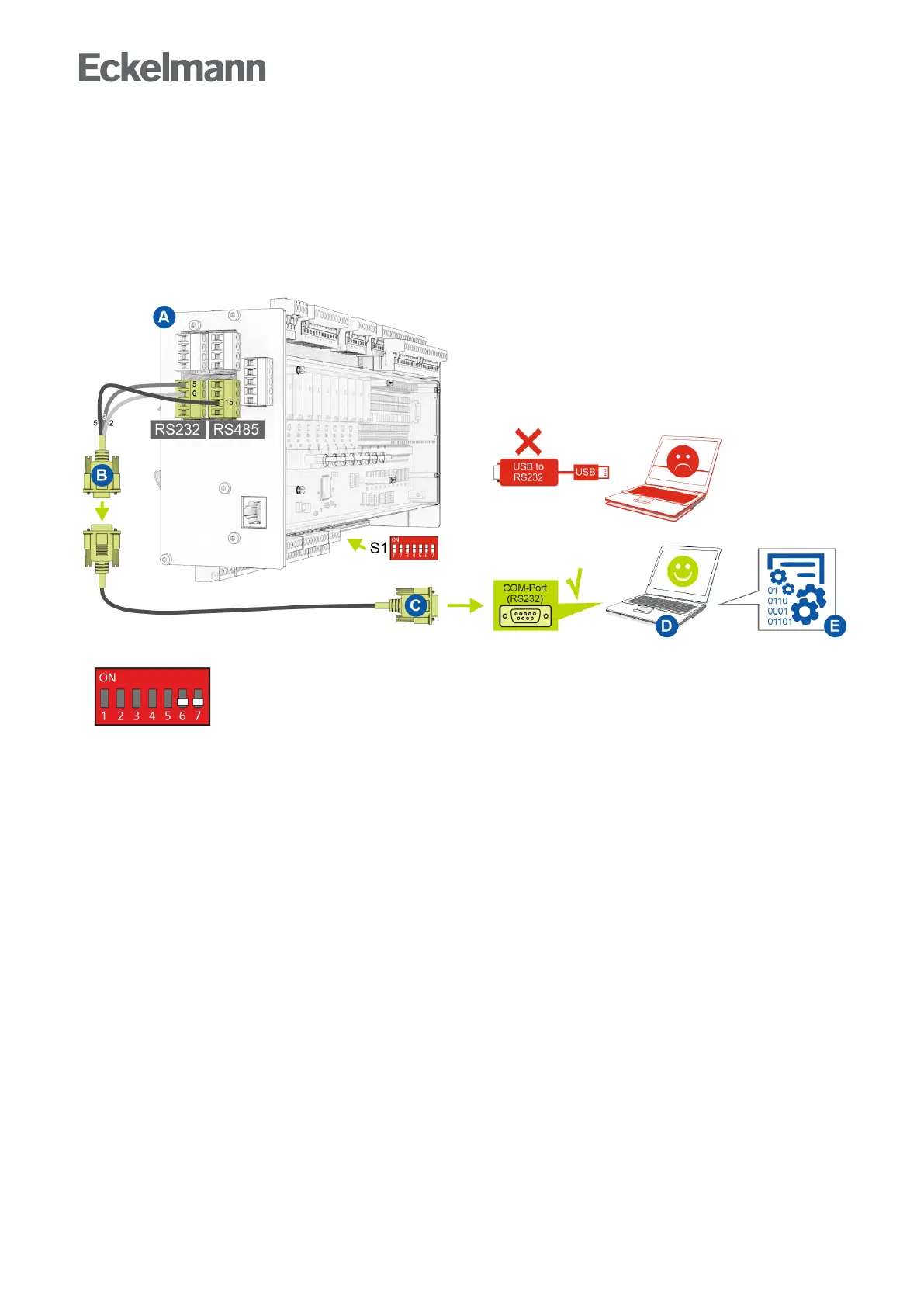
The firmware update is performed using a notebook (or PC) that is connected to the controller via the COM port
interface(RS232).The following steps must be strictly performed and observed during the firmware update:
1. Strictly disconnect controller from the mains power supply (there must be absence of voltage) .
2. Set DIP switch S1 coding switches 6 and 7 to OFF:
3. Connect controller (A) to flash cable (B) (connect both 4-pin plug connectors at the terminals 5/6/7/8 and
13/14//15/16).
4. Connect flash cable (B) to null modem cable (C).
5. Connect null modem cable (C) to the COM port (RS232) of the notebook (D)
6. In Windows Explorer, run the file "GLT3010.exe" by double clicking on it and select the used COM port on
the screen.



 To Next Page