221
Technical Publication Document NO: SYSTEM-007-ENG (Ver.1.1)
HF-525Plus Installation, Operation and Service Manual
12.6 Troubleshooting for Table Bucky (SMS-BT-4)
12.6.1 Device composition
12.6.2 How to check (1)
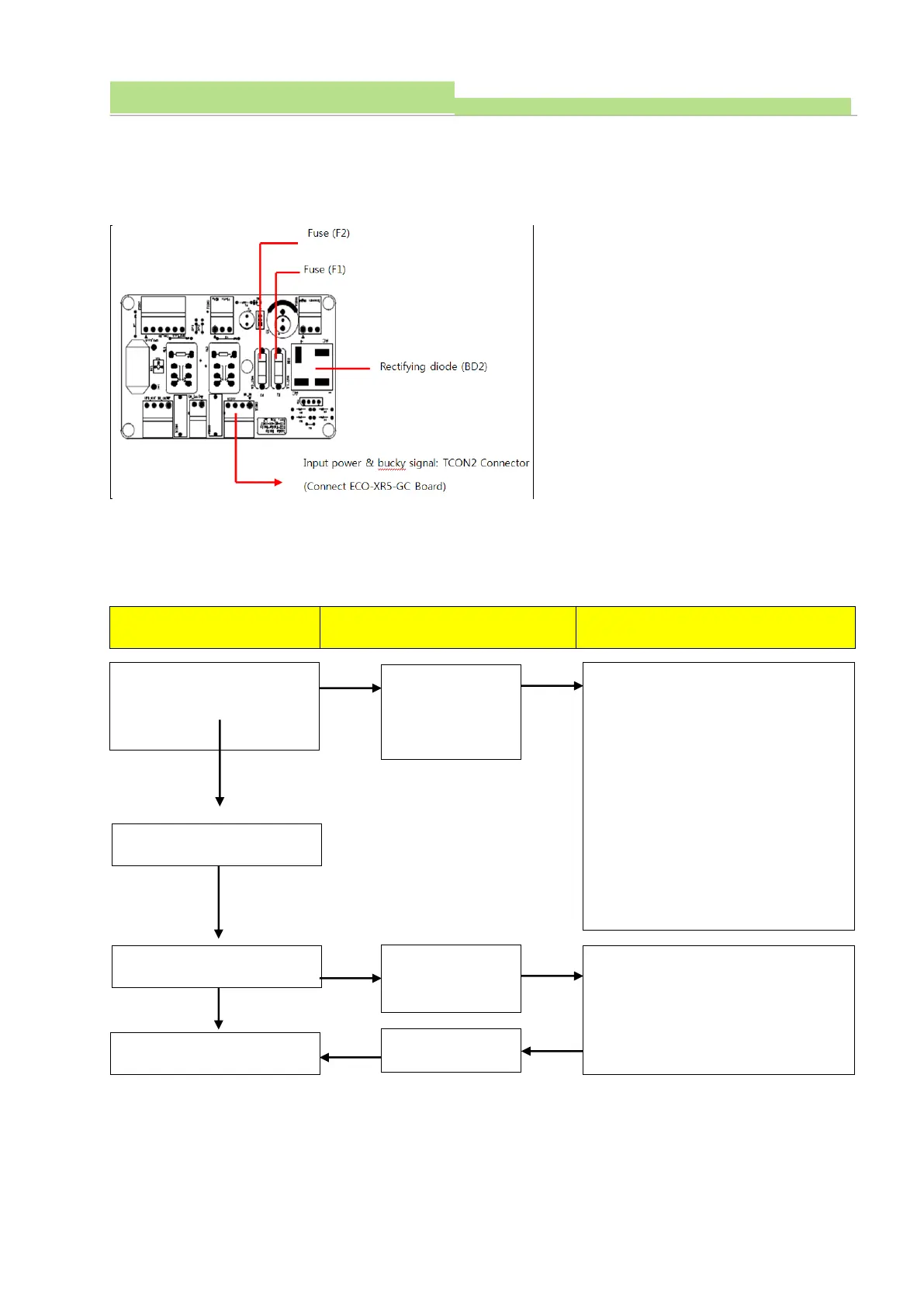
(1) Board name: ECO-TABLE-BUCKY Board
(2) Function: Control electromagnet of table and operate bucky device
(3) Check points of ECO-TABLE-BUCKY Board are as below
Breakdown details and trouble shooting
Operate table bucky
(sensor location :
bottom of the product))
Fixture of
electromagnet is
not unlocked
1. Check the fuse of TF1, TF2 of ECO-
TABLE-BUKCY
2. Check rectifying diode of BD2 of ECO-
TABLE-BUCKY
3. Check input power into TCON2
Connector of ECO-TABLE-BUCKY Board
4. Check operation of ECO-XR5-GC Board
Select Bucky on the Console
Select Ready on the console
1. Check voltage of bucky device while
bucky operation.
2. Check bucky signal of ECO-XR5-GC
Board
Select Ready on the console



 To Next Page