176
Technical Publication Document NO: SYSTEM-007-ENG (Ver.1.1)
HF-525Plus Installation, Operation and Service Manual
(6) When generator is in trouble with power, Standby LED turns ‘yellow’ and LCD screen will alert with
error message.
(7) Users can make Reset and try to power ON the generator again.
NOTE▶
When LCD screen shows error continuously, verify the input power again.
7.2.12 X-ray Exposure
During radiation is activated, OP console produces beep sound and EXP LED lamp is ON. (to alert the
radiation to users)
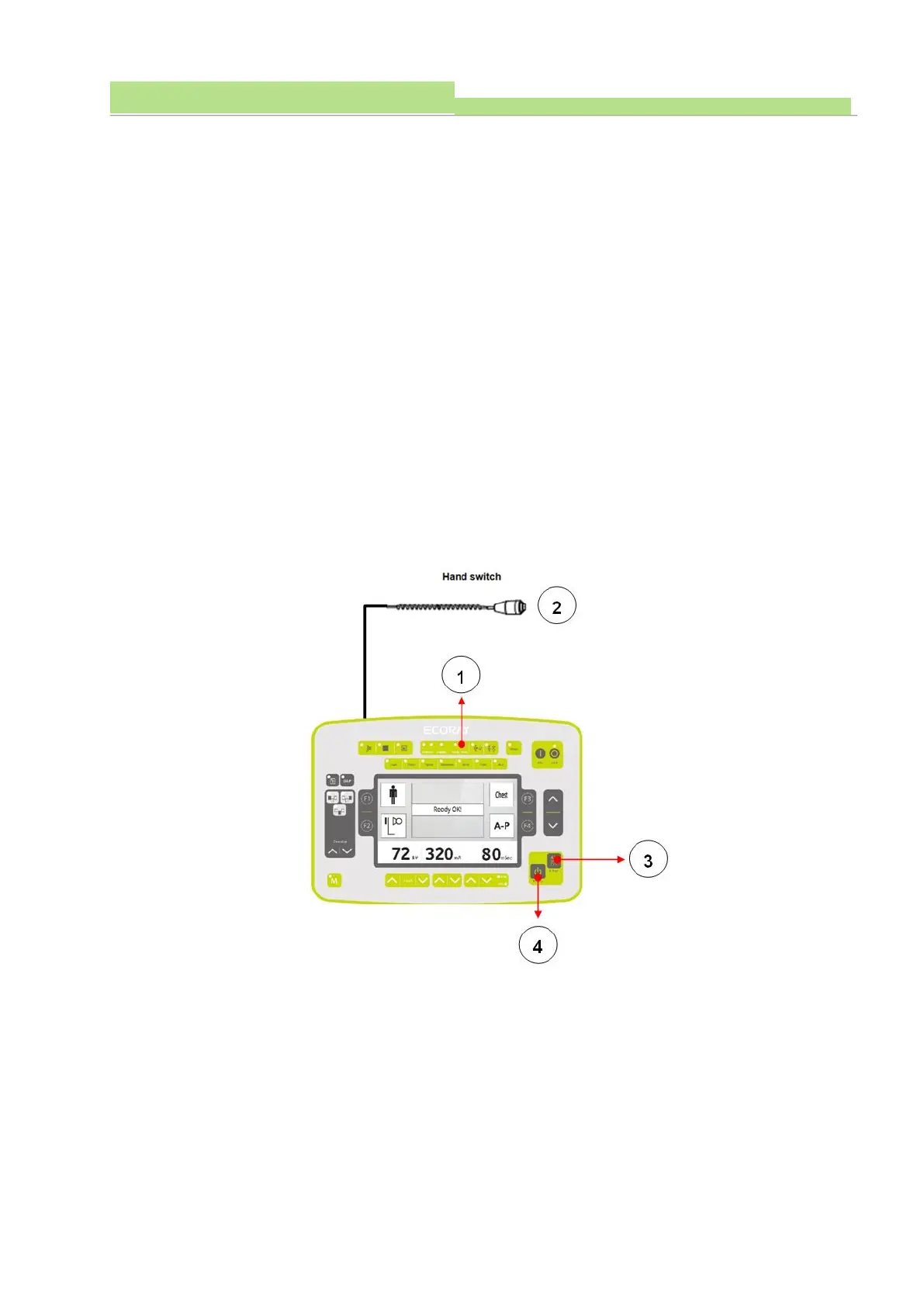
● While the X-ray is being irradiated, the console's Ready, X-Ray operation indicator lamp (Figure 1)
lights up and a beep sound to inform the user that the X-ray is being exposed.
● The X-ray irradiation switch (Figure 3, 4) is at the bottom of the console.
● The console's Ready, X-Ray switch and also a separate hand switch can expose the X-ray, and the
hand switch is connected to the console.
● To activate X-Ray shooting, press the Ready switch (Figure 4) on the console and after about 1
second, the Ready indicator light (Figure 1) lights up in yellow and the Ready button without
releasing, press the X-Ray switch (Figure 3) simultaneously to take an X-ray.



 To Next Page