Document ID: OMM-00131 Rev. E
20
3.7 Operator Station Installation
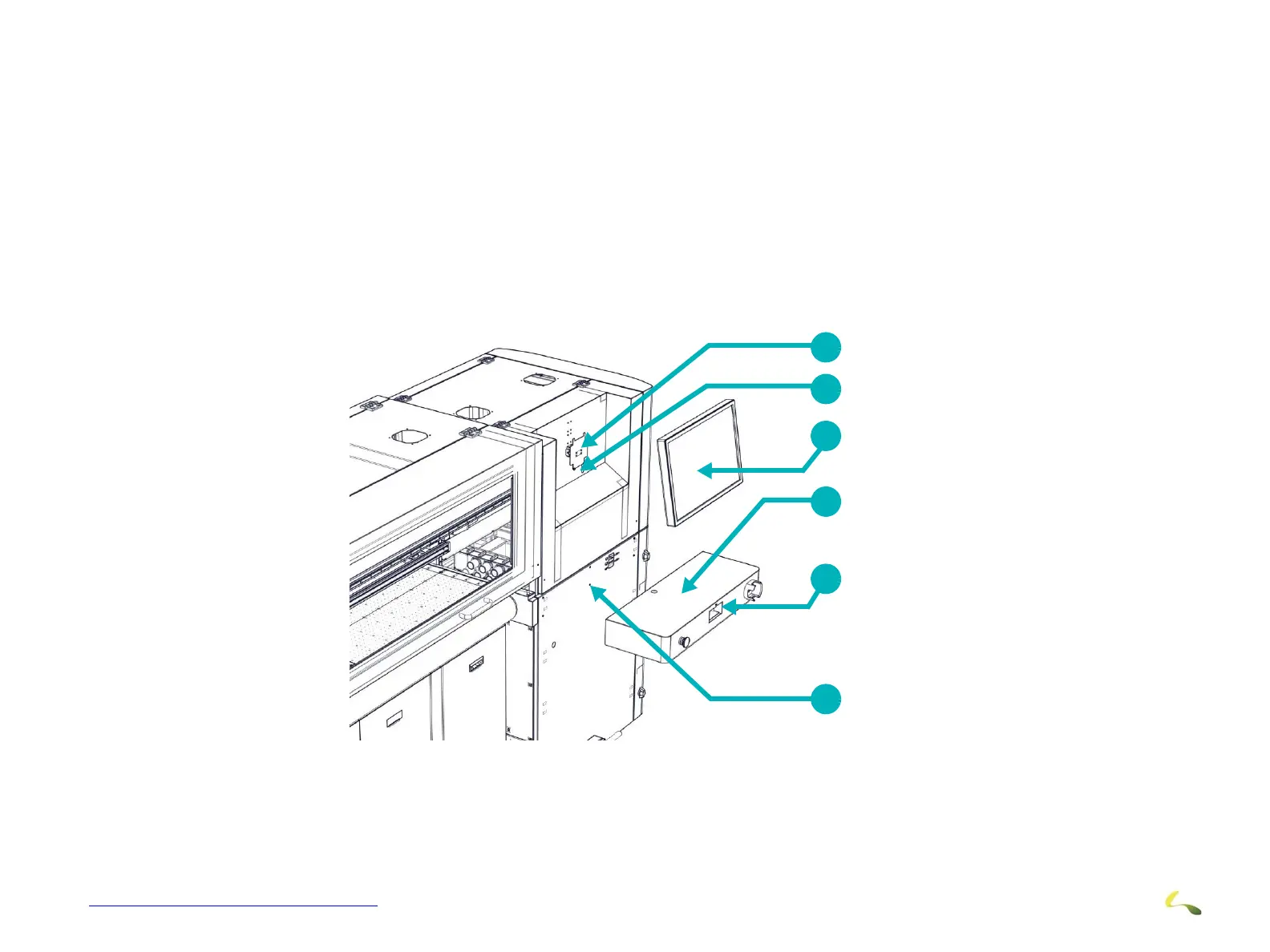
The Operator Station is comprised of the monitor, keyboard tray, keyboard and mouse. Install and connect Operator Station
components as described in the following paragraphs and illustrations.
A brief overview of operator station installation is provided below:
1. Route the cables for the monitor and keyboard tray connections.
2. Install the Monitor to the Monitor mounting bracket and make cable connections.
3. Remove the Interlock Override Keys and place in Keyhole for later use.
4. Install the Keyboard Tray and make cable connections.
5. Place the keyboard and mouse onto the keyboard tray and connect.
1
2
3
4
5
6
Figure 3-11: Monitor and Keyboard Installation
1 Monitor Mounting Bracket 2 Remove Interlock Override Keys and place in Keyhole 3 LCD Monitor Assembly
4 Place Keyboard and Mouse Here 5 Keyboard Tray Assembly 6 Keyboard Mounting Screw



 To Next Page