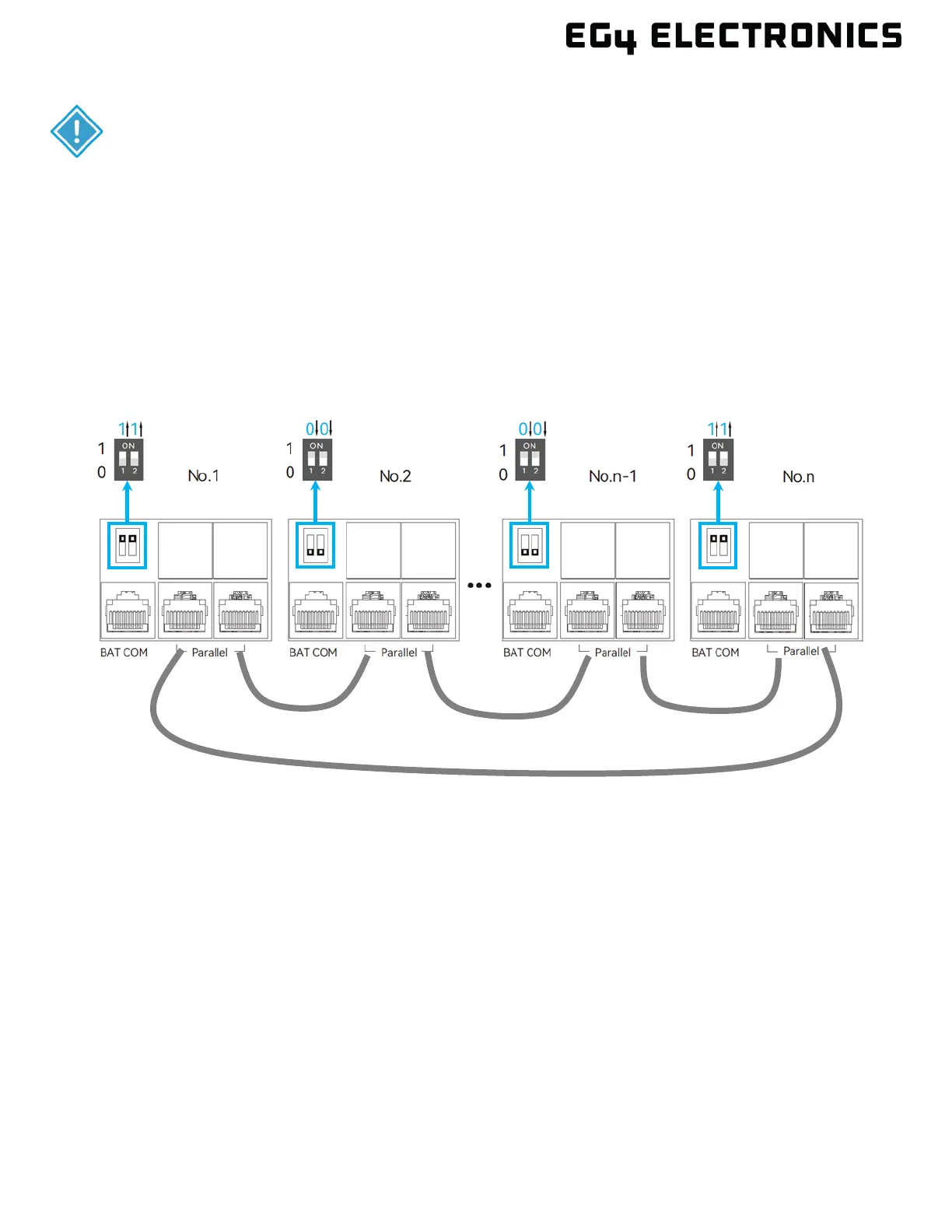
1. Set the CAN communication PIN to ON position for the first and the last inverter. Set the PIN
to the OFF position for any inverters between the first and last. Both switches in the “ON”
position translates to address 1. Both switches in the “OFF” position translates to address 0.
2. Install the included parallel cable (grey in color) to the parallel port on each inverter as shown
in the diagram below. If only two inverters are installed only one parallel cable is required.
Two parallel cables will provide redundancy in the event one cable is disconnected or stops
working.
3. Ensure each inverter circuit breaker is in the open (OFF) position. No voltage should be
coming in or out of the inverter at this point.
4. Using a multimeter, check the following:
5. Check the battery bank voltage is within operating range at the inverter DC breaker, or the
external DC disconnect.
6. Check the PV voltage is within operating range at input connections of the DC isolation
switch.
7. If utilizing AC input, double check each hot line to neutral connection supplying power to the
inverter to ensure voltage is in operating range of the unit.
8. Upon confirming all voltages are within the inverter’s operating range, set the inverter battery
breaker to the closed (ON) position. If equipped, set the external battery breaker installed
between the battery bank and inverter to the closed (ON) position
9. Begin powering on each battery one at a time, starting with the master. Then power on each
additional battery in ≈5 second intervals.
CAUTION:
Only use the provided orange parallel cable when connecting the inverters
together. Using the wrong cable could cause hardware damage. If a longer
cable is required, see below for more information on creating a cable or



 To Next Page