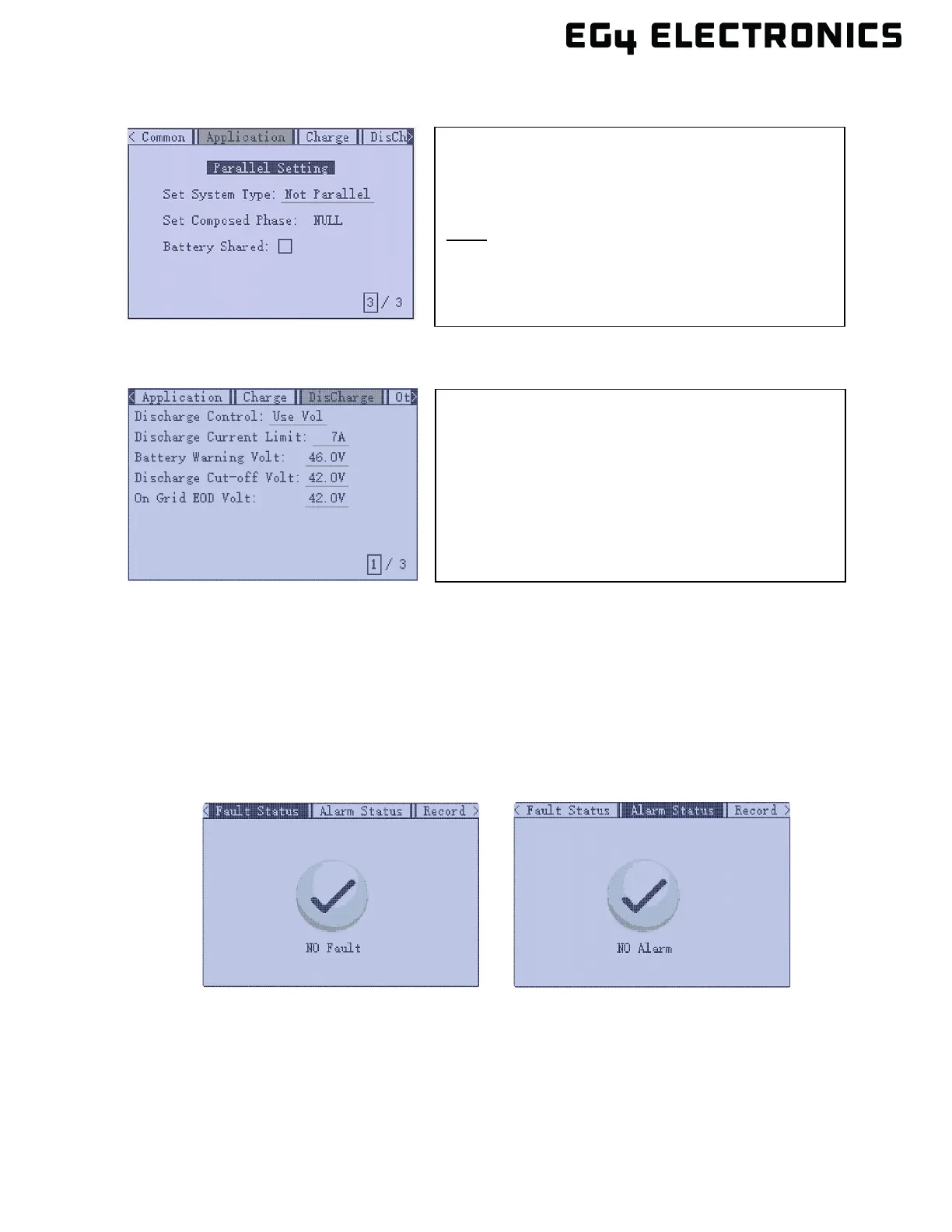
• Discharge
14. Power off all inverters. Then power on the master. Once the master inverter is powered up,
power on each additional inverter.
15. After all the inverters are powered up, double check each inverter and verify the system type
is set to “Parallel” and the battery shared option is selected.
16. Ensure the battery communications cable is properly connected from master battery to the
master inverter.
17. Using the inverter display panel, verify there are no faults or alarms (see sections 8 and 9 for
more information).
18. Verify the loads panel is ready to accept current from the inverter. Set the input breaker at the
loads panel to the closed (ON) position.
19. Set the output breaker on inverter to the closed (ON) position. Turn the EPS output switch to
the closed (ON) position. The inverter should now be providing current to the loads panel.
Discharge Current Limit: The discharge current limit is
at 250A to support a single inverter. When running in
parallel mode, set the max discharge to support the
max current draw as a total from all connected
inverters. If this setting is not adjusted and the inverter
uses current greater than the default setting, the
inverter will either shutdown or switchover to grid
supplying the loads. Once the load returns to within
specified settings, the inverter will switchover back to
Set System Type: Change from Not Parallel to Parallel.
Battery Shared: Place a check mark in the battery
shared box.
Note: Repeat the “Set System Type” and “Battery
Shared” settings on each inverter connected in a
parallel configuration. The rest of the settings will
be copied to each inverter as they are set on the
master inverter.



 To Next Page