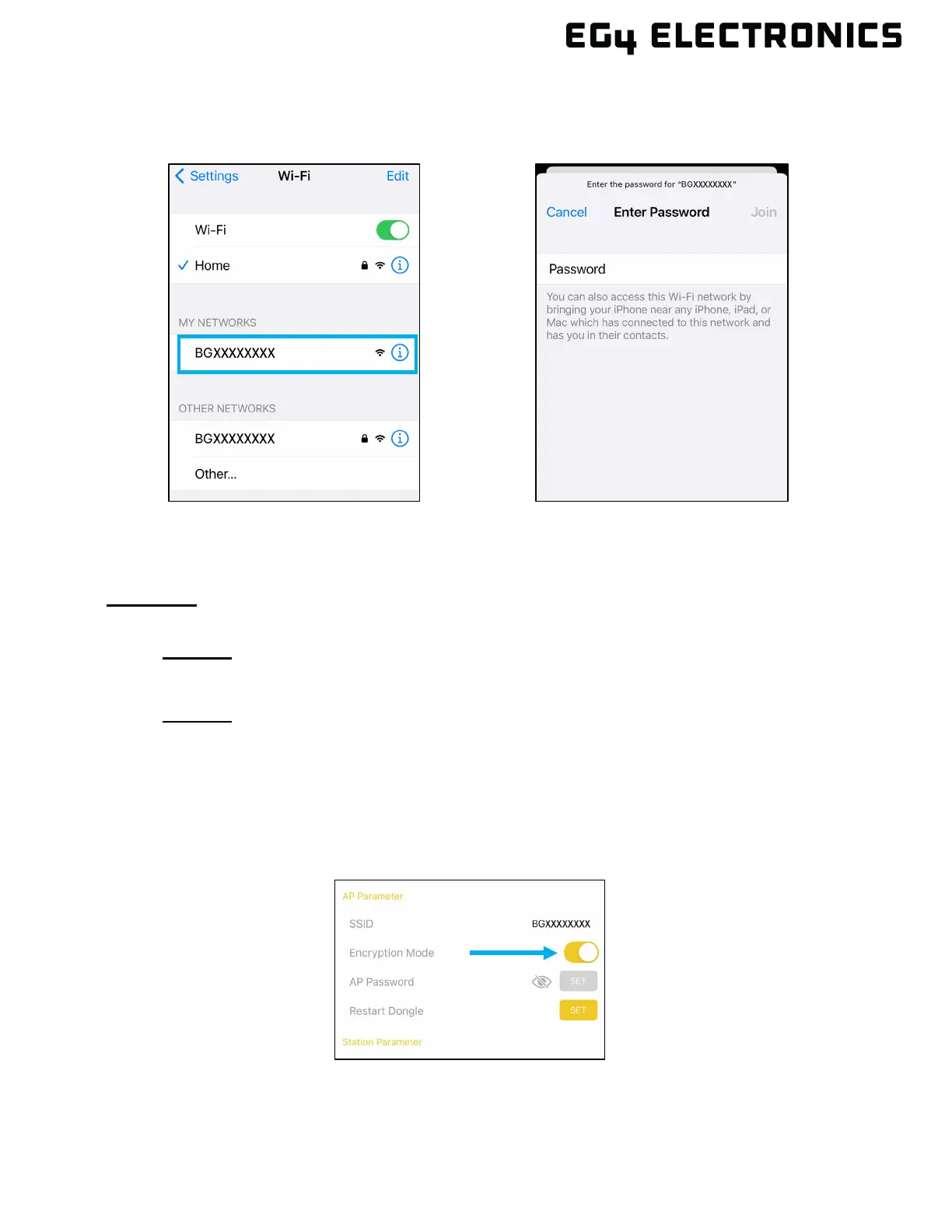
8. Go to the phone’s Wi-Fi settings and re-select the dongle’s Wi-Fi network. The lock icon
should appear next to the dongle’s wireless network which means security is enabled. Enter
the password created in the previous step.
9. The EG4
®
mobile app can now be used as it was previously when security was not enabled.
Also note, enabling and setting up WPA2 security on the dongle’s Wi-Fi network will not
change the dongle’s ability to connect to the home Wi-Fi network.
Disabling:
There are two options to disable the security settings for the dongle’s network.
• Option 1: Hold down the reset button on the bottom of the dongle for at least 10 seconds
and release. This is the quickest and easiest option because it does not require using the
currently set WPA2 password set on the dongle’s Wi-Fi network.
• O
ption 2: Use the EG4 App to disable the security settings on the dongle. This option can
only be used if the WPA2 password is known. Follow the step list below:
1. Connect a phone to the dongle’s Wi-Fi network. If the network was not previously saved
on the current phone, enter the dongle’s WPA2 password when prompted.
2. Open the EG4 app and select “DONGLE CONNECT”.
3. Under AP Parameter area, select the slider button next to Encryption Mode to disable
security.



 To Next Page