03-2009 SOI/DT-mdm FCPD-dp Quality-fz 12/91 599 70 56-70
5.2 Reading the alarm codes
It is possible to display the last three memorised alarms in the FLASH memory of the electronic board:
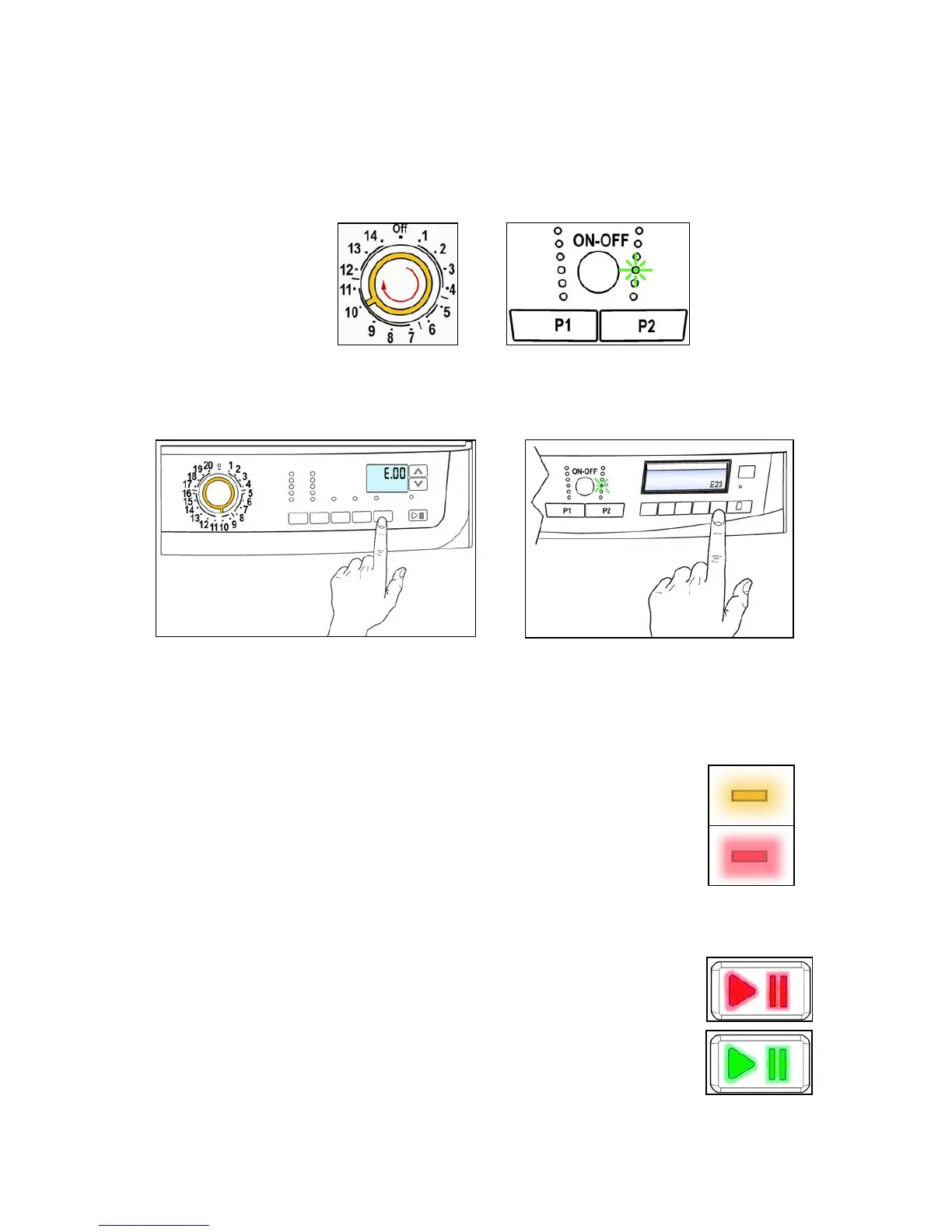
• Enter diagnostic mode (par. 4.1)
• Irrespective of the type of PCB and configuration:
turn the programme selector clockwise (version with knob) pushing button P1 (version INPUT)
to the tenth position.
• The last alarm is displayed.
• To display the previous alarms, press sequentially the left button of the START/PAUSE button (as
represented in figure).
• To return to the last alarm, press the START/PAUSE button.
5.2.1 Alarm displaying
AEG Version:
The alarm is displayed by a repeated flashing sequence of the LED placed above
the button START / PAUSE with yellow and red light (0,5 seconds on, 0,5
seconds off with a 2,5 second pause between the sequences).
• LED indicator START / PAUSE with yellow light → indicates the first digit of
the alarm code (family).
• LED indicator START / PAUS with red light → indicates the second digit of
the alarm code (internal number of the family).
These two LEDs are featured in all models.
Other versions:
The alarm is displayed by a repeated flashing sequence of the START / PAUSE
button with red and green light (0,5 seconds on, 0,5 seconds off with a 2,5
second pause between the sequences).
• LED indicator START / PAUSE with red light → indicates the first digit of the
alarm code (family)
• LED indicator START / PAUSE with green light → indicates the second digit
of the alarm code (internal number of the family)
These two LEDs are featured in all models.




 To Next Page