28
9500
(A)
(B)
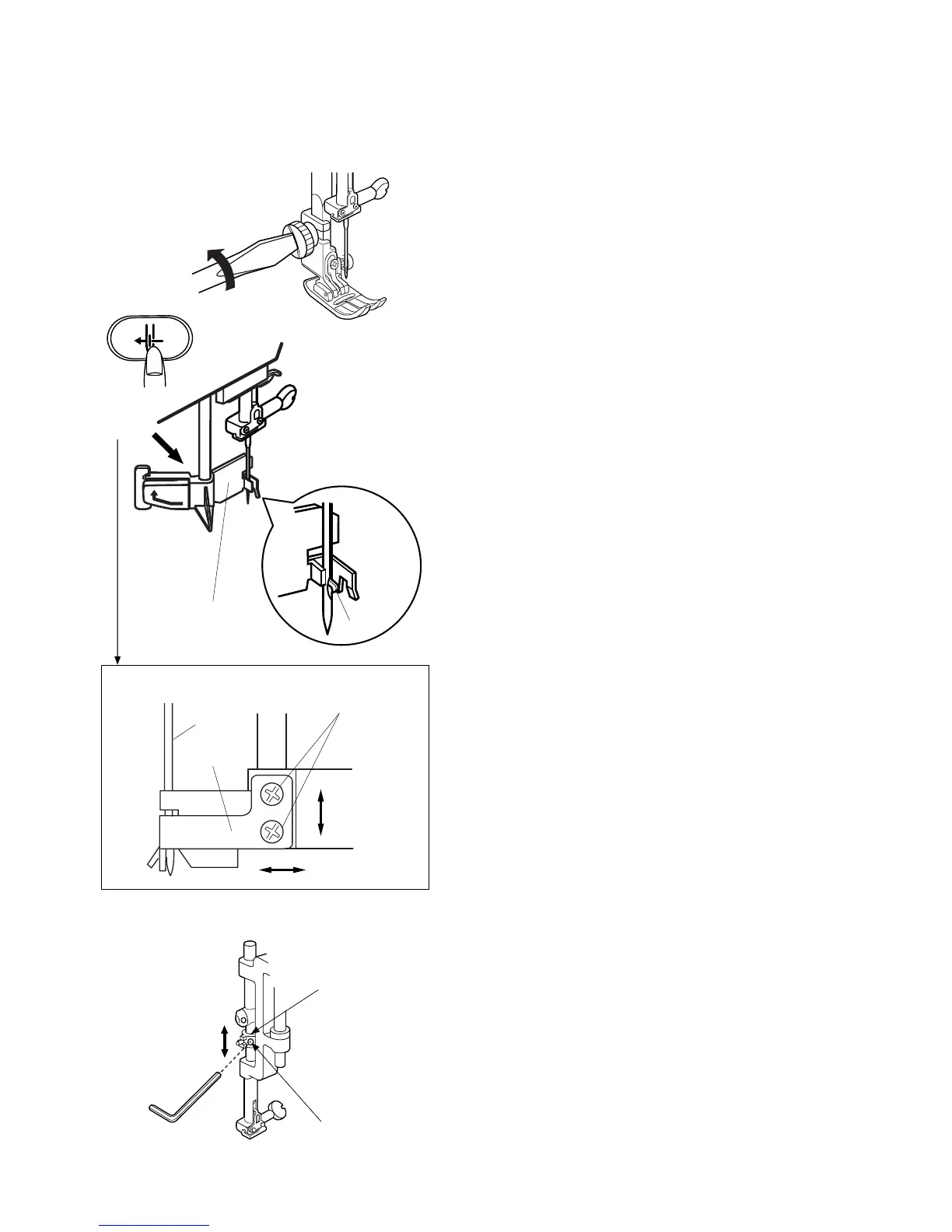
Replacing Threader Plate and Adjustment
If the hook on the threader plate is damaged, replace it as follows.
To replace:
1 Remove the foot holder.
2Turn the power switch “ON”. Raise the needle
while pressing the needle up/down button.
3Lower the threader while pushing the threader
button .
4Turn off the poawer switch.
5 Loosen screaws (2pcs)(A) and replace the threader
plate .
Adjustment procedure:
1. If the threader hook thrusts or hits against either
left or right edge of the needle eye: Loosen Screws
(A) and adjust the position of the threader plate .
2. If the threader hook thrusts against either top or
bottom edge of the needle eye, or misses the needle
eye:
Remove the face cover and loosen Screw (B). Move
the Threader position adjusting holder (G) up or
down to adjust the hook position.
q
e
e
w
r
q
w
w
e
w
r
VIEW-X
VIEW-X
Needle



 To Next Page