30
9500
PRESS MARK
á@
4
2
5
ADJUSTMENT END
OK
1
3
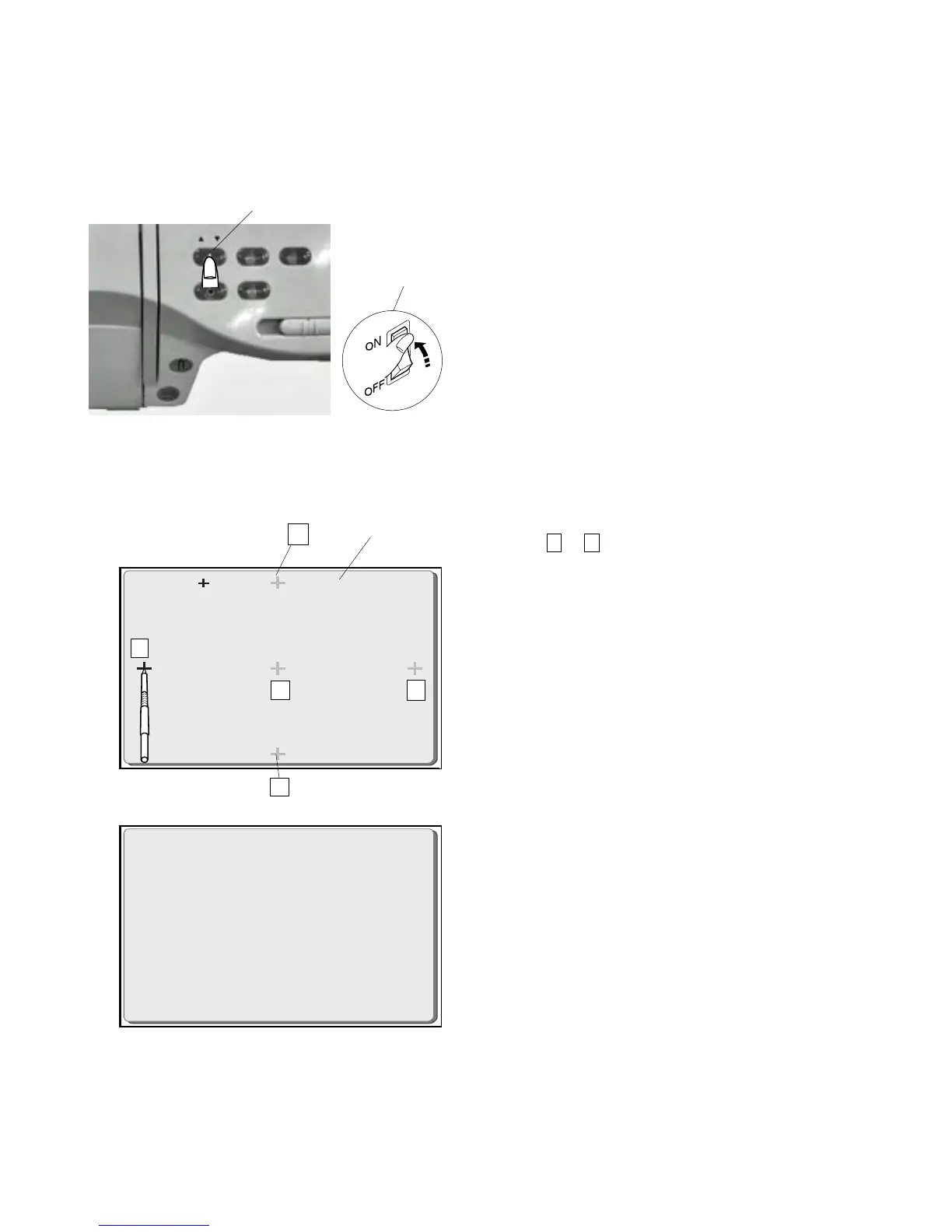
TTP Adjusting Mode
if a different pattern appears on the touch panel when you pressed the touch panel for
selecting a desired pattern, follow the instructions below.
To adjust touch panel:
1 While pressing the Needle Up/Down button ,
turn the power switch “ON” .
(Keep pressing the Needle Up/Down button until the
“PRESS MARK” and ” + “ mark appears.)
2 Press “+ “ mark with the touch pen or the tip of the
additional spool pin.
(Press to in order.)
3 When you press the fifth “ + “, “ADJUSTMENT END”
will appear on the touch panel.
4 Turn the power switch “OFF”.
5 Turn the power switch “ON” and check the Touch
panel again.
q
w
q
w
e
Needle Up/Down button
Power switch
Touch panel
15
w
q
w
e



 To Next Page