32
9500
SET
Main
Slave
DC1
Foot UD
OK
H
(A)
q
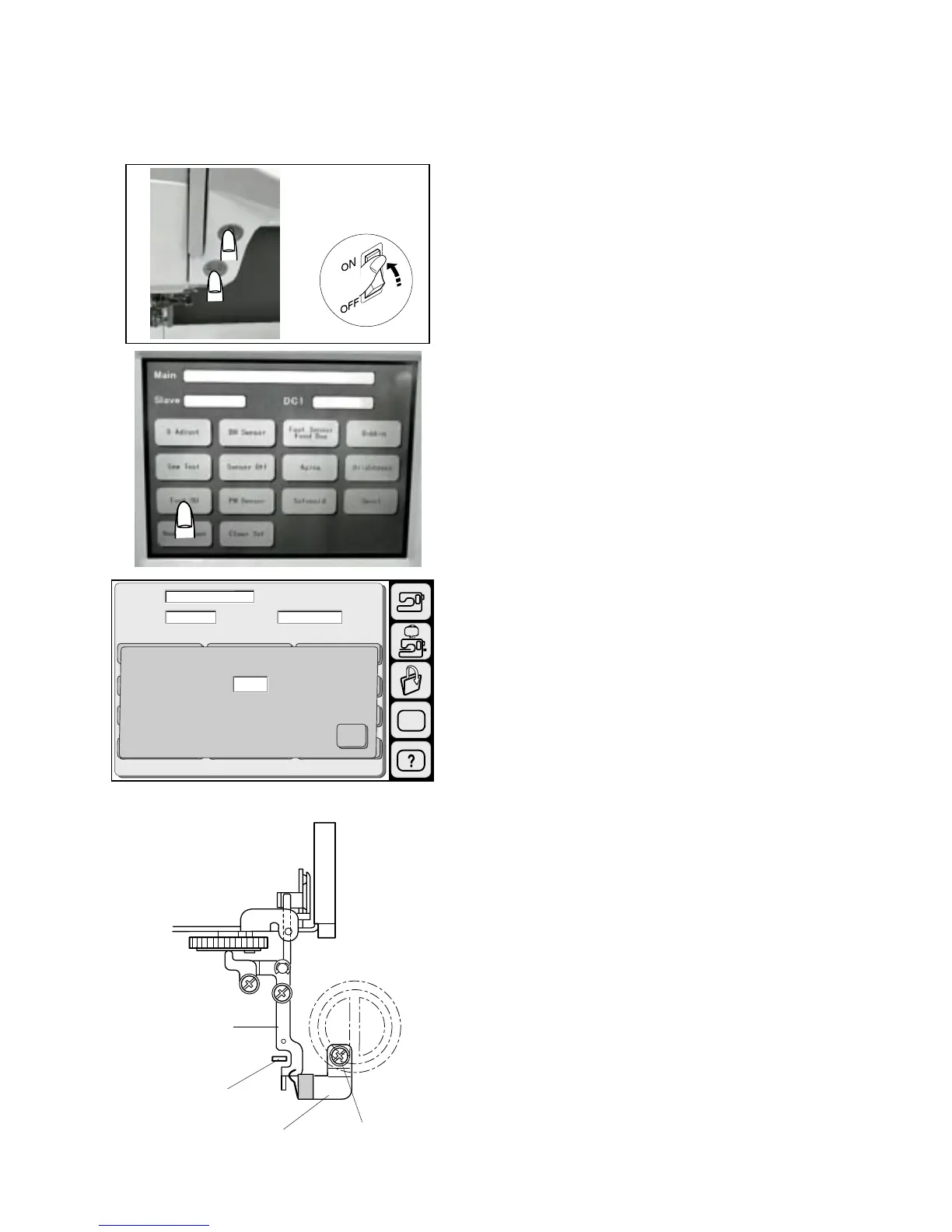
Adjusting Presser Foot Lifter Sensor
To adjust the presser foot sensor
1 Start the machine in “Adjust Mode”. Turn the power
switch “ON” while pressing the Start/Stop button and
the reverse button at the same time. (Keep pressing
both buttons until LCD shows “Adjust Mode”.)
2. Press the “Foot UD” key on the touch panel.
3 Remove the top cover.
4. Loosen Screw (A) and adjust the Switch fixing plate
and make sure the screen shows “H” when the
presser foot is raised and screen shows “L” when the
presser foot is lowered, then tighten the Screw (A).
* After turning the power switch “ON”, in this condition,
the Tension release plate should be pushed by the
Tension release lever .
5 Press “X” key and turn the power switch “OFF”.
6 Attach the top cover.
* Turn the power switch “ON” and check if the sensor
works properly when the patternNo.16 is selected.
q
w
e
w
e



 To Next Page