35
9500
Main
Slave
DC1
Bobbin Thread
X
0
250
256
Bobbin holder lever
Bobbin thread detection lever
Adjusting Remaining Bobbin Thread Sensor
To adjust buttonhole lever:
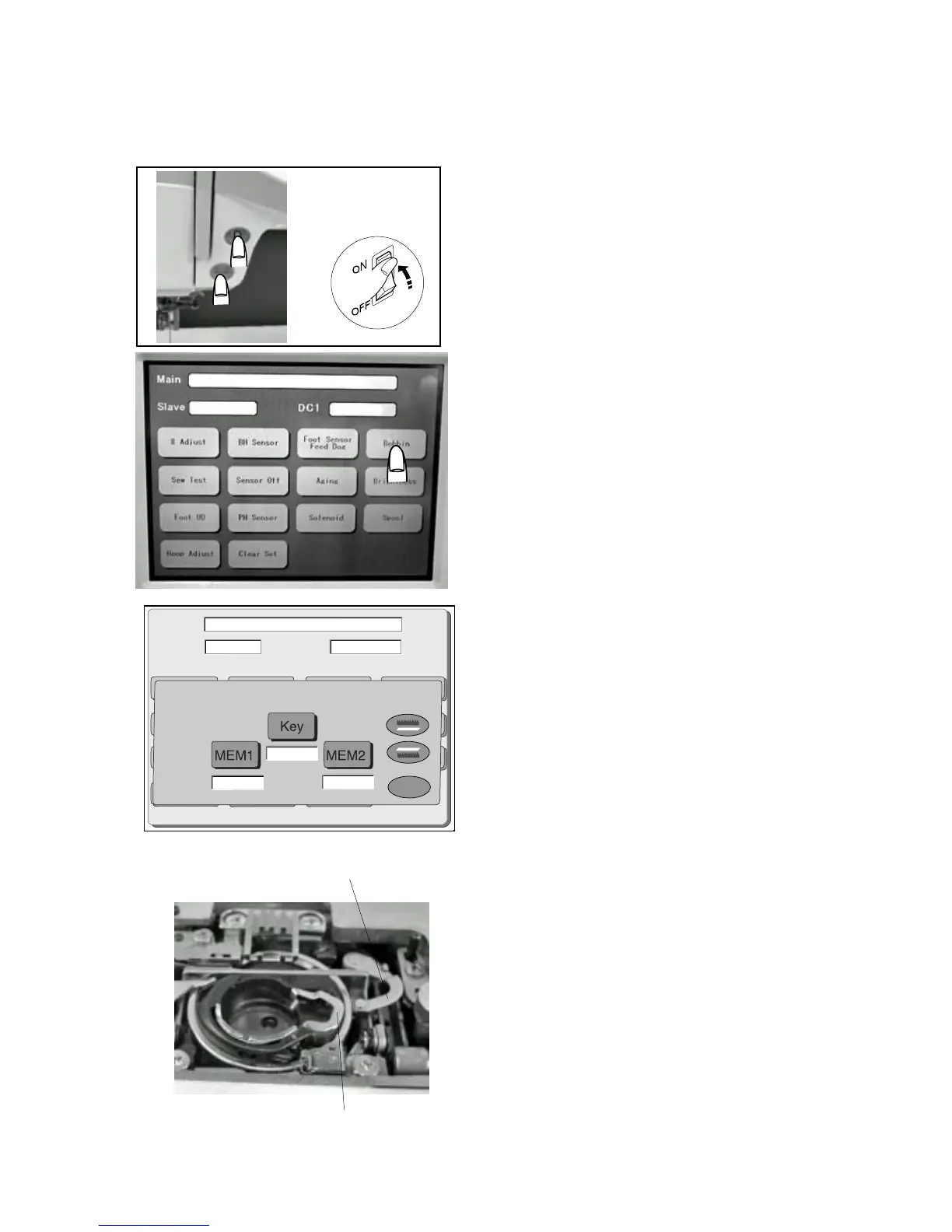
1 Start the machine in “Adjust Mode”. Turn the power
switch “ON” while pressing the Start/Stop button and
the reverse button at the same time. (Keep pressing
both buttons until LCD shows “Adjust Mode”.)
2 Press “Bobbin” key on the touch panel.
3 Insert the gauge bobbin (9.2 mm in diameter) in the
bobbin holder and press the “Key” button.
(The numbers will appear under the “Key” button.
Press the “Key” button several times and check if the
same number appears each time.)
4 Press “MEM1” button. (The data for step 3 is registered
in “MEM 1”.)
5 Insert the gauge bobbin (10.3 mm in diameter) in the
bobbin holder and press the “Key” button.
(The numbers will appear under the “Key” button.
Press the “Key” button several times and check if the
same number appears each time.)
6. Press “MEM 2“ button. (The data for “Step 5” is
registered in “MEM 2”.)
7 Make sure the difference of numbers for “MEM 1” and
“MEM 2” is 4 or more. (The mean number of “MEM 1”
and “MEM 2” will be the standard data.)
8 Press “OK” button.
9 Turn the power switch “OFF”.



 To Next Page