33
9500
(A)
(B)
Main
Slave
DC1
BH Sensor
H
X
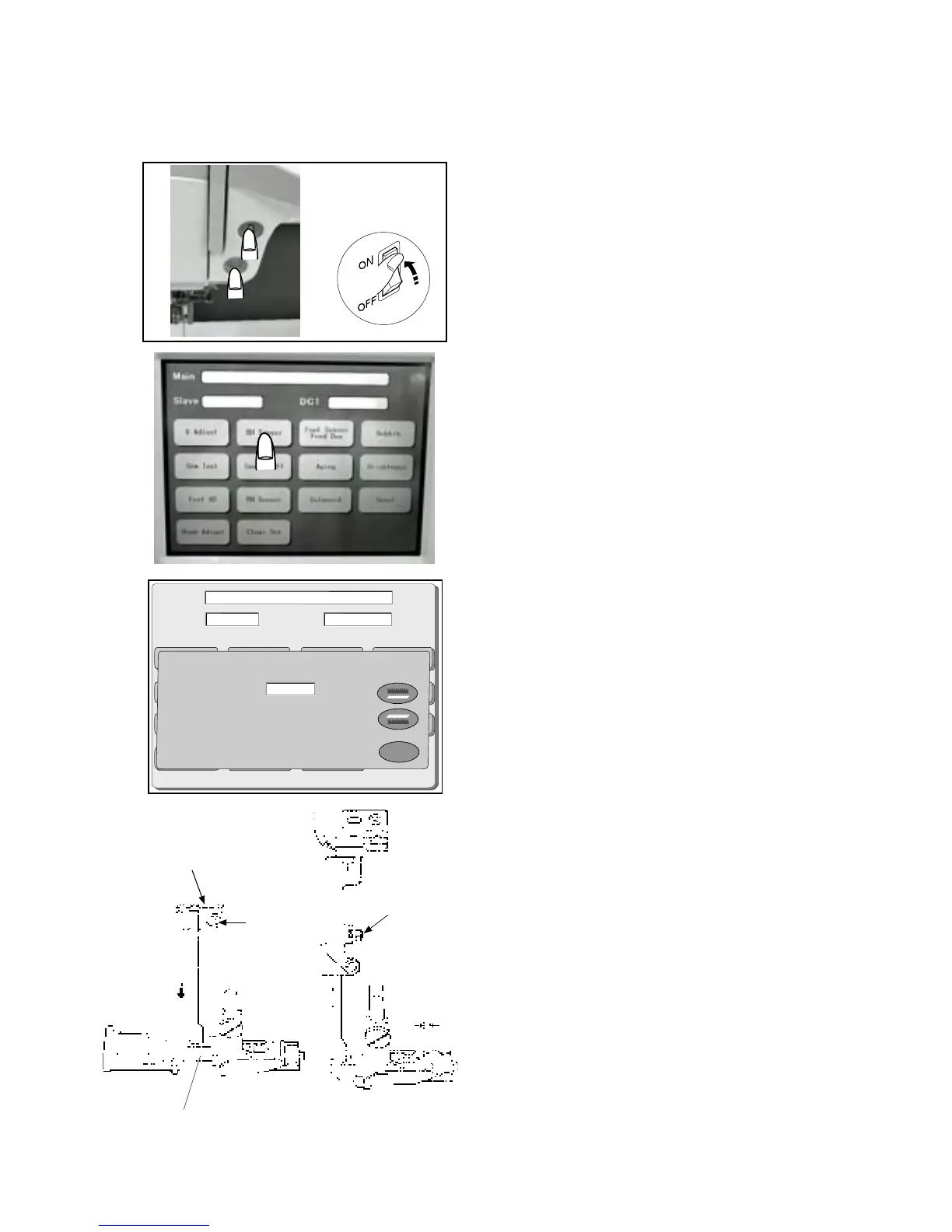
Adjusting Buttonhole Lever
To adjust buttonhole lever:
1 Start up the machine in “Adjust Mode”. Turn the
power switch “ON” while pressing the Start/Stop
button.
(Keep pressing the button until the LCD shows
Adjusting window.)
2 Press “BH Sensor” key on the touch panel.
3 Loosen screw (A) and move the BH lever guide ,
so that the screen shows “L” when the BH lever
is lowered. Then tighten Screw (A).
4 Attach the BH Foot (R) and lower the BH lever .
5 Insert the 1.6 mm thickness gauge between the
slider and the spring holder to set the space at 1.6
mm.
6. Loosen Screw (B) until the touch panel shows “H”.
7 Screw in the screw until the screen indication changes
from “H” to “L”.
8 Press “X” key and turn the power switch “OFF”.
q
w
w
e
q
w
e
r
t
Screw (A)
Buttonhole lever guide
Buttonhole lever
Clearance: 1.6 mm
Screw
q
w
e



 To Next Page