31
9500
(A)
(B)
(A)(B)
Main
Slave
DC1
8 Adjust
88888888
X
INITIALIZE
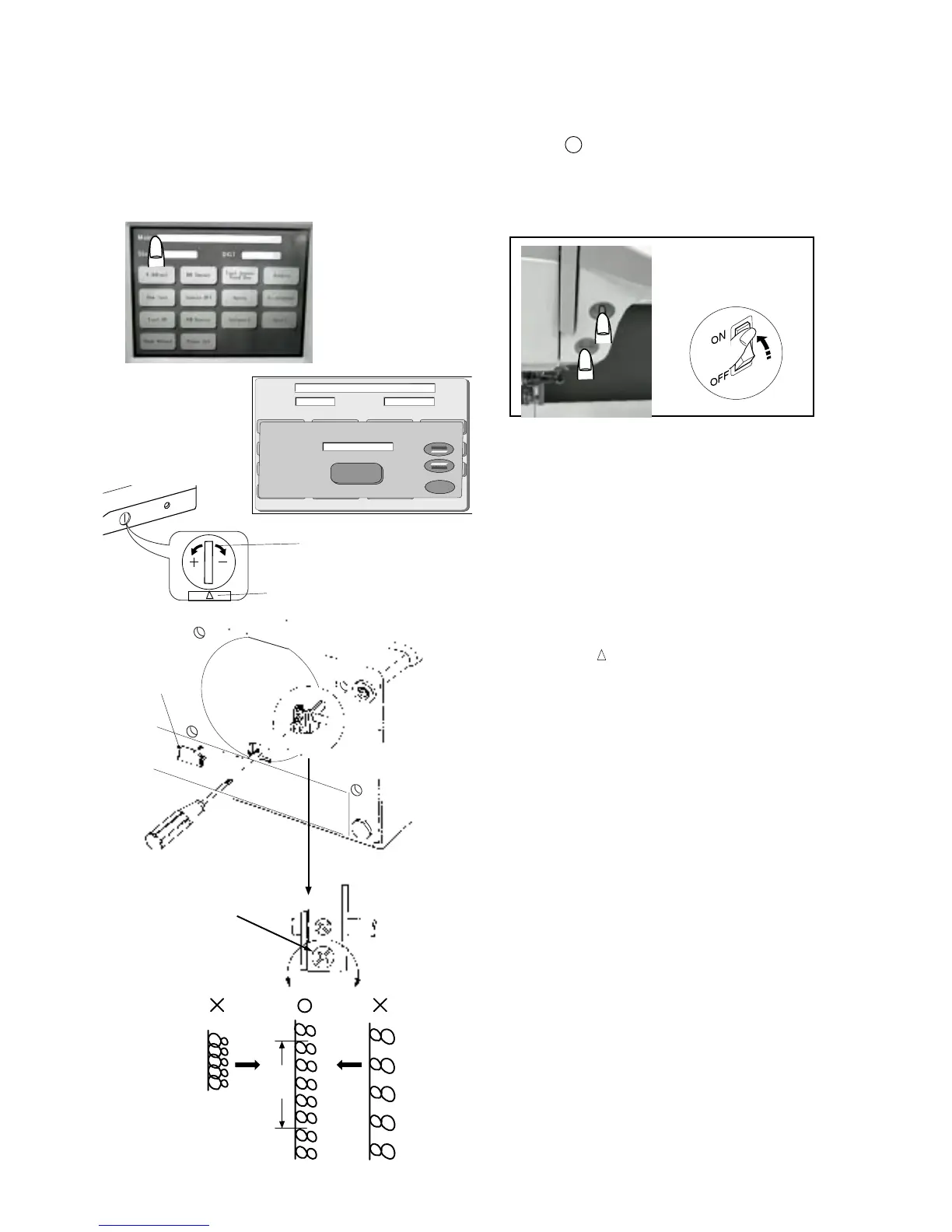
Adjusting Stretch Stitch Balance
When a stretch pattern is sewn with the feed balancing dial set at the standard setting
mark “ “, the pattern should be as indicated with the “ “ mark in the following figure.
If not (If the forward feeding and backward feeding are out of balance), make an adjustment
as follows:
1 Set up the machine in “Adjust Mode”. Turn the
power switch “ON” while pressing the Start/Stop
button (Keep pressing button until the LCD shows
the Adjusting window.)
2 Press “8 Adjust” on the touch panel.
3 Set the feed balancing dial at the standard
setting mark “ “ .
4 Check the sewing results.
(The standard length of the five pieces of figure 8 is
34 mm .)
5 Remove the base lid.
6 If the length of the stitch pattern is extended more
than the standard length, turn the Adjusting screw
in the direction of A.
If the length of the stitch pattern is shorter than the
standard length, turn the Adjusting screw in the
direction of B.
7 Check the sewing results.
8 Press (X) key and turn the power “OFF”.
9 Reattach the base lid .
q
w
t
r
r
e
q
w
e
r
t
Feed adjusting dial
Setting mark
Base lid (3)
Adjusting screw
31 to 37 mm
q
w
e
r
t
q
w



 To Next Page