Epson Artisan 700/Epson Stylus Photo PX700W/TX700W Revision C
DISASSEMBLY/ASSEMBLY Disassembly Procedures 166
Confidential
4.2.4.22 Front Paper Guide Waste Ink Pad
Parts/Components need to be removed in advance:
ADF Unit (Artisan 800/PX800FW/TX800FW only)/Scanner Unit/Upper Left
Housing/Pap
er Guide Top Assy/Upper Housing/Cassette Unit/Lower Paper Guide
Waste Ink Pad Assy
Removal procedure
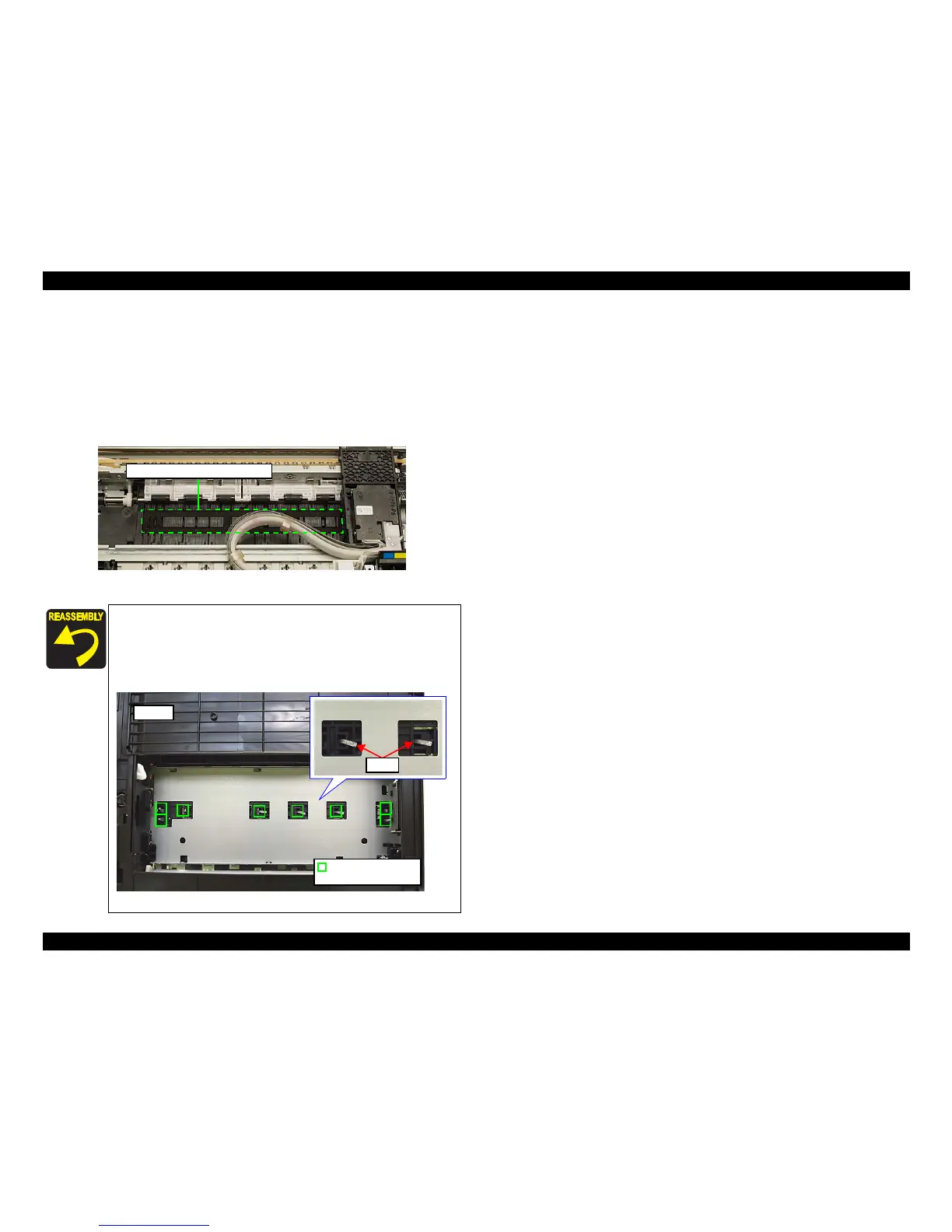
1. Remove the Front Paper Guide Waste Ink Pad with tweezers.
Figure 4
-160. Removing the Front Paper Guide Waste Ink Pad
Install the Front Paper Guide Waste Ink Pad without any gap.
(See Fig. 4-160.)
Insert the Front Paper Guide Waste Ink Pad till
the legs (x8) of
Front Paper Guide Waste Ink Pad come out from the Front
Paper Guide.
Figure 4-161. Installing the Front Paper Guide Waste Ink Pad
Front Paper Guide Waste Ink Pad
Legs
Leg of the Front Paper
Guide Waste Ink Pad
Bottom













 To Next Page