Epson Artisan 700/Epson Stylus Photo PX700W/TX700W Revision C
DISASSEMBLY/ASSEMBLY Disassembly Procedures 173
Confidential
4.2.5.5 Cover Open Sensor
Parts/Components need to be removed in advance:
Scanner Unit/ADF Unit/Scanner Upper Housing
Removal procedure
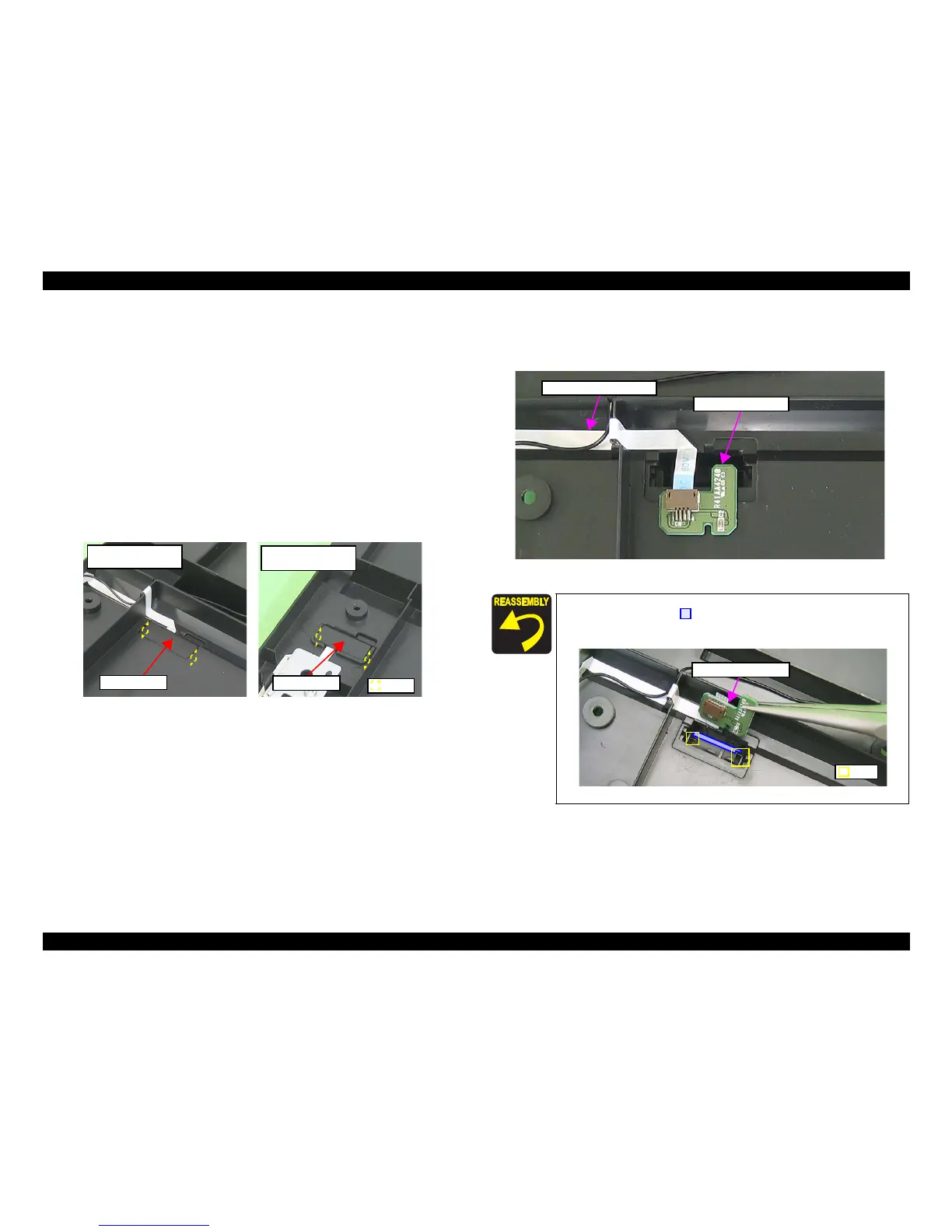
1. Release the hooks (x2) of the Sensor Cover, and remove th
e Sensor Cover
from the Scanner Lower Housing.
Figure 4-174. Removing the Cover Open Sensor (1)
2. Disconnect the Cover Open Sensor FFC from
the connector of the Cover
Open Sensor, and remove the Cover Open Sensor from the Scanner Lower
Housing.
Figure 4-175. Removing the Cover Open Sensor (2)
C H E C K
P O I N T
Sensor Cover
Artisan 800/PX800FW/
TX800FW
Hook
Sensor Cover
Artisan 700/PX700W/
TX700W
When attaching the Cover Open Sensor, insert it into the space
inside the ribs (x2) of the Scanner Lower Housing as shown
in Fig. 4-174.
Figure 4-176. Attaching the Cover Open Sensor
Cover Open Sensor
Cover Open Sensor FFC
Cover Open Sensor
Rib













 To Next Page