Epson Artisan 700 / Epson Stylus Photo PX700W / TX700W Revision C
PRODUCT DESCRIPTION Specification for Each Function 33
Confidential
1.7.2.3 Automatic Detection of Images in Memory Card
When a memory card is inserted in the card slot on the printer, or when a memory card
is detected at power-on, the printer automatically searches for all images stored in the
card. When the card is removed, the printer erases the information on the all detected
files.
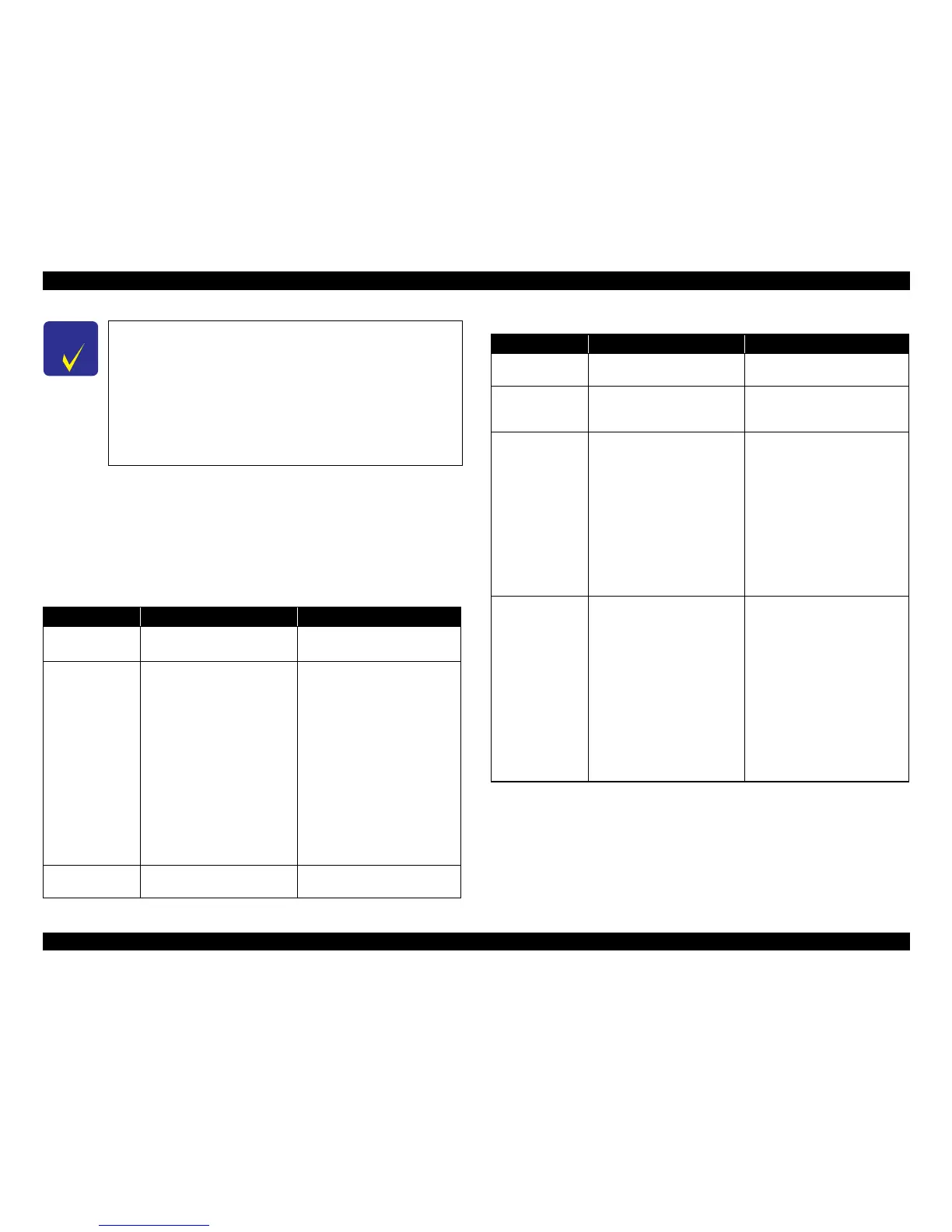
1.7.2.4 Specifications for Handling Image Data
C H E C K
P O I N T
The printer does not detect any files stored under the following
directories or their sub-directories.
• Directories containing system properties or hidden properties.
• “RECYCLED” (Windows directory for deleted files)
• “PREVIEW” (directories of CASIO DSC for thumbnail images)
• “SCENE” (directories of CASIO DSC
for its Best Shot function)
• “MSSONY” (directories of SONY DSC for e-mail images, voice memos,
movies, or non-compressed images)
•
“DCIM\ALBUM\IMAGE” (directories of CASIO DSC for its album
function)
Table 1-33. Specifications for Handling Image Data
Item Specification Remarks
Image size (pixel)
• Horizontal: 80
≤ X ≤ 9200
• Vertical: 80
≤ Y ≤ 9200
---
Maximum number
of images
Up to 9,990 images When a memory card stores 9,990
or more images, the first 9,990
images are detected and become
valid in the printer. The detecting
order varies depending on the
folder configuration in the card, so
which images are included in the
first 9,991 cannot be defined.
However, images specified by
camera definition files can
be
select
ed to be printed even when
the total number of images has
exceeded 9,990. Up to 999 camera
defined image files can be
specified.
Maximum number
o
f copies
99 c
opies for each image.
Up to 999 sheets in total.
---
Valid date and time
01/01/1980 00:00:00 to
12/31/2099 23:59:59
---
Thumbnail image
data
Supports DCF Ver.1.0 or 2.0-
compatible da
ta (Exif format,
160x120 pixels)
Thumbnail images are used for the
Print Index Sheet function.
File sorting
The printer sorts image files in
ascending ASCII order based on
their full-pathnames such as
“\DCIM\100EPSON\EPSN0000.
JPG”, and assigns a number to
each of them.
If over 1,000 files exist in the
memo
ry card, up to 999 files
can
be numbered and displayed on
LCD. You can select which 999
files should be displayed from the
menu on LCD.
• The image number assigned by
the printer may be different from
that assigned by the camera.
• If two or
more files have the
sam
e full pa
thname, the sorting
function may not operate
properly. (existence of the same
full-pathname is not allowed
under DOS)
Acquisition of date
and ti
me
information
The print
er acquires date and time
information included in image
files in the order of precedence
shown below.
1. Date and time information in
digital camera stan
dard format
(Exif)
2. Date and time information
applied on DOS-compliant file
syste
m.
3. Fixed date and time
in
formation (01/01/1980,
00:00:00)
Date
and time information included
in an im
age file
is not always the
shooting date and time. It changes
each time the image is edited and
restored. The printer acquires the
latest date and time information.
Table 1-33. Specifications for Handling Image Data
Item Specification Remarks













 To Next Page