Epson Artisan 700 / Epson Stylus Photo PX700W / TX700W Revision C
PRODUCT DESCRIPTION Specification for Each Function 41
Confidential
1.7.4 Various Settings (Setup Mode)
Epson Artisan 700/Epson Stylus Photo PX700W/TX700W provides various configuration
and maintenance.
They can be done by selecting “Setup” from the menu on LCD. The
following explains the outline of these menu functions.
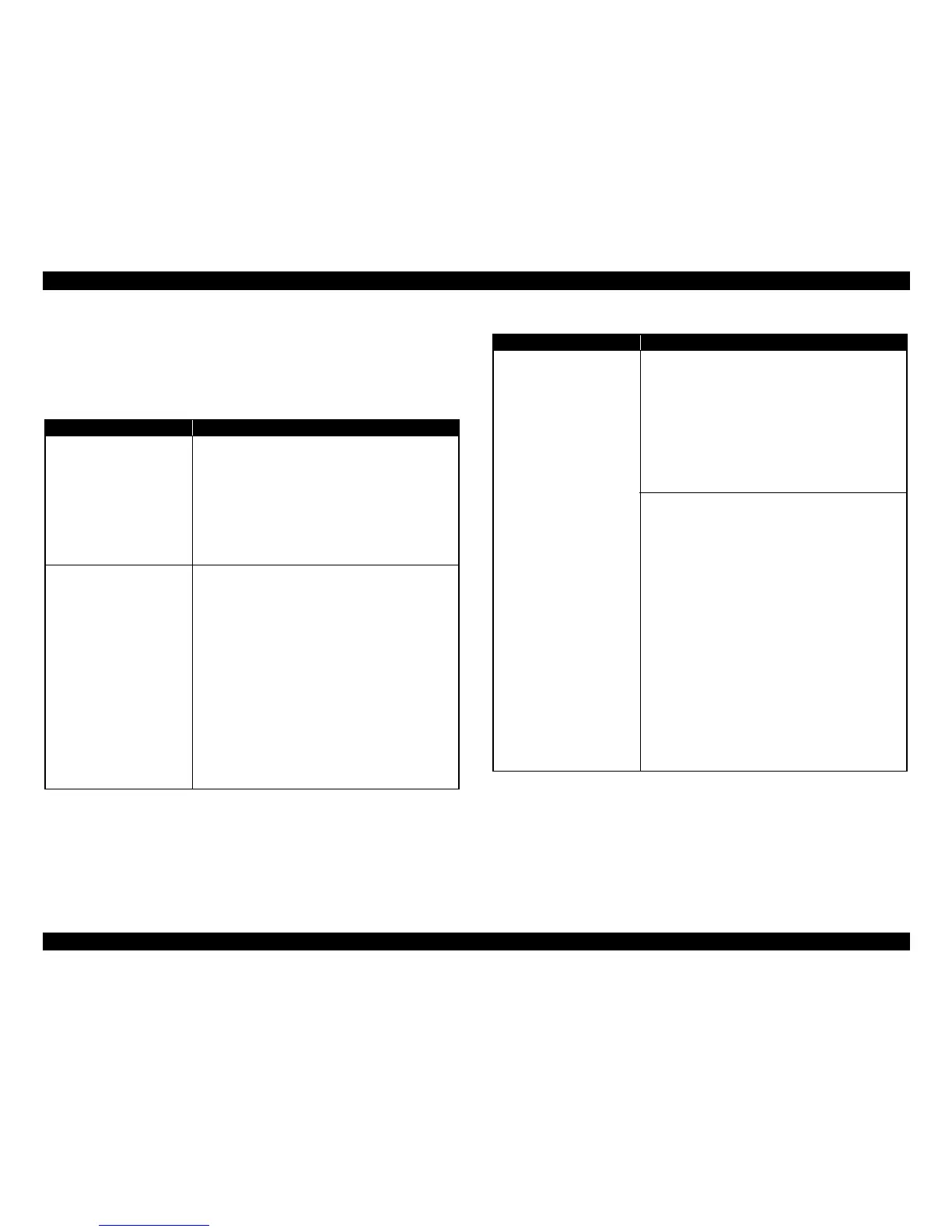
Table 1-42. Menu List for Setup Mode
Item Function
Ink Levels
The current ink levels of each of the cartridges are
displayed in bar chart by the rules described below.
• The bar chart is displayed in the order of cyan, yellow,
light cyan, black, magenta, and light magenta from the
left.
• When initial filling is completed, or
after replacing the
cartridge, the ink level becomes 100% (full).
• The ink level is indicated in increment of 1%. Lower than
1% is rounded down.
Maintenance
Runs various maintenance for the printer. The following
shows each menu.
• Nozzle Check
A nozzle check pattern to check the Printhead nozzles
status is printed. A head cleaning can be run if necessary.
(Refer to Figure 1-10 for Printout pattern.)
• Head Cleaning
Runs a printhead cleaning. The cleaning
cannot be made
when low ink level is detected. In such case, an ink low
error is displayed instead of running the cleaning.
• Head Alignment
Adjustment to improve the bi-directional print
quality.
Head alignment icon and the instructions for the
adjustment are displayed on the LCD.
• Automatic Head Maintenance
Selects On/Off of the auto head cleaning.
Printer Setup
Changes settings for the printer. The menu is described
below.
• CD/DVD Alignment
Makes the printing position adjustment for CD/DVD
label.
• Stickers (Euro/Asia only)
Makes the printing position adj
ustment for Stickers.
• Thick Paper
Selects On/Off of friction reduction between paper and
printhead.
• Sound
Selects On/Off of the settings of beep sound*, audio
output, and also selects the volume.
• Screen Saver Settings
If the panel is not used in stand-by mo
de, plays a slide
show using the images in a memory card as the screen-
saver.
•Display Format
The screen when displaying a photo can be selected from
the following three types.
1-up with Info
1-up without Info
View Thumbnail Images
• Use Selected P.I.F. Frame with Photo
Selects On/Off of photo printing using P.I.F frame.
•Date/Time*
• Daylight Saving Time*
• Country/Region*
• Language
Table 1-42. Menu List for Setup Mode
Item Function













 To Next Page