Epson Artisan 700/Epson Stylus Photo PX700W/TX700W Revision C
DISASSEMBLY/ASSEMBLY Disassembly/reassembly procedures specific to Artisan 700/PX700W/TX700W 187
Confidential
4.3.1.2 Upper Left Housing (Artisan 700/PX700W/TX700W)
Parts/Components need to be removed in advance:
None
Removal procedure
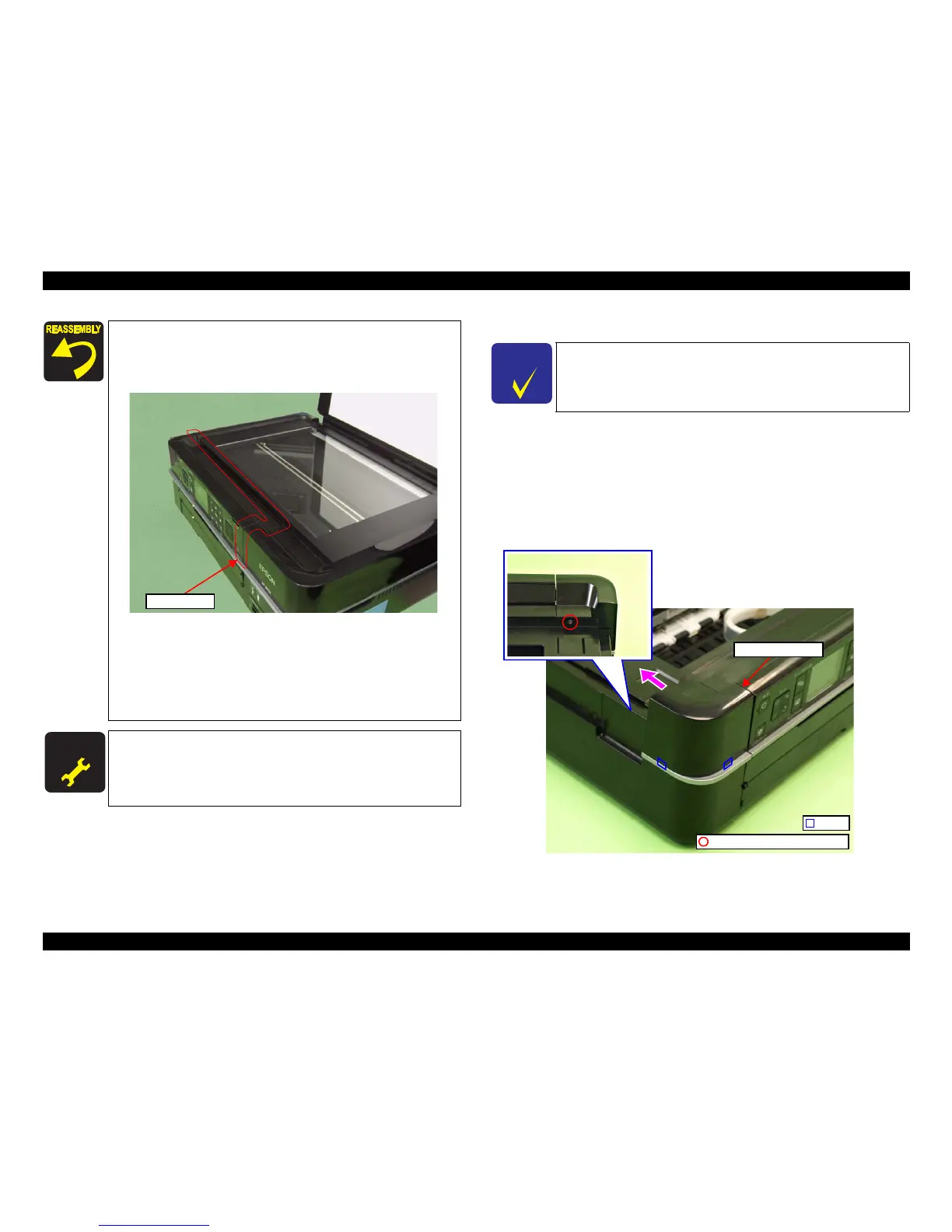
1. Remove the screw (x1) that secures the Upper Left Housing.
2. Slide the Upper Left Housing to the rear side, release the hooks (x2) and
remove
the Upper Left Housing.
Figure 4-209. Removing the Upper Left
Housing
4. Close the Scanner Unit while temporarily tightening them
screw (x1).
5. Tighten the screw (x1) after making sure that there is no
gap between the Scanner Unit and the printer.
Figure 4-208. Installing the
Scanner Unit (2)
Make sure to insert the
terminal of the Grounding wire to the
fixing rib of
the frame. (See Fig. 4-204.)
For the routing the FFCs, see 4.4 "Routing FFC/cables" (p202).
When installing the Cable Cover, secure it with a new Harness
Cover Clamp. (See Fi
g. 4-203.)
A D J U S T M E N T
R E Q U I R E D
After removing/replacing the Scanner Unit, make the specified
adjustments. (See
Chapter 5 "ADJUSTMENT".)
Check the gap.
C H E C K
P O I N T
The disassembly/reassembly procedures for Artisan 800/PX800FW/
TX800FW differ from those of Artisan 700/PX700W/TX700W, see
4.2.2.4 "Upper Left Housing / Panel Lock Button" (p106) for the
procedures.
C.B.P. 3x10 (black) (6±1Kgfcm)
Upper Left Housing
Hook







 To Next Page