Epson Artisan 700/Epson Stylus Photo PX700W/TX700W Revision C
DISASSEMBLY/ASSEMBLY Routing FFC/cables 202
Confidential
4.4 Routing FFC/cables
ADF/SCANNER (ARTISAN 700/PX700W/TX700W)
Note * :See Fig. 4-247 for the connector positions on the Main Board (Artisan 700/
PX700W/TX700W).
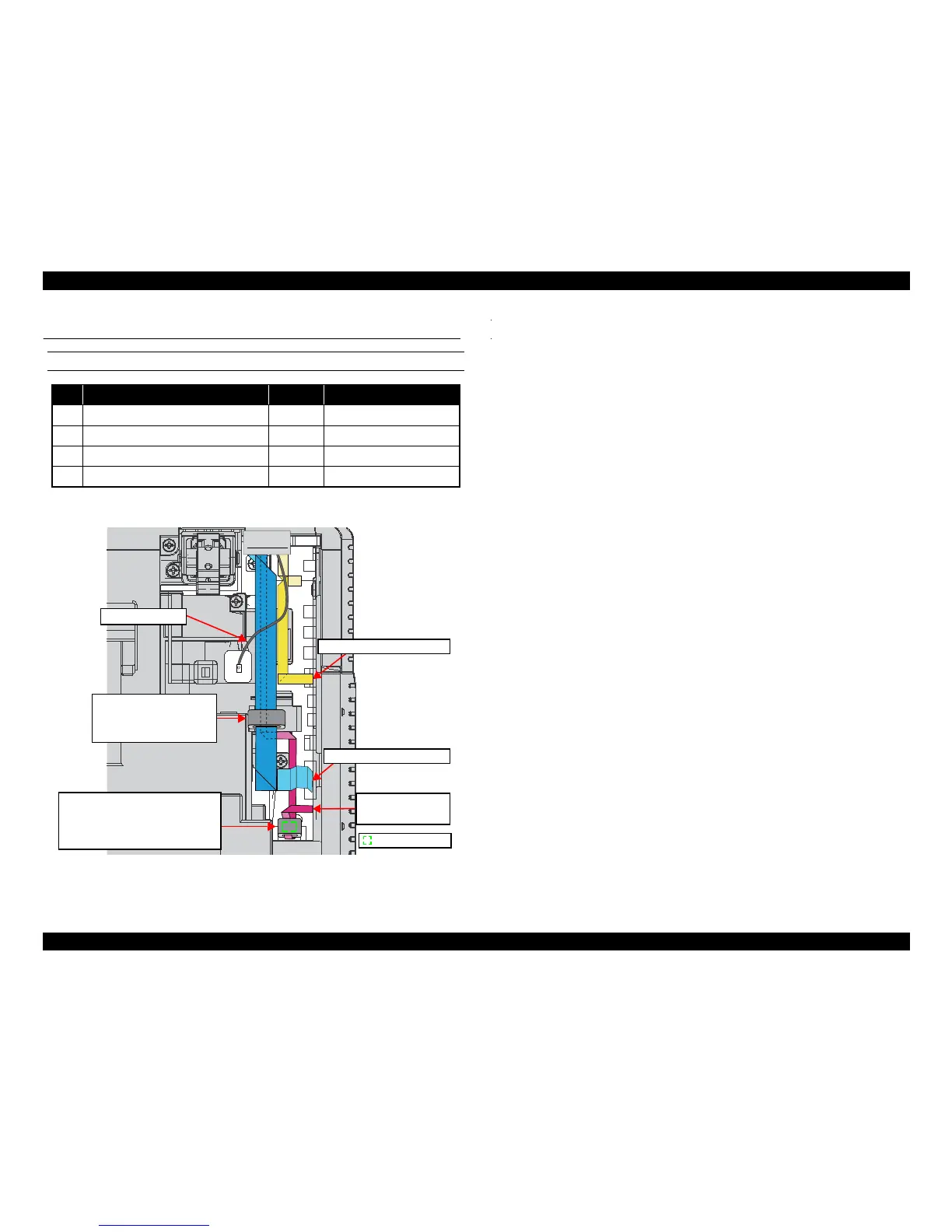
Figure 4-244. ADF/Scanner (Artisan 700/PX700W/TX700W)
No. FFC/cable name CN No.
*
Remarks
1 Scanner Cover Open Sensor FFC CN10 Ferrite Core x1
2 Scanner Carriage FFC CN41 Ferrite Core x1
3 Scanner CR Encoder FFC CN49 ---
4 Grounding Wire (x1) --- ---
Scanner CR Encoder FFC
Scanner Carriage FFC
Scanner Cover Open
Sensor FFC
Double-sided tape
Grounding Wire
Ferrite Core B:
Put the Scanner Cover Open Sensor
FFC through this and secure it together
with the FFC on the Main Board Unit
with the double-sided tape.
Ferrite Core A:
Put the Scanner Carriage FFC
through this and attach it to
the Upper Housing.













 To Next Page