Epson Artisan 700/Epson Stylus Photo PX700W/TX700W Revision C
DISASSEMBLY/ASSEMBLY Disassembly Procedures 177
Confidential
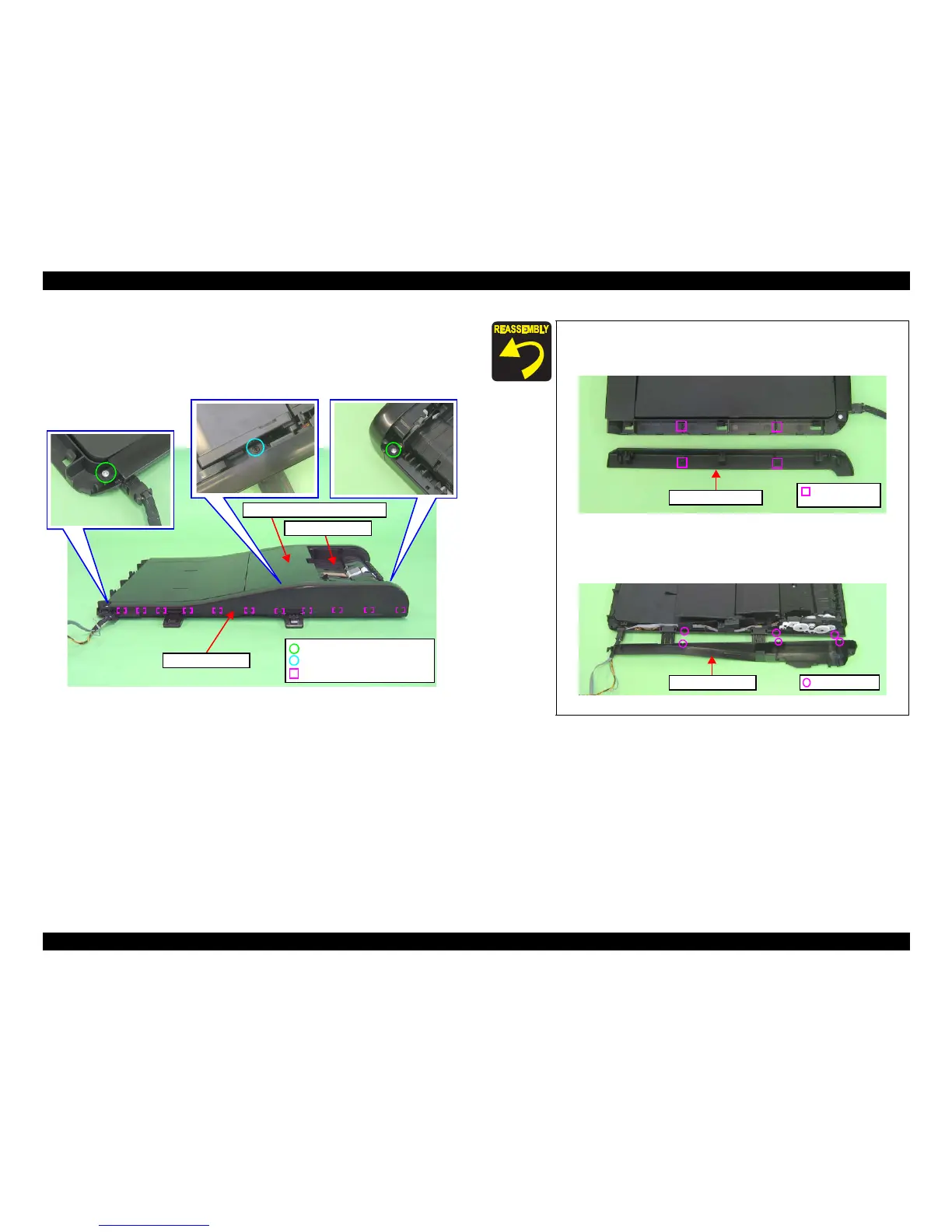
2. Open the ADF Document Support Cover.
3. Remove the screws (x3) that secure the ADF Rear Cover.
4. Release the hooks (x11) that secure the ADF R
ear Cover, and remove the
ADF Rear Cover from the ADF Base Assy.
Figure 4-184. Removing the ADF Rear Cover
ADF Rear Cover
C.B.P. 2.5x6 (black) (6±1kgfcm)
Hook
C.B.P. 2.5x6 (6±1kgfcm)
ADF Base Assy
ADF Document Support Cover
When installing the ADF Right Cover, align the positioning
holes (x2) with the dowels (x2) of the ADF Right Cover and the
ADF Base Assy, and also align the ribs (x6) shown in Fig. 4-183.
Figure 4-185. Installing the ADF Right Cover
When installing the ADF Rear Cover, align
the ribs with the
groov
es (x3) as shown below.
Figure 4-186. Installing the ADF Rear Cover
Positioning hole
& dowel
ADF Right Cover
Rib & Groove
ADF Rear Cover













 To Next Page