41 / 106
5 • Description of the Controls
80113-101_V25087
2023-11
Chapter 5
Description of the Controls
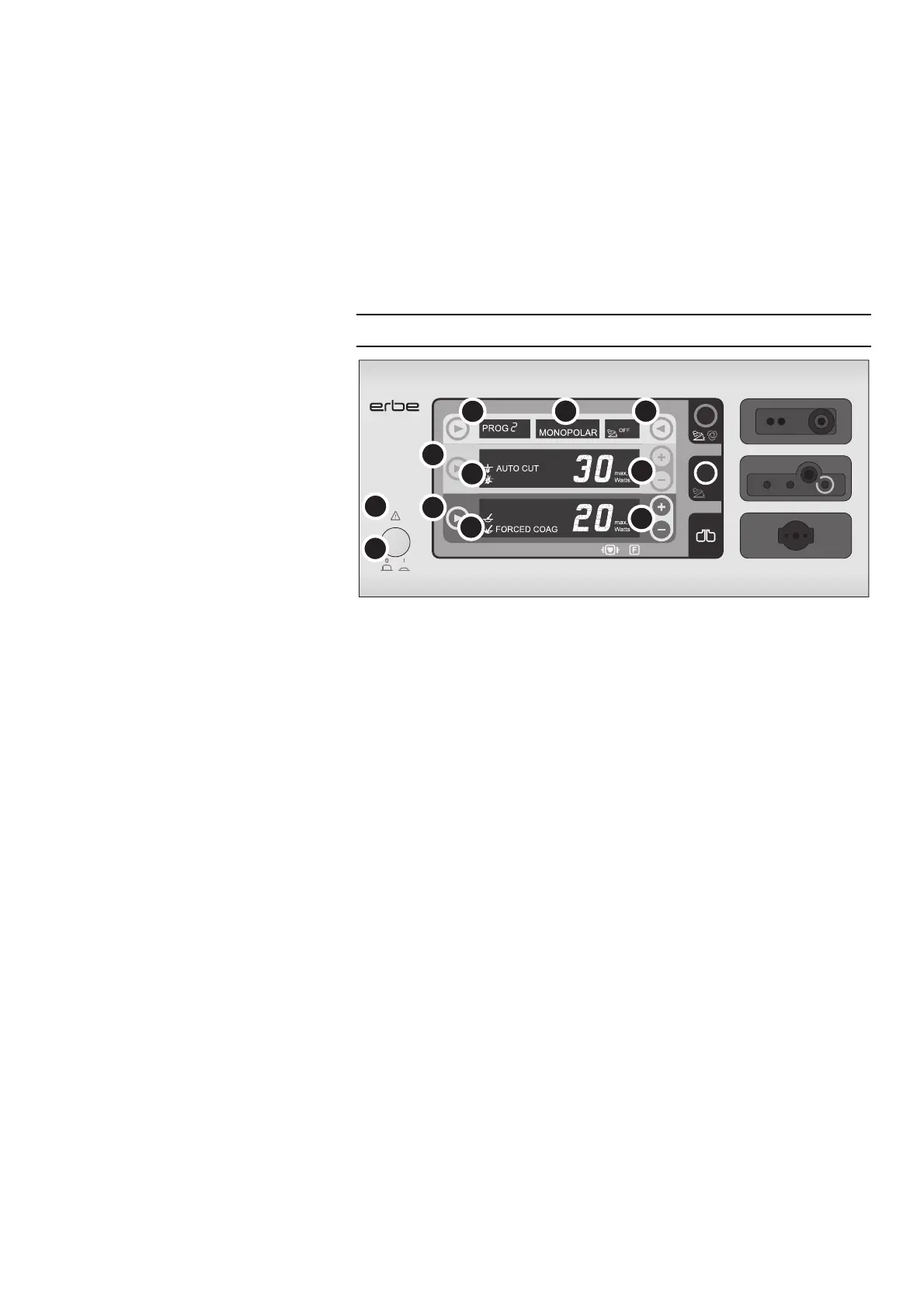
Controls on the front panel
Fig. 5-1
(1) Power switch
Switches the unit on or off.
The unit is completely disconnected from the power supply when the power plug is
pulled. Install the unit such that the power plug could be easily disconnected from the
power source.
(2) Symbol “Caution”
Indicates that the safety instructions in the User Manual must be read before switch-
ing the unit on.
(3) COAG range of settings
(3a) Selection button and display for the COAG mode
(3b) Display and Plus/Minus buttons for adjusting the COAG power limitation
(4) CUT range of settings
(4a) Selection button and display for the CUT mode
(4b) Display and Plus/Minus buttons for adjusting the CUT power limitation
(5) Area for program selection
Selection button and display for the program.
(6) Focus display
Displays whether the monopolar or bipolar socket is currently in focus (selected). The
settings of the socket currently in focus are always displayed.
(7) Area for selecting the activation
type
Display and selection button for the activation type. Here you can assign the
footswitches or AUTO
START function to the socket currently in focus (AUTO START
available for the bipolar socket of the VIO
100 C only).
Continued on the next page.



 To Next Page